
 321-236-2899

Local SEO for Home Builders: Rank Every Community
Most home builders treat local SEO for home builders like a single switch to flip for one business. But a builder is not one local business — it is a portfolio of communities, each sitting in a different town, each competing against different local results in Google Maps.
We have watched builders with beautiful model homes stay invisible in the exact cities where they are actively selling. The fix is almost never “more content.” It is a repeatable system that gives every community and sales office its own local footprint.
This guide walks through that system step by step. By the end you will know how to claim the right Google Business Profiles, build community pages that rank, and measure results per location instead of guessing across your whole brand.
Key takeaways
- Treat every community as its own local market. One brand-wide effort will not rank you in six different cities at once.
- A staffed sales office or model home can earn its own Google Business Profile. An unstaffed, locked construction site cannot.
- Every community needs a dedicated location page with unique details, directions, and schema — not a city name swapped into a template.
- Reviews and citations are your prominence engine. Build them per location, continuously, not in one push.
- Measure by community. Map pack rankings, calls, and form fills should be tracked location by location, with a realistic three-to-twelve-month ramp.
Step 1: Map Your Local Footprint Before You Optimize Anything
Local SEO for home builders starts with a map of where you actually compete, not a keyword list. Each active community is a separate local market with its own searchers, competitors, and map pack.
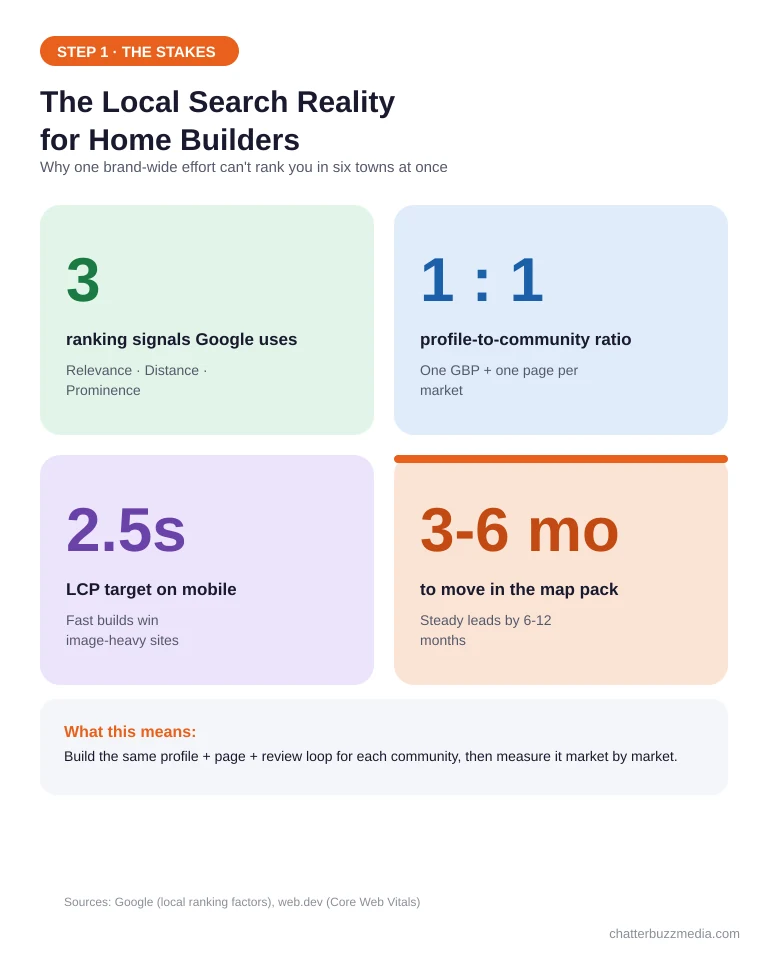
Google ranks local results using three signals: relevance, distance, and prominence, as described in Google’s own local ranking documentation. Distance is measured from the searcher to your physical location, which is why a single corporate address cannot rank you in every town you build in.
This is what makes builder local SEO different from a dentist or a law firm. A single-location business optimizes one profile; a builder has to repeat the same playbook across a moving portfolio of communities that open and close over time.
It also means “near me” searches work in your favor. When a buyer standing in a suburb searches “new homes near me,” Google leans on distance and prominence — and the builder with a nearby staffed model and a strong profile wins that moment.
Before touching a profile or a page, list every place you want to be found. For most builders that means:
- Active communities — each neighborhood or development currently selling.
- Sales offices and model homes — any staffed location a buyer can visit.
- Target cities and suburbs — the towns buyers type after “new homes in.”
- Future releases — communities breaking ground soon, so you can stage the work in advance.
Next to each one, note whether it has staff and set hours. That single detail decides whether it qualifies for its own profile in Step 2.
Then run a quick map pack check for each market. Search “new homes in [city]” from that location and note who holds the top three spots, so you know exactly which local competitors you are trying to outrank.
This footprint becomes the backbone of everything else. It maps one-to-one onto the profiles, pages, and reviews you will build, and it mirrors the structure we recommend in our home builder SEO guide and our broader multi-location marketing playbook.
With the footprint drawn, you can claim the right profiles instead of spraying listings you cannot maintain.
Step 2: Claim a Google Business Profile for Every Sales Office and Model Home
Create a separate Google Business Profile for each staffed location a buyer can walk into. A sales center or model home with real hours qualifies; a fenced, unstaffed lot does not.
This is the single biggest lever in local SEO for home builders, because the profile is what puts you in the map pack. Each legitimate location gets its own listing, its own address, and its own stream of reviews.
For every profile you claim, get these fundamentals right:
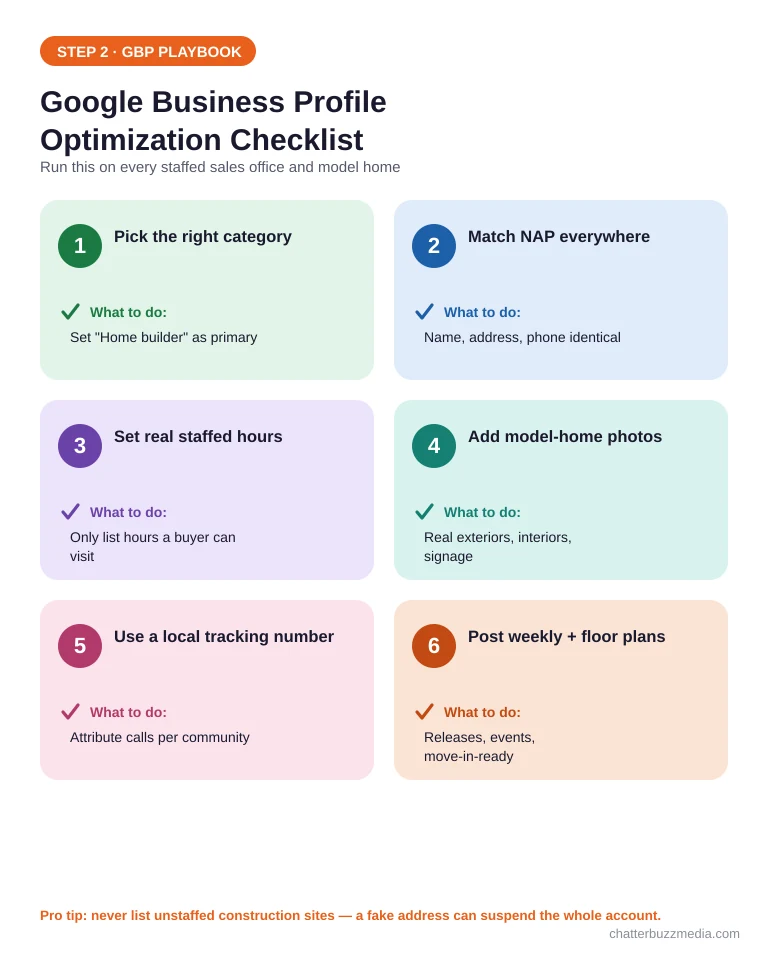
- Primary category: “Home builder” for the main listing; use “Real estate developer” or “Model home” only where it genuinely fits.
- Exact NAP: name, address, and phone that match your website and directories character for character.
- Hours and attributes: real staffed hours, plus attributes like “onsite services” and appointment links.
- Photos: exterior, interior, and signage shots of that specific model — not stock renders.
- Local phone number: ideally a tracking number per location so you can attribute calls later.
- Products and posts: floor plans as products, plus weekly posts on releases, events, and move-in-ready inventory.
Decide between a storefront and a service-area setup for each listing. A staffed model home is a storefront with a visible address; a builder office that only meets buyers on site may use a service area with a hidden address.
Do not create listings for communities with no staff on site. Google can suspend profiles for fake or ineligible addresses, and one suspension can put your whole account under review.
Expect each new profile to need verification, usually by video or postcard, so start early on communities opening soon. Managing several listings is far easier from a single Business Profile group account than from scattered logins.
Keep a brand-level profile for your headquarters too. It anchors your brand entity and links out to each community profile, reinforcing that they belong to one trusted builder.
Profiles get you on the map. Location pages are what make Google trust that you actually serve each city.
Step 3: Build a Location Page for Every Community You Sell
Give every community its own dedicated page, built to rank for that city — never one page listing all of them. This is where relevance is won or lost.
A community page should read like it was written for someone standing in that town. Thin, templated pages with only the city name changed are the fastest way to get ignored by Google and buyers alike.
Each community page needs:
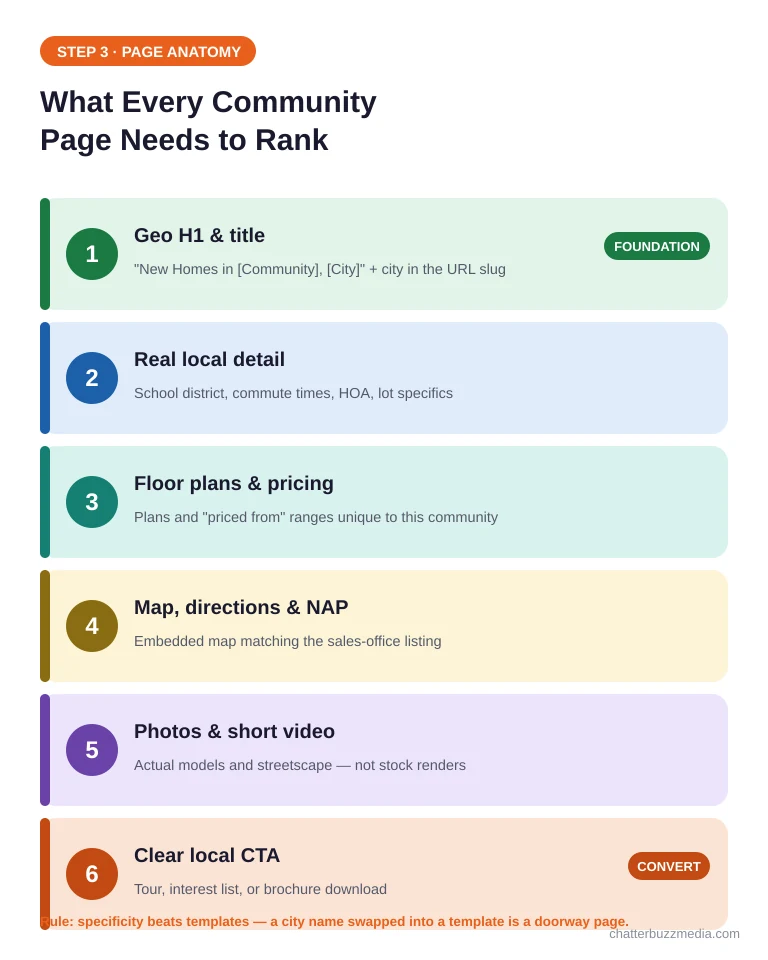
- A geo-specific H1 and title — “New Homes in [Community], [City]” with the city in the URL slug.
- Real local detail — school district, commute times, nearby landmarks, and HOA or lot specifics.
- Floor plans and pricing-from ranges unique to that community.
- Embedded map, directions, and the matching sales-office NAP.
- Photos and a short video of the actual models and streetscape.
- A clear CTA — schedule a tour, join the interest list, or download the brochure.
The difference between a ranking page and a doorway page is specificity. Buyers in a master-planned suburb care about different schools, lot sizes, and commutes than buyers in an infill neighborhood, so the copy has to reflect that.
Picture a real example. A “Riverstone in Katy, TX” page names the exact ISD, lists the pool and trail amenities, shows the three floor plans selling there, and embeds directions from the nearest highway — details a generic “our communities” page could never carry.
Structure the URLs to match that hierarchy: your communities hub at /communities/, each development at /communities/[community-name]/, and inventory nested beneath. A predictable structure helps both buyers and crawlers understand how your markets relate.
Link each community page to and from your main communities hub, and cross-link related pages like financing and the build process. A strong internal structure is the same backbone that makes a home builder website convert, and it supports the campaigns in our custom home builder marketing guide.
When a community sells out, keep the page live. Redirect buyers to nearby active communities and preserve the local authority you built, rather than deleting the URL and losing it.
These pages give Google something relevant to rank. Next, your keywords tell it exactly which searches to rank them for.
Step 4: Target the Right Local Keywords for Each Market
Match keywords to how buyers actually search in each town, from early research to ready-to-tour intent. One generic list cannot cover six different local markets.
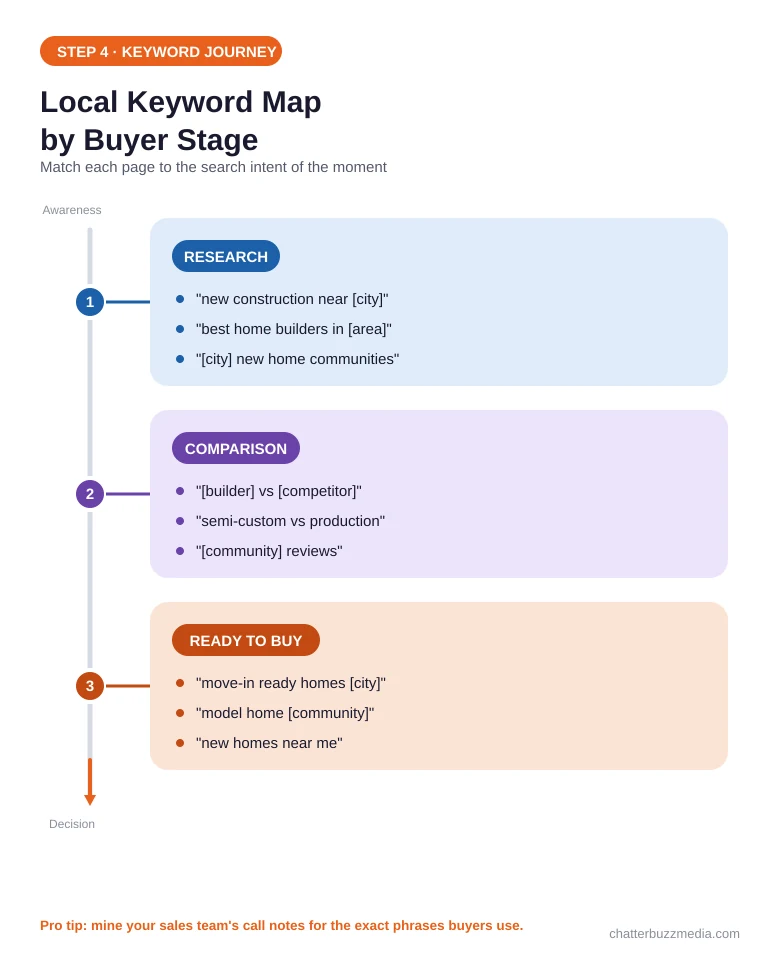
Home buyers move through stages, and their search language changes at each one. Your pages should answer the question being asked at every stage.
- Research stage: “new construction near [city],” “best home builders in [area],” “[city] new home communities.”
- Comparison stage: “[builder] vs [competitor],” “semi-custom vs production homes,” “[community] reviews.”
- Ready-to-buy stage: “move-in ready homes [city],” “model home [community],” “new homes near me.”
Lead with the parent term “home builder SEO” and local “new homes in [city]” phrases on hub pages, then let each community page own its specific neighborhood queries. The low difficulty of these local terms means one well-built page can rank for many variants.
Pro tip: mine your own sales team for the exact phrases buyers use on calls and tours. Those real questions become H2s, FAQ entries, and long-tail pages competitors never think to write.
Resist stuffing the same city term into every sentence. One clear primary phrase per page, supported by natural variations and buyer questions, outperforms a page that repeats “new homes [city]” until it reads like a robot wrote it.
Weave the keywords into titles, H2s, image alt text, and body copy naturally. Writing for the buyer first is also what earns you citations in AI answers, a point we cover in SEO vs AEO and across our home builder marketing strategies.
Keywords point Google at your pages. Citations and reviews convince it you are the prominent choice.
Step 5: Build Citations and Reviews Across Every Location
Earn consistent citations and a steady flow of reviews at each location to build the prominence Google rewards. Prominence is the signal most builders under-invest in.
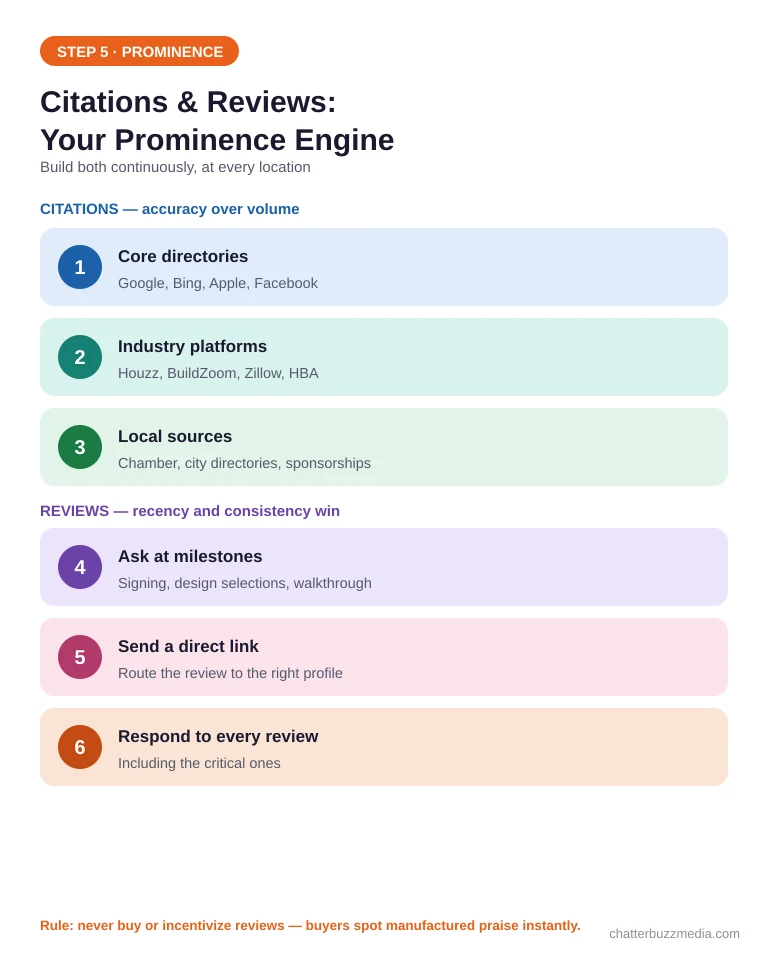
Citations are mentions of your name, address, and phone across the web. The goal is accuracy and consistency, not raw volume.
Prioritize the listings buyers and Google actually trust:
- Core directories: Google, Bing Places, Apple Business Connect, and Facebook.
- Industry platforms: Houzz, BuildZoom, Zillow, and your local home builders association.
- Local sources: chamber of commerce, city business directories, and community sponsorships.
Reviews are the other half of prominence. The majority of consumers read online reviews before choosing a local business, according to BrightLocal’s Local Consumer Review Survey, and those reviews need to live on the right location’s profile.
Build review requests into your handover and milestone moments:
- Ask at emotional highs — contract signing, design-center selections, and final walkthrough.
- Send a direct link to that community’s profile so the review lands in the right place.
- Respond to every review, including the critical ones about timelines or punch lists.
Never buy or incentivize reviews. Beyond violating Google’s policies, buyers reading a new-home builder’s reviews are making one of the largest purchases of their lives and can spot manufactured praise instantly.
Local links compound the same prominence signal. Sponsoring a Parade of Homes, a local charity build, or a school event earns coverage on trusted community sites that no competitor can copy.
Spreading reviews across every community profile strengthens each local market independently. Pair this with a system to qualify and route the leads those profiles generate, and reinforce them with paid social campaigns that point back to the same communities.
With prominence building, the last foundation to lock down is technical.
Step 6: Get Technical SEO, Schema, and AI Visibility Right
Make your multi-community site fast, crawlable, and richly marked up so both Google and AI engines can read it. Technical gaps quietly cap everything you built above.
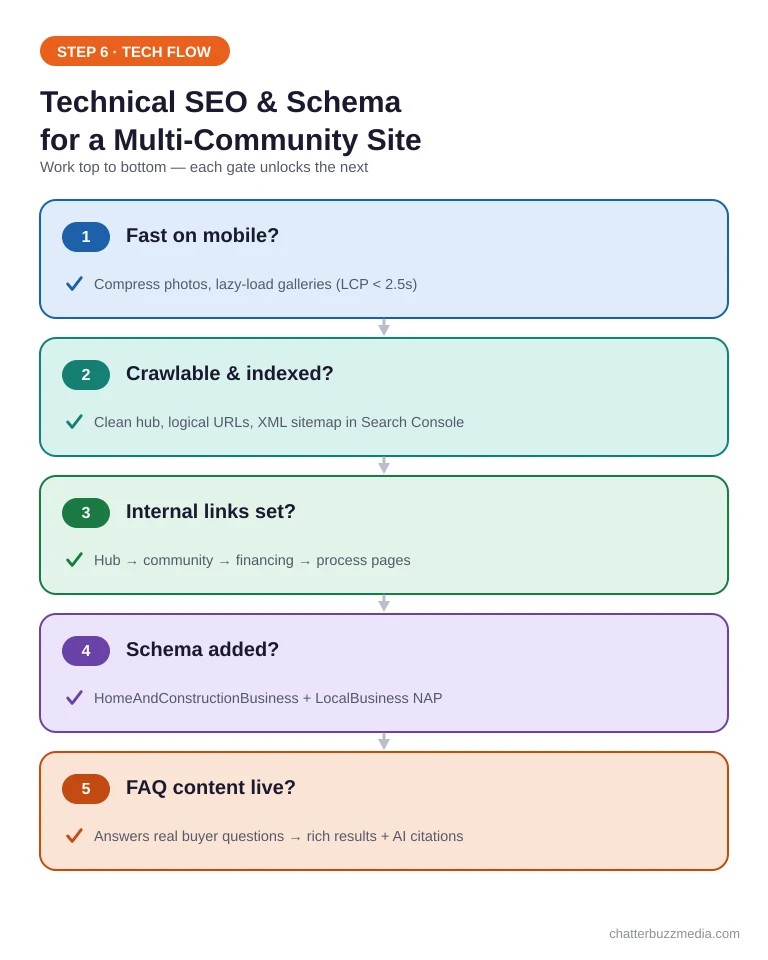
Start with the fundamentals that affect every page. A builder site is image-heavy, so performance is usually the first thing to fix.
- Core Web Vitals: compress model-home photos and lazy-load galleries to keep load times low on mobile.
- Crawlability: a clean communities hub, logical URLs, and an XML sitemap listing every location page.
- Internal links: connect hub, community, financing, and process pages so authority flows to each market.
Google’s Core Web Vitals reward a largest contentful paint under about 2.5 seconds, which matters because most buyers browse communities on their phones. Heavy photo galleries are the usual culprit, so modern image formats and lazy loading pay off immediately.
Then add structured data so search engines understand what each page represents. Use HomeAndConstructionBusiness or GeneralContractor schema on location pages, with LocalBusiness details matching each profile’s NAP.
Schema is also how you get surfaced in AI Overviews and chat answers. Clear, structured, question-answering content is what gets cited, which is exactly the approach in our guide to schema markup for AI search and getting cited by ChatGPT.
Add FAQ content to community pages that answers real buyer questions about that location. It feeds both rich results and answer engine optimization.
Finally, confirm every location page is indexed. Submit the sitemap in Search Console and spot-check that each community URL is actually in Google, because a page that is not indexed cannot rank no matter how well it is built.
With the technical base solid, you can finally measure whether all of it is working.
Step 7: Measure Local SEO by Community, Not Just Company-Wide
Track rankings, calls, and leads location by location, and judge progress against a realistic timeline. A single brand-wide dashboard hides which communities are winning and which are stuck.
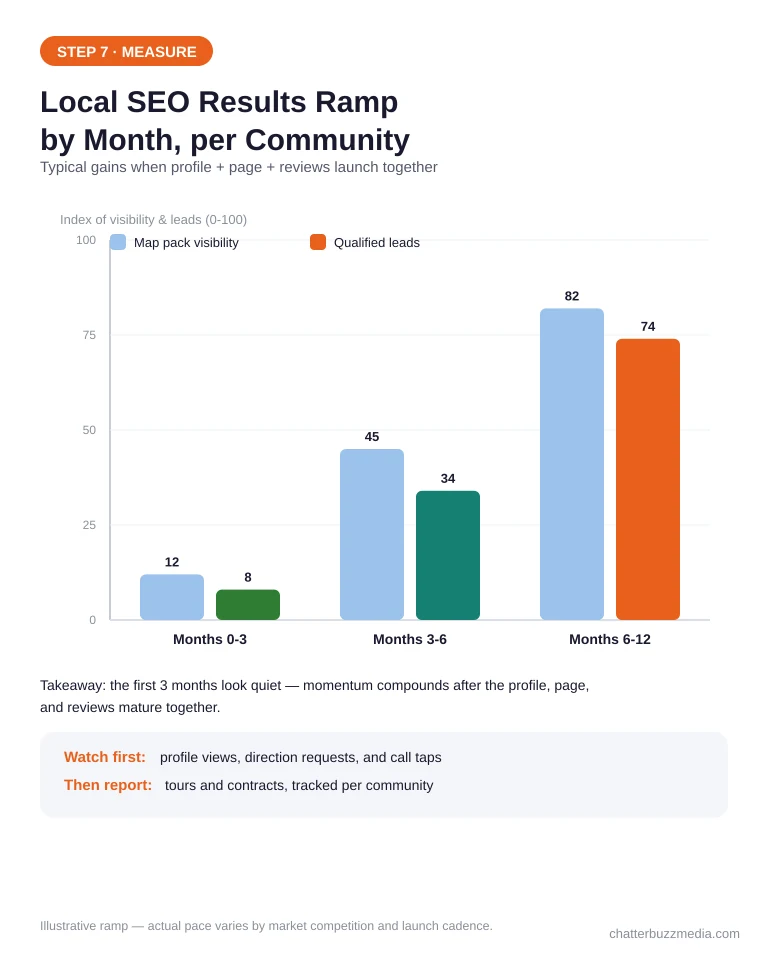
Set up measurement that matches your footprint. Each community should have its own view so you can act on it specifically.
- Map pack and local rankings tracked from each target city, not just your head office.
- Google Business Profile insights — calls, direction requests, and website clicks per location.
- Call tracking and form attribution tied to the right community page.
- Review velocity and rating trends per profile.
Just as important, set expectations on timing. Local SEO compounds, so the early months look quiet before momentum builds.
A realistic ramp for most builders is movement in the map pack within three to six months, with wider metro visibility and steady lead flow by six to twelve months. Report these gains per community so leadership sees exactly where the pipeline is coming from, the same discipline we apply when we measure search ROI.
Watch the leading indicators before the lagging ones. Profile views, direction requests, and “call” taps move first; tour bookings and contracts follow a month or two later, so judging too early makes a healthy campaign look like a failure.
Build a simple monthly report that pairs each community’s ranking and lead numbers with the next action. That cadence keeps local SEO tied to pipeline instead of vanity metrics, and it pairs naturally with your home builder advertising results.
Measured this way, local SEO stops being a mystery line item and becomes a predictable source of qualified buyer traffic.
Frequently Asked Questions
1. 🔍 Should each community have its own Google Business Profile?
Only if that community has a staffed sales office or model home with real, posted hours a buyer can visit. Those locations qualify for their own profile; unstaffed, locked construction sites do not and can get your listings suspended.
2. 📊 Do home builders need a separate page for every city they build in?
Yes. Google ranks on relevance to a specific location, so each community or city needs a dedicated page with unique local detail. One page listing all your communities will not rank well in any of them.
3. ⚡ Can a model home or sales office be listed on Google Maps?
Yes, as long as it is staffed with set hours and buyers can meet you there. Use the exact onsite address, a local phone number, and photos of that specific model so the listing is accurate and eligible.
4. 🏢 How long does local SEO take to work for a home builder?
Most builders see movement in the map pack within three to six months and steadier lead flow by six to twelve months. New communities ramp faster when the profile, page, and reviews launch together rather than piecemeal.
5. 🤝 How many reviews does a community profile need to rank?
There is no fixed number; what matters is a steady, recent flow of genuine reviews compared with local competitors. Consistency and recency usually matter more than a large one-time total.
6. 💰 How much should a home builder budget for local SEO?
Budget scales with how many communities you are optimizing, since each needs its own profile, page, and review effort. A single-market builder needs far less than a developer launching five communities across a metro at once.
7. 🚀 What happens to a community page after it sells out?
Keep it live and redirect interest to nearby active communities instead of deleting it. The page has earned local authority and backlinks, and removing it throws that equity away.
8. 📈 Does local SEO help home builders show up in AI search?
Yes. The same structured, location-specific content and schema that rank you in Maps are what AI engines cite when buyers ask for new-home recommendations in a city.
Conclusion: Local SEO for Home Builders Is a System, Not a Switch
Local SEO for home builders works when you stop treating your brand as one business and start treating every community as its own local market. The builders who win the map pack are simply the ones who do this consistently, community by community.
Here is the action plan to put it in motion:
- Map your footprint. List every community, sales office, and target city, and flag which are staffed.
- Claim and optimize a profile and a location page for each eligible market, with consistent NAP throughout.
- Build reviews and citations continuously, and lock down your technical SEO and schema.
- Measure by community against a three-to-twelve-month ramp, and double down on the markets gaining traction.
If you want a second set of eyes on where your communities are losing local visibility, start with a free marketing audit or explore the full playbook in our home builder SEO guide.

Victoria Wallace
Victoria Wallace is a senior content strategist and marketing writer with 30+ years of experience helping more than 200 brands translate complex business goals into clear, conversion-focused content. Her background spans paid media, marketing strategy, go-to-market planning, brand positioning, and full-funnel campaign development, giving her a deep understanding of how SEO content connects to real business growth.