
 321-236-2899
Facebook Ads for Home Builders: How to Sell Communities (Not Just Houses) on Meta
Every guide on facebook ads for real estate is written for agents trying to sell single listings. That advice is useless for home builders who need to fill entire communities.
The difference matters. Builders run 12- to 18-month sales cycles, manage multiple active communities, and measure success by model home visits and contracts — not listing clicks. Over the past decade, builders who structure social media advertising around communities instead of individual homes consistently outperform those copying the agent playbook.
This guide shows you exactly how to build full-funnel Meta campaigns that drive qualified buyers to your sales centers — starting with compliance setup and ending with the KPIs that actually predict revenue.
Key Takeaways
All housing ads on Meta must use the Special Ad Category, which removes age, gender, ZIP code targeting, and enforces a 15-mile minimum radius.
Structure campaigns by funnel stage — awareness for the community brand, consideration for virtual tours and floor plans, conversion for model home visit bookings.
Sell the lifestyle and neighborhood, not square footage. Community-level messaging outperforms individual home ads for builders.
Use Meta Lead Ads with Instant Forms to book model home appointments directly — then route leads to on-site sales counselors within 5 minutes.
Track cost per model home visit and cost per contract, not just cost per lead. These builder-specific KPIs predict actual revenue.
Why Most Facebook Ads Advice Fails Home Builders
The standard facebook ads for real estate playbook assumes you are selling one property to one buyer through one agent. Home builders operate in a fundamentally different model — and need a fundamentally different strategy.
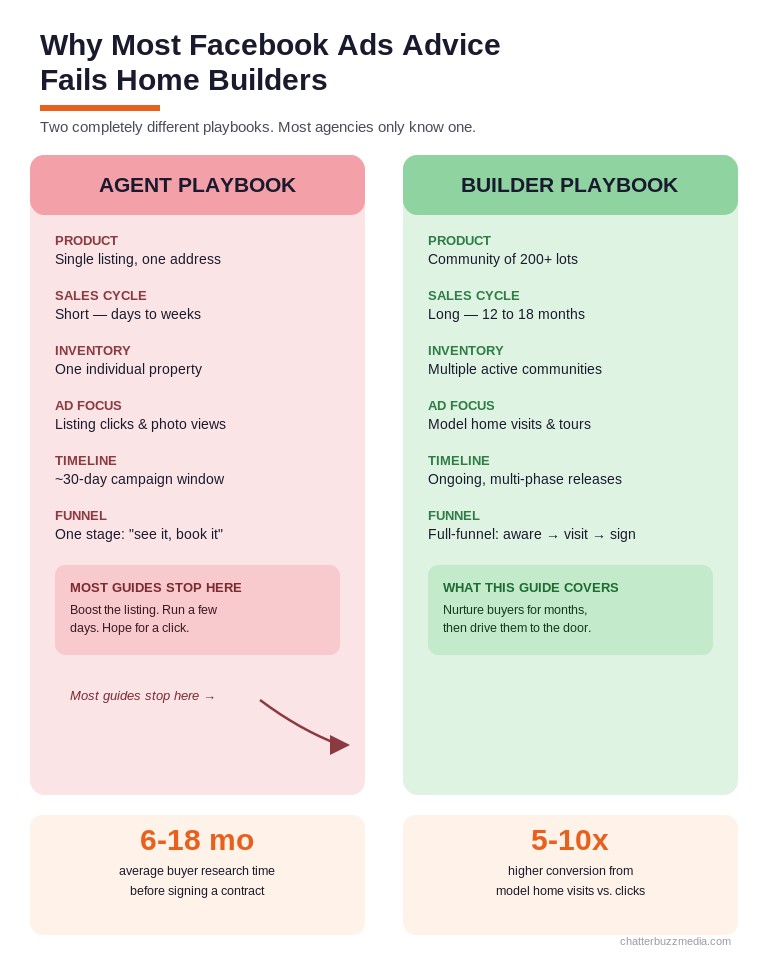
Builders sell communities, not individual addresses. A single campaign might need to fill 200 lots across three phases over 24 months. The buyer journey for new construction averages 6 to 18 months of online research before a single form is filled out, according to New Home Star’s 2025 builder marketing research.
The conversion event is different, too. Agents optimize for listing inquiries. Builders optimize for model home visits — the single highest-intent action in the new construction sales funnel.
Standard targeting advice also breaks down for builders. Meta’s Special Ad Category restrictions already limit what any housing advertiser can do. But builders face an additional challenge: they need to reach buyers who haven’t started searching yet — families considering new construction for the first time, renters ready to upgrade, or relocators who don’t know the market.
That requires a full-funnel approach that most real estate lead generation guides never cover. The following steps build that approach from the ground up.
How to Set Up Meta Ads Under Housing Compliance Rules
Every facebook ad for home builders must comply with Meta’s Special Ad Category for Housing. Skipping this step gets your ad account restricted — or permanently shut down.
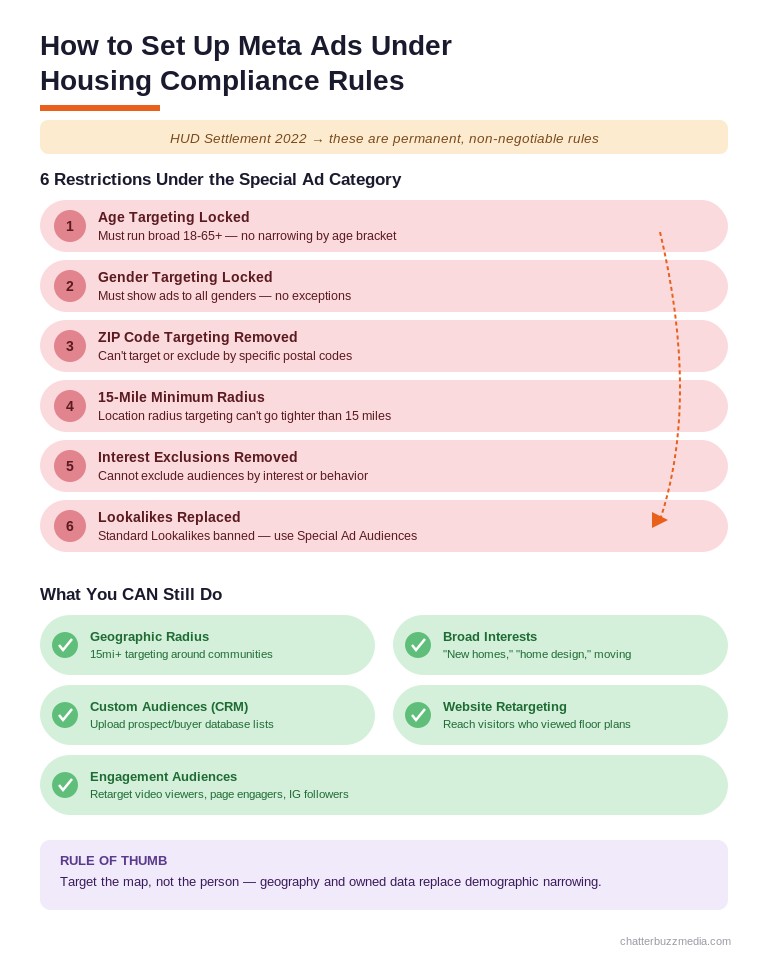
In 2022, Meta settled with the U.S. Department of Housing and Urban Development over discriminatory ad targeting. The result was a permanent set of restrictions that apply to all ads related to housing sales, rentals, or financing. As of 2026, Meta auto-detects housing ads from your images and copy, so trying to avoid the category triggers automatic enforcement.
Here is what the Special Ad Category removes from your targeting toolkit:
- Age targeting — locked to 18–65+, no narrowing allowed
- Gender targeting — must include all genders
- ZIP code targeting — completely removed
- Location radius — minimum 15-mile radius in the U.S.
- Detailed interest exclusions — cannot exclude audiences by interest
- Lookalike audiences — replaced by “Special Ad Audiences” with limited matching
To set this up correctly, go to Ads Manager, select the Housing category at the campaign level, and verify your business through Meta Business Suite. Install the Meta Pixel and Conversions API on every community landing page — first-party data is your most reliable signal now that third-party cookies are gone.
One critical detail most guides miss: Meta evaluates your landing page too. A compliant ad linked to a non-compliant landing page still gets rejected. Make sure your community pages don’t use language that implies preference for a protected class.
How to Structure Full-Funnel Campaigns for New Communities
A full-funnel campaign structure is the single biggest difference between builders who generate cheap leads that never convert and builders who fill communities on schedule. Each funnel stage requires its own campaign, creative, and measurement approach.
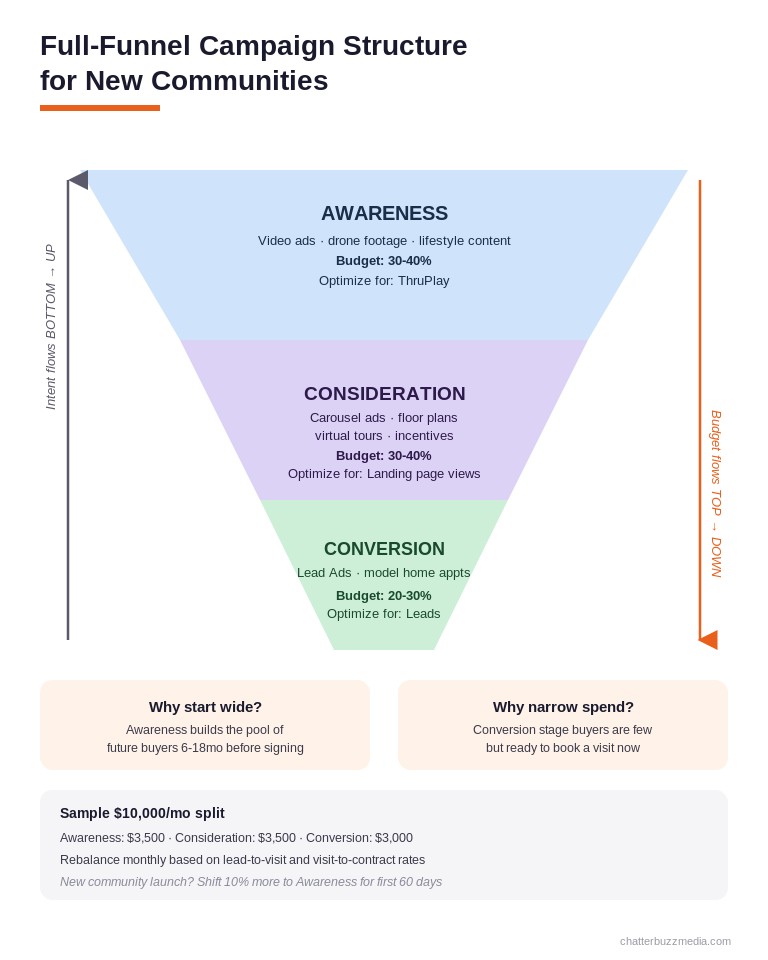
Top of Funnel — Community Awareness: The goal here is reach and brand recognition for your community — not leads. Use video ads showcasing the lifestyle: neighborhood amenities, drone footage of the community, resident testimonials, and nearby schools or retail. Optimize for ThruPlay (video views) or reach.
Budget 30–40% of your Meta spend here. This builds the warm audience pool that your mid-funnel campaigns will retarget.
Middle of Funnel — Consideration: Retarget everyone who watched 50%+ of your awareness videos or visited your community pages. Serve carousel ads with floor plan highlights, virtual tour links, and storytelling content about the neighborhood. Include builder incentives like rate buydowns or design center credits.
Budget 30–40% here. Optimize for landing page views or content views.
Bottom of Funnel — Conversion: Target your warmest audiences — people who viewed multiple floor plans, spent time on pricing pages, or engaged with mid-funnel ads multiple times. Use Lead Ads with Instant Forms to book model home appointments directly. This is where every dollar should drive a scheduled visit.
Budget the remaining 20–30% here. Optimize for leads. Your cost per lead at this stage should be significantly lower than cold traffic because you have already built intent through the upper funnel.
For builders managing multiple active communities, create separate ad sets for each community within shared campaigns. This lets you control budget allocation by community sales velocity — pouring more spend into communities that are launching or struggling, and reducing spend on communities that are nearly sold out.
How to Target Buyers at Every Stage of the Home Search
Targeting for home builders on Meta works differently than for resale agents because the Special Ad Category limits your options. But within those constraints, builders still have powerful levers most advertisers ignore.
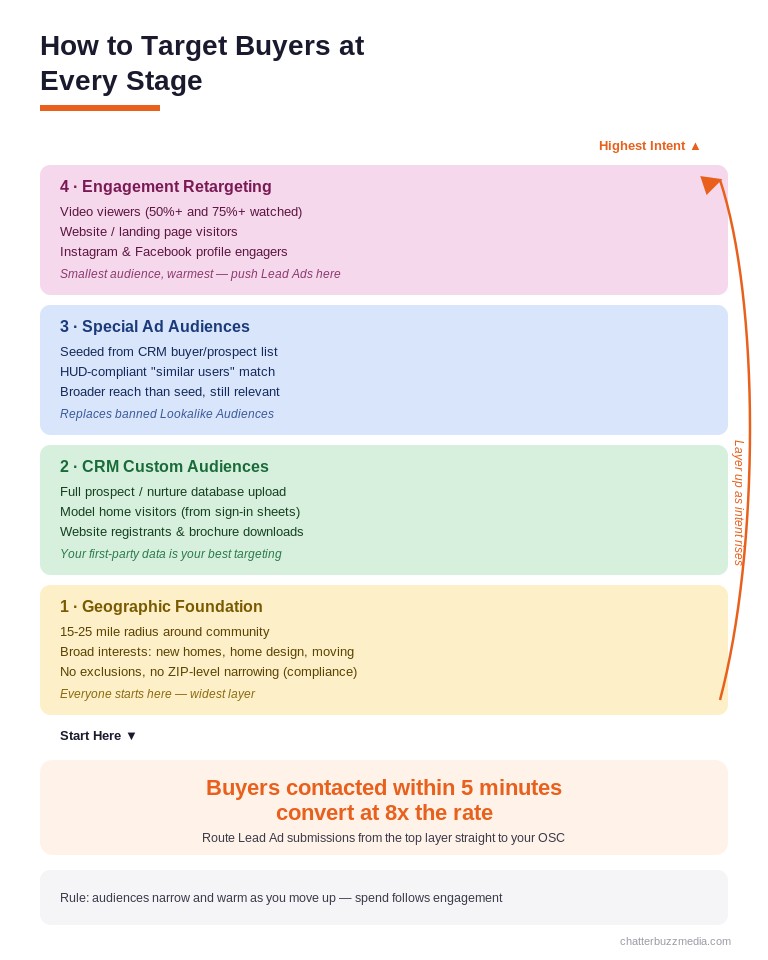
Geographic targeting with intent signals: Start with a 15- to 25-mile radius around each community. Layer in the interests you can still use — “new homes,” “home design,” “interior design,” “moving” — to narrow within that radius. For builders in growth markets like Orlando, Tampa, or DFW, these broad interests still generate qualified traffic.
Custom Audiences from your CRM: Upload your existing prospect database — everyone who has visited a model home, registered on your website, or been contacted by an OSC (Online Sales Counselor). Meta matches these against its user base for retargeting. This is your highest-converting audience segment.
Special Ad Audiences: These replaced Lookalike audiences for housing. They use a seed audience (like your CRM list or website visitors) to find similar users, but with less precision than standard Lookalikes. They still work — just expect broader reach and slightly higher CPL.
Engagement-based retargeting: Build audiences from people who watched your video ads, visited specific community pages, or interacted with your Facebook/Instagram profiles. Layer these by engagement depth — someone who watched 75% of a community tour video is far more qualified than someone who watched 3 seconds.
The key principle: let the funnel do the targeting work. Your top-of-funnel campaigns cast a wide net within geographic bounds. Your retargeting campaigns progressively narrow that audience based on demonstrated behavior. By the time someone sees your bottom-funnel Lead Ad, they have already self-selected through multiple touchpoints.
How to Create Ads That Sell the Lifestyle, Not the Floor Plan
The biggest creative mistake builders make on Meta is leading with square footage and pricing. Buyers scroll past spec sheets. They stop for a vision of the life they could live in your community.
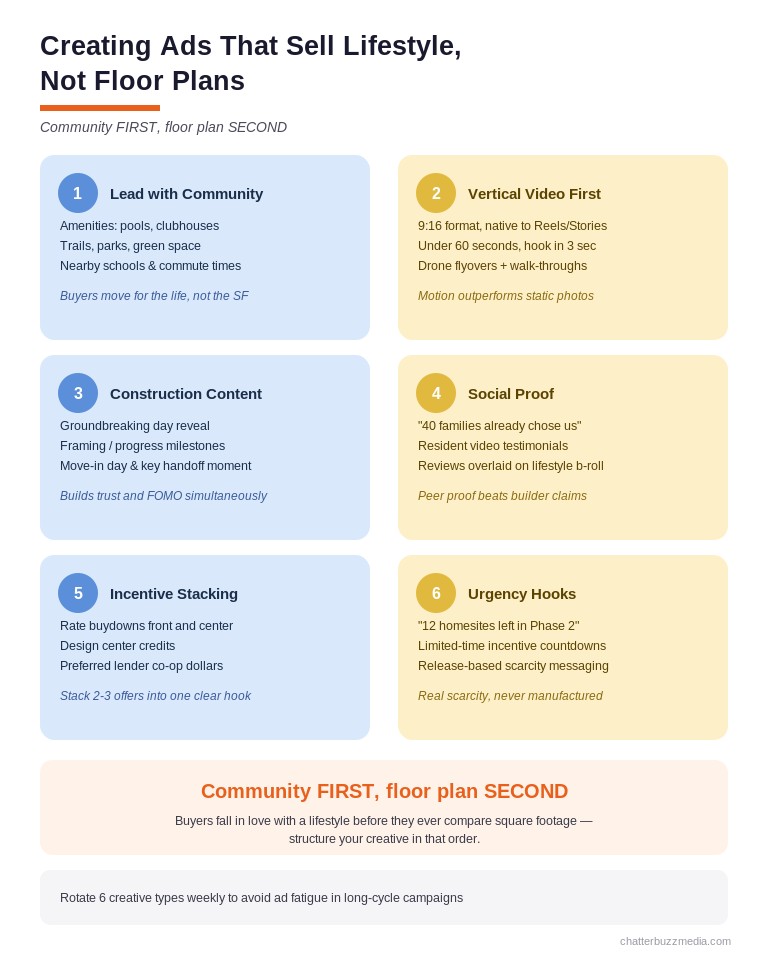
Video is non-negotiable. Meta’s algorithm prioritizes video content, and vertical video (9:16 for Reels and Stories) now outperforms every other format for housing ads. Shoot walk-through tours, drone community overviews, resident testimonial clips, and design center reveals. Keep each video under 60 seconds for top-of-funnel and under 30 seconds for retargeting.
Lead with the neighborhood, not the house. Show the pool, the trails, the dog park, the school down the street. A carousel ad with “5 reasons families choose [Community Name]” outperforms a carousel of floor plan renderings every time. Buyers choose communities first, then pick a floor plan — your ads should mirror that decision sequence.
Use construction-stage content as an ad pipeline. Groundbreaking photos, framing progress, design center walkthroughs, and move-in day celebrations create authentic, scroll-stopping content that no competitor can replicate. This content also builds trust — buyers see real progress, real homes, real families.
Builder-specific ad copy hooks that convert:
- “Tour [Community Name] this weekend — only 12 homesites left in Phase 2” (urgency + specificity)
- “New homes from the $380s with 5.99% financing through [Preferred Lender]” (price anchor + incentive)
- “See why 40 families chose [Community Name] in the last 6 months” (social proof)
- “Your kitchen. Your finishes. Your rules. Tour the design center →” (customization angle)
If you are using AI-generated content in your ad creative, Meta now requires disclosure. Add the AI disclosure label during ad creation to avoid rejection.
How to Drive Model Home Visits with Meta Lead Ads
Model home visits are the single most important conversion event for home builders. According to industry data, buyers who physically visit a model home are 5–10x more likely to contract than those who only browse online. Your entire Meta strategy should funnel toward this one action.
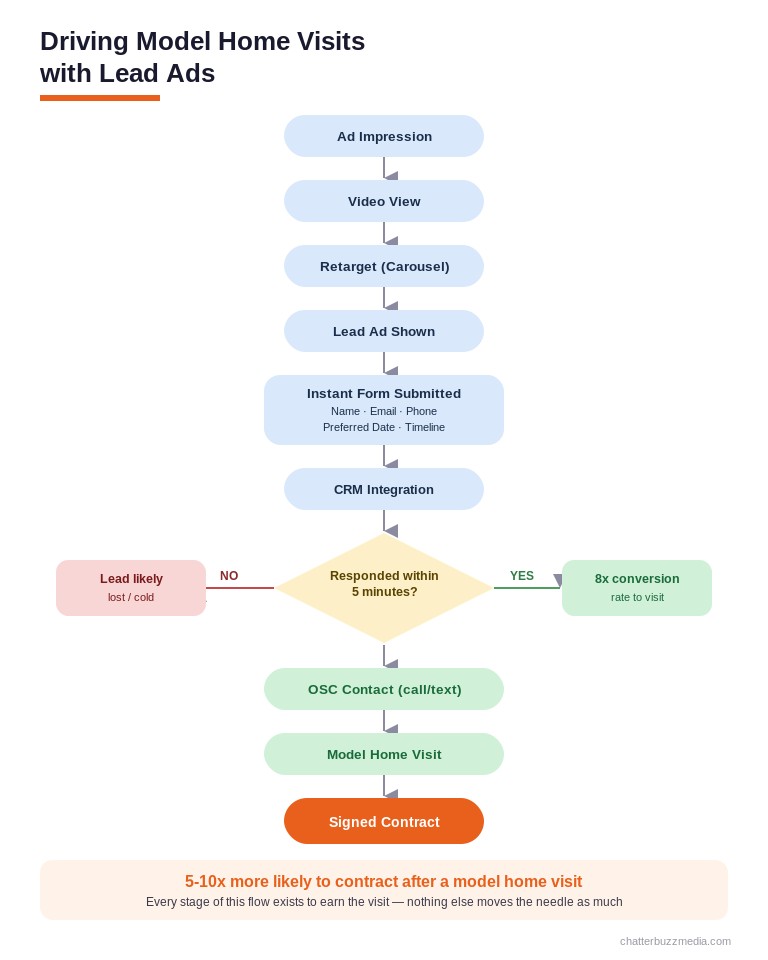
Meta’s Lead Ads with Instant Forms are the best tool for this. They let buyers book appointments without leaving Facebook or Instagram — no landing page load time, no friction, no drop-off. For housing ads under the Special Ad Category, this native experience consistently delivers lower CPL than sending traffic to external pages.
Structure your Instant Form for model home appointments:
- Headline: “Schedule Your Private Tour of [Community Name]”
- Description: 2-3 sentences about what they will see (model homes, amenities, design center)
- Fields: Name, email, phone, preferred visit date (use multiple choice with 3-4 date options)
- Qualifying question: “When are you looking to move?” with timeline options (0-3 months, 3-6 months, 6-12 months, just exploring)
- Thank you screen: Include the model home address, hours, and a “Add to Calendar” link
The critical next step most builders fumble: speed to lead. Connect your Instant Form to your CRM (HubSpot, Salesforce, Lasso) via Zapier or a native integration. Route new leads to your on-site sales counselor or OSC within 5 minutes. Research from the real estate lead generation industry shows that response time is the single largest predictor of conversion — leads contacted within 5 minutes convert at 8x the rate of leads contacted after 30 minutes.
For builders with preferred lender partnerships, add a co-branded element. Include the lender’s rate buydown offer in the ad creative and add a “Would you like a pre-approval estimate?” checkbox on the form. This lets you stack incentives (builder + lender) and deliver a warmer lead to your sales team.
How to Measure Builder-Specific KPIs That Actually Matter
Most pay-per-click advertising dashboards track cost per lead, click-through rate, and impressions. For home builders, these metrics tell you almost nothing about actual revenue impact.
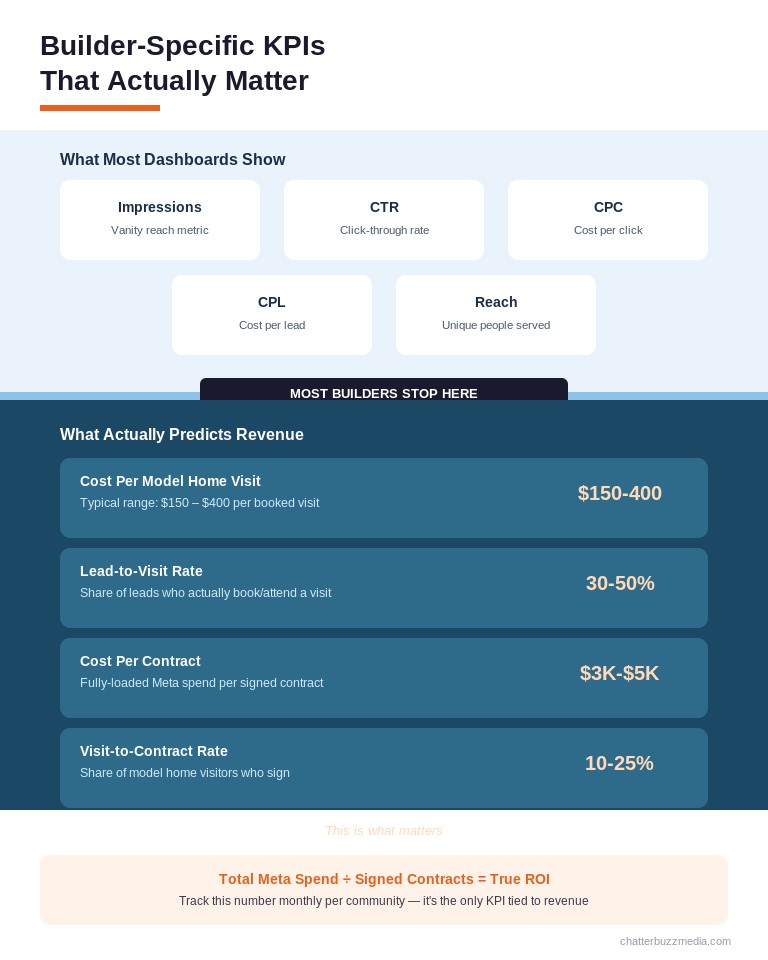
Builder-specific KPIs require tracking the full journey from ad click to signed contract. Here is the measurement framework that connects Meta spend to revenue:
Cost Per Model Home Visit (CPMV): This is the metric that matters most. Track how many ad-generated leads actually show up to tour a model home. Industry benchmarks for facebook ads for home builders put CPMV between $150 and $400 depending on market and community price point. If your CPMV exceeds $500, your funnel has a leak between form submission and appointment attendance.
Cost Per Contract (CPC-Contract): Divide total Meta ad spend by the number of signed purchase agreements attributed to ad-sourced leads. For a community selling homes at $400K, a cost per contract of $3,000–$5,000 represents strong ROI — that is less than 1.25% of the sale price.
Lead-to-Visit Rate: What percentage of form submissions convert to actual model home visits? Healthy benchmarks sit between 30% and 50%. Below 20% signals either poor lead quality (top-of-funnel targeting issue) or slow follow-up (operational issue).
Visit-to-Contract Rate: What percentage of model home visitors sign a contract within 90 days? Typical rates range from 10% to 25% depending on market conditions and price point.
To track these KPIs accurately, integrate your Meta ad data with your builder CRM. Use UTM parameters on every ad link and match those parameters to CRM records. The conversion rate optimization stack should connect Meta Ads Manager → your website analytics → your CRM → your sales reporting.
Review performance weekly at the community level. Shift budget toward communities with the lowest cost per contract, not the lowest cost per lead — a $20 lead that never visits costs more than a $60 lead that contracts.
Frequently Asked Questions
1. 🔍 How much do Facebook ads cost for home builders?
Most home builders spend $2,000 to $10,000 per month per active community on Meta ads. Cost per lead typically ranges from $25 to $65, but the more meaningful metric is cost per model home visit, which runs $150 to $400. Budget allocation should follow a 30/30/20 split across awareness, consideration, and conversion campaigns.
2. 📊 Do Facebook ads work better than Google Ads for home builders?
They serve different purposes. Google Ads capture high-intent searchers who are already looking for “new homes in [city].” Facebook ads build awareness and demand among people who haven’t started searching yet. The most effective builders use both — Google for intent capture, Meta for demand generation. Learn more about the differences between SEO and PPC strategies.
3. ⚡ What is the Special Ad Category and why does it matter for builders?
The Special Ad Category is Meta’s compliance framework for housing, employment, and credit ads. It removes demographic targeting (age, gender, ZIP code), enforces a 15-mile minimum radius, and eliminates detailed interest exclusions. Builders must select this category for every campaign — failure to comply can result in ad rejection or account suspension.
4. 🏦 How do I track model home visits from Facebook ads?
Connect your Meta Lead Ad forms to your builder CRM via Zapier or a native integration. Tag every lead with a UTM source of “meta” and the specific campaign and community name. When a lead visits a model home, your on-site sales team logs the visit in the CRM, completing the attribution chain from ad to visit.
5. 🤝 Should home builders use Lead Ads or send traffic to a landing page?
Lead Ads with Instant Forms generally outperform landing pages for home builders under the Special Ad Category. The native form experience reduces friction, loads instantly, and pre-fills user information. For builders who need more qualifying information, use a landing page with a clear conversion purpose and strong visual content.
6. 💰 What type of ad creative works best for new construction communities?
Vertical video (9:16) outperforms all other formats. Lead with community lifestyle content — amenities, neighborhood footage, resident testimonials — rather than floor plan specs. Carousel ads showing “reasons to choose [community]” also perform well for mid-funnel retargeting. Avoid stock photography; use real footage from your communities.
7. 🚀 How long does it take for Facebook ads to generate results for builders?
Expect 2–4 weeks for Meta’s algorithm to exit the learning phase and optimize delivery. Meaningful lead volume typically begins in month 2, and the full funnel — from first ad impression to model home visit to contract — can take 3–6 months given new construction’s longer sales cycle. Builders who commit to a 6-month minimum see the strongest ROI.
8. 📈 Can I target specific neighborhoods or ZIP codes with housing ads?
No. Meta’s Special Ad Category removes ZIP code targeting entirely and requires a minimum 15-mile radius for location targeting. To reach buyers in specific areas, use a radius centered on your community’s address and layer in broad interest signals like “new homes” or “home improvement.” Your retargeting audiences will naturally refine geographic reach over time.
Conclusion
Facebook ads for home builders work — but only when you stop treating them like agent listings and start treating them like community marketing engines. The builders who fill communities on schedule are the ones running full-funnel campaigns, selling lifestyle over square footage, and measuring what matters: model home visits and contracts, not vanity metrics.
Here is your four-step action plan:
- Set up your Meta Ads account with the Special Ad Category, Business Verification, and the Conversions API installed on every community page.
- Build a three-stage funnel for each active community — awareness video campaigns, mid-funnel retargeting carousels, and bottom-funnel Lead Ads for model home appointments.
- Create community-first creative — drone footage, amenity showcases, construction progress, and resident testimonials in vertical video format.
- Connect your CRM and track cost per model home visit and cost per contract as your primary KPIs. Review weekly and reallocate budget by community performance.
For a deeper look at organic strategies that complement your paid campaigns, explore the complete home builder SEO guide — combining paid and organic creates a compounding effect that lowers your cost per acquisition over time.

Victoria Wallace
Victoria Wallace is a senior content strategist and marketing writer with 30+ years of experience helping more than 200 brands translate complex business goals into clear, conversion-focused content. Her background spans paid media, marketing strategy, go-to-market planning, brand positioning, and full-funnel campaign development, giving her a deep understanding of how SEO content connects to real business growth.