
 321-236-2899
How Long Does It Take Google Ads to Work and How Does It Work?
You launched your Google Ads campaign, and now you are watching the dashboard like it owes you money. The clicks are trickling in, the spend is climbing, and the leads are not matching the promise.
The honest answer to “how long does it take Google Ads to work” is that you will see activity within hours, usable signal in about two weeks, and stable, plannable performance at around 90 days — but the full story depends on your budget, your industry, and how your account learns.
This guide is built on Google’s own documentation and 2025 benchmark data from more than 16,000 campaigns, not gut feel. We have managed paid search across home services, B2B, eCommerce, financial, and healthcare accounts, and the same pattern repeats: the advertisers who win are the ones who understand what “working” actually means at each stage and resist the urge to rip the engine apart mid-climb.
By the end, you will know exactly what to expect in week one, why your early numbers look worse than your real performance (hint: conversion lag), and how to tell a slow campaign from a broken one. Let’s start with the machine you are actually feeding.
Key Takeaways
- Clicks start within hours of ad approval, but meaningful, decision-grade data takes 7–14 days.
- 90 days is the realistic maturity mark — the point where cost per lead is stable enough to budget around.
- Conversion lag makes week-one results look 30–50% worse than reality, because conversions are credited back to the click date days or weeks later.
- Smart Bidding needs conversion volume, not just time — roughly 15–30 conversions per month per campaign is where automated bidding gets reliable.
- Budget buys speed: thin budgets starve the learning period and stretch the timeline for months.
- The fastest way to slow a campaign is to keep editing it — major changes restart learning.
How Google Ads Actually Works: The Auction Behind Every Search
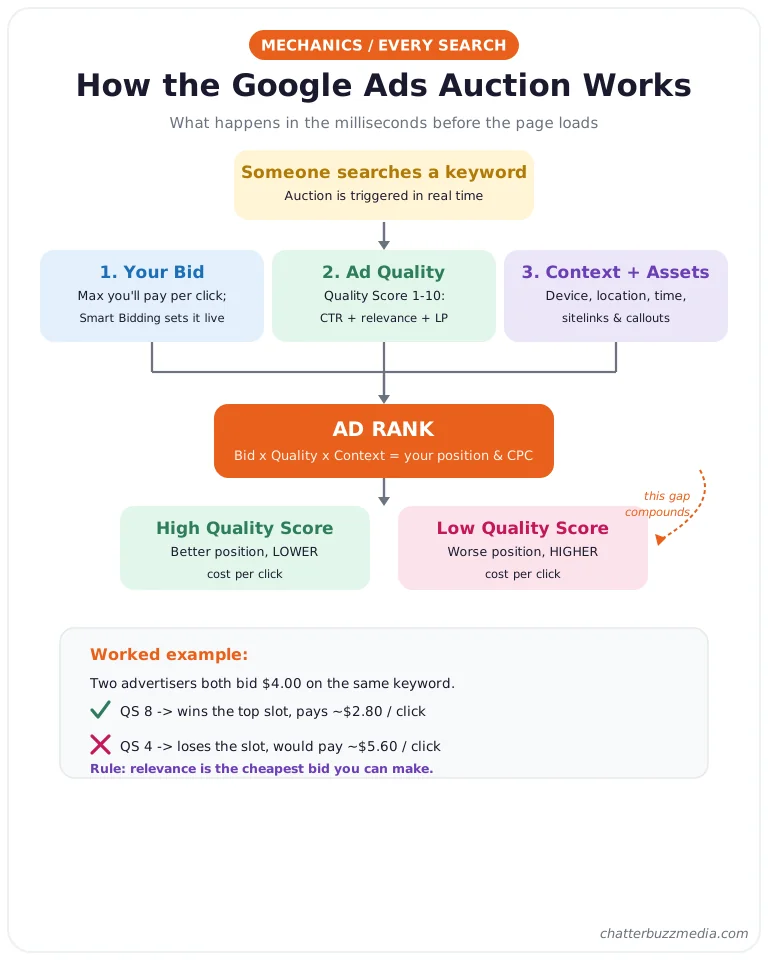
Google Ads runs a live auction every single time someone searches, and your ad’s position is decided in the milliseconds before the page loads. You are not buying a fixed slot; you are competing for eligibility on each query.
This matters for timeline because the auction rewards relevance and history, and a brand-new account has neither yet. That is the real reason results take time — the system is building a track record of how people respond to your ads.
Three inputs decide whether you show and where:
- Your bid: the maximum you are willing to pay for a click, which with Smart Bidding Google sets dynamically per auction.
- Ad quality: measured largely through Quality Score, Google’s 1–10 diagnostic of expected click-through rate, ad relevance, and landing page experience.
- Context and assets: the searcher’s device, location, time of day, and the ad assets (sitelinks, callouts) you have added.
Google combines these into Ad Rank, which determines your position and your actual cost per click. A higher Quality Score lets you win better positions at a lower price, which is why early optimization compounds.
Quality Score itself is built from three components, and each one is a lever you control. Expected click-through rate predicts how likely people are to click your ad, ad relevance measures how closely your ad matches the search intent, and landing page experience rates how useful and fast your page is after the click.
A quick example shows why this matters for both cost and timeline. Two advertisers bid the same $4 on the same keyword, but the one with a Quality Score of 8 can outrank the one scoring 4 while paying less per click — because Ad Rank rewards the better experience.
The takeaway: every day your campaign runs, it feeds the auction more data about which clicks turn into customers. That data is the currency that buys you cheaper, more consistent results later — and it is why patience is a strategy, not a personality trait.
Now let’s put a clock on it.
How Long Until Google Ads Work? The Timeline at a Glance
Google Ads produces clicks almost immediately, usable data in one to two weeks, and dependable performance at roughly 90 days. The word “work” is doing a lot of lifting in that question, so here is what each milestone actually means in practice.
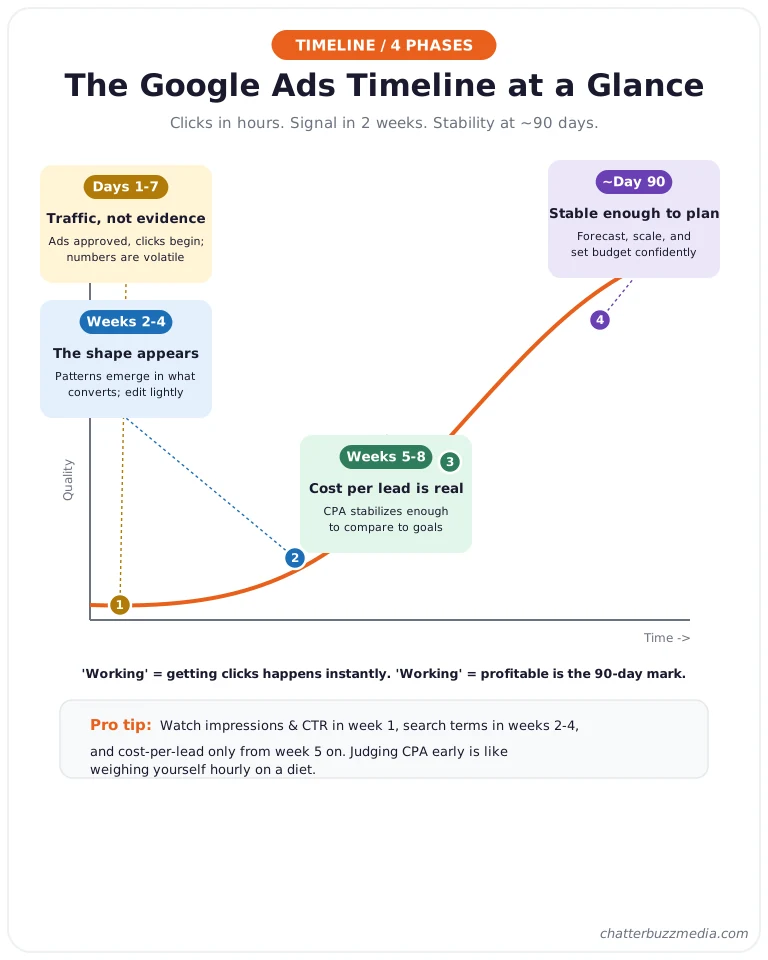
Think of it as four phases, each with a different job:
- Days 1–7 — Traffic, not evidence. Ads get approved, impressions and clicks begin, and the account starts collecting data. Early cost per click and conversion numbers are volatile and should not be trusted yet.
- Weeks 2–4 — The shape appears. Patterns emerge in which keywords, audiences, and times convert. You can start making informed, measured adjustments.
- Weeks 5–8 — Cost per lead becomes real. With enough conversion volume, your cost per acquisition stabilizes enough to compare against goals.
- Around day 90 — Stable enough to plan around. Performance is consistent enough to forecast, scale, and build budget decisions on.
Independent agency guidance lines up with this. Oyova pegs steady results at one to three months, and JumpFly describes a longer arc of two to six months to stabilize and six to twelve months to fully mature for competitive, lower-budget accounts.
It helps to separate two definitions of “working” that people blur together. Working as in “showing and getting clicks” happens almost instantly, while working as in “profitable and predictable” is the 90-day destination most people actually mean.
It also helps to know which metric to watch at each stage, because watching the wrong one is what triggers premature panic. In week one, watch impressions and click-through rate to confirm the account is serving and your ads are relevant.
In weeks two to four, shift to search terms and conversion volume to see what intent is actually converting. From week five onward, cost per lead and cost per acquisition finally become reliable enough to judge.
Chasing cost per lead in week one is like weighing yourself hourly on a diet — the number is real, but it tells you nothing yet.
There is also a common misconception worth clearing up: Google Ads is not front-loaded to fail so an agency can look like a hero later. The slow start is structural — the system genuinely performs better once it has conversion history to bid against, and that history cannot be bought, only accumulated.
One useful mental model from the industry is that every significant change costs you roughly a week of relearning. Some practitioners express it as “seven days times the number of changes,” which is why an account edited constantly can feel permanently stuck around the three-month mark while a disciplined account sails past it.
The lesson is not “never change anything” — it is “change deliberately, then wait long enough to measure the result.”
The 90-day figure is not arbitrary. It is roughly the window most accounts need to gather enough conversions for Smart Bidding to calibrate, which is the single biggest lever on when your results get predictable.
The next sections break down each phase — starting with the one everyone is most anxious about.
Days 1–7: Approval, Setup, and the Start of Learning
In your first week, expect your ads to go live within one business day and your account to begin its learning period almost immediately after. This is the phase where your job is to set the foundation correctly, not to judge results.
Here is what happens, in order:
- Ad review (hours to 1 day): Google reviews new ads for policy compliance. Per Google’s ad review documentation, most ads are reviewed within one business day, though ads in regulated categories like finance and healthcare can take longer.
- First impressions and clicks (hours after approval): Once approved, your ads can start showing immediately. Clicks often appear the same day.
- Initial data collection (days 3–7): The account begins recording which searches trigger your ads, what people click, and how your landing page performs.
Regulated industries should build in extra buffer. Finance, healthcare, and other restricted categories can face longer reviews and, in some cases, advertiser verification before ads run — so submit several days ahead of any launch date.
If you market in a compliance-heavy vertical such as credit unions and financial services, factor approval timing into your campaign calendar from the start.
What you should not do in week one is panic-optimize. The numbers are noisy by design, and every major edit resets the clock on the learning the account is trying to do.
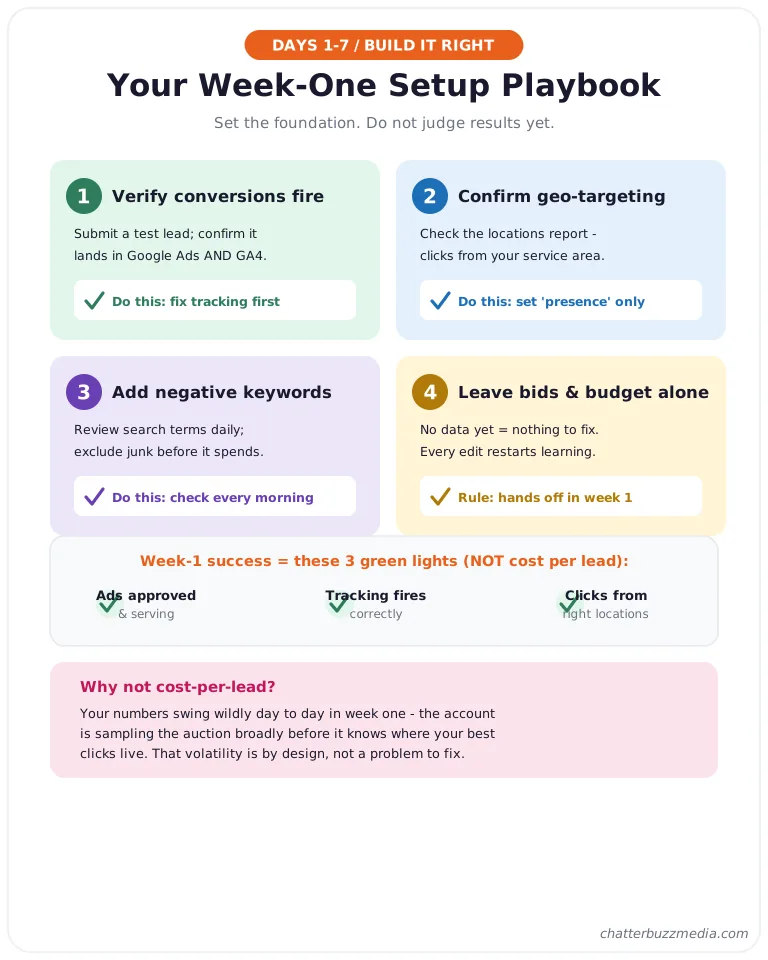
A realistic week-one success benchmark is simple: ads approved and serving, conversion tracking firing correctly, and clicks coming from the right locations. Notice that none of those are about cost per lead — that number is not trustworthy yet.
Getting conversion tracking right is the highest-leverage task of the week, because everything downstream depends on it. If you are also running Meta, the same discipline applies to your server-side conversion tracking through the Meta Conversions API.
Here is a concrete week-one checklist that separates accounts that climb fast from accounts that stall:
- Verify every conversion action fires. Submit a test lead and confirm it registers in Google Ads and GA4, so you are not optimizing toward a broken signal.
- Confirm geographic targeting. Check the locations report to make sure clicks are coming from your service area and not from “people interested in” your area worldwide.
- Add obvious negative keywords. Review the search terms report daily in week one and exclude clearly irrelevant queries before they drain budget.
- Leave bids and budgets alone. Resist every urge to “fix” performance this week — you do not have enough data to fix anything yet.
One more expectation to set: your cost per click and conversion rate will swing wildly day to day in week one, and that is normal. The account is sampling the auction broadly before it knows where your best clicks live.
With the foundation set, the account moves into the phase that confuses the most advertisers: the learning phase.
The Google Ads Learning Phase, Explained
The learning phase is the period when Google’s Smart Bidding algorithm calibrates to your conversion goal, and it is driven by conversion data far more than by a fixed number of days. This is the most misunderstood part of the timeline, so let’s use Google’s actual definition rather than agency folklore.
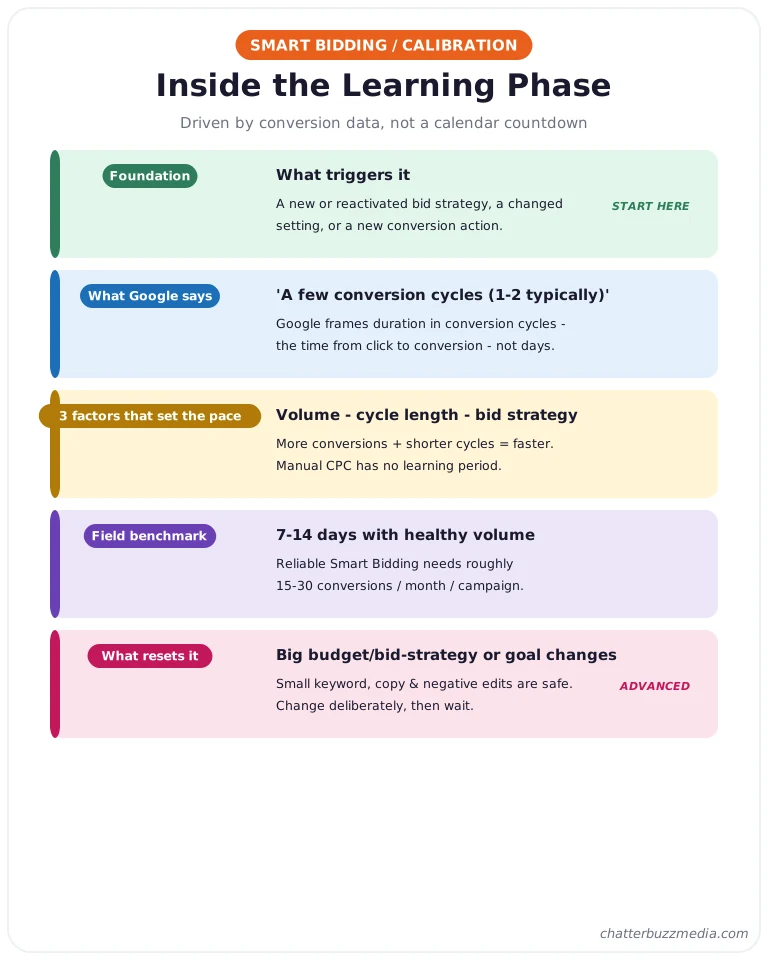
According to Google’s documentation on learning period duration, a bid strategy enters “Learning” status and needs time to calibrate toward its goal. Google says this typically takes “a few conversion cycles (1–2 typically)” — meaning the time it takes for clicks to turn into conversions, not a calendar countdown.
Three factors determine how long learning lasts, straight from Google:
- Conversion volume: how many conversions your campaigns, ad groups, and keywords are generating. More conversions calibrate the system faster.
- Conversion cycle length: the time from a click to a conversion. A business with a two-week sales cycle learns slower than one with same-day purchases.
- Bid strategy: automated strategies like Maximize Conversions have a learning period; Manual CPC does not.
In the field, that calibration tends to land in the 7–14 day range for accounts with healthy conversion volume, which is why that number shows up across the industry. Google’s own Smart Bidding guidance emphasizes conversion history as the fuel, and widely referenced practitioner benchmarks put reliable automated bidding at roughly 15–30 conversions per month per campaign.
Your bid strategy choice changes how learning feels. Maximize Conversions and Maximize Conversion Value start learning as soon as they have a goal, while adding a Target CPA or Target ROAS constraint asks the system to hit a specific number and generally needs more conversion history to do it reliably.
A common and costly mistake is setting an aggressive target too early. If you launch Target CPA at a number tighter than the account has ever achieved, you can choke delivery before the system has learned anything — better to start with Maximize Conversions, let the data accumulate, then layer a realistic target on top.
During learning, Google is deliberately exploring. It tests different combinations of audiences, times, devices, and placements to discover where your conversions come from, which is why performance is intentionally uneven in this window.
Two things reset learning and send you back to the start: significant budget or bid-strategy changes, and changes to conversion actions. Small edits to keywords, ad copy, or negative keywords are generally safe.
The practical rule is to make meaningful changes deliberately and then leave the account alone long enough to recover. Batch your edits into a single weekly review rather than tweaking daily, so the system gets uninterrupted runway between changes.
A worked example makes the “stop editing” rule stick. Say you launch, then on day 4 you raise the budget 50%, on day 8 you switch bid strategies, and on day 12 you add a new conversion action — each of those can restart learning, so by day 12 your account is effectively on day zero again.
That is how a campaign ends up “stuck in learning” for a month with nobody understanding why.
The counterintuitive truth is that doing less is often the highest-value move in the first few weeks. The algorithm improves fastest when you let it finish what it started.
Here is the trap almost no competitor explains, and it is the reason your learning-phase numbers look alarming: conversion lag.
Conversion Lag: Why Your Early Results Look Worse Than They Are
Conversion lag is the delay between when someone clicks your ad and when they actually convert — and because Google credits conversions back to the original click date, your recent days always look artificially weak. This single concept explains more “my ads aren’t working” panic than any other, and most guides skip it entirely.
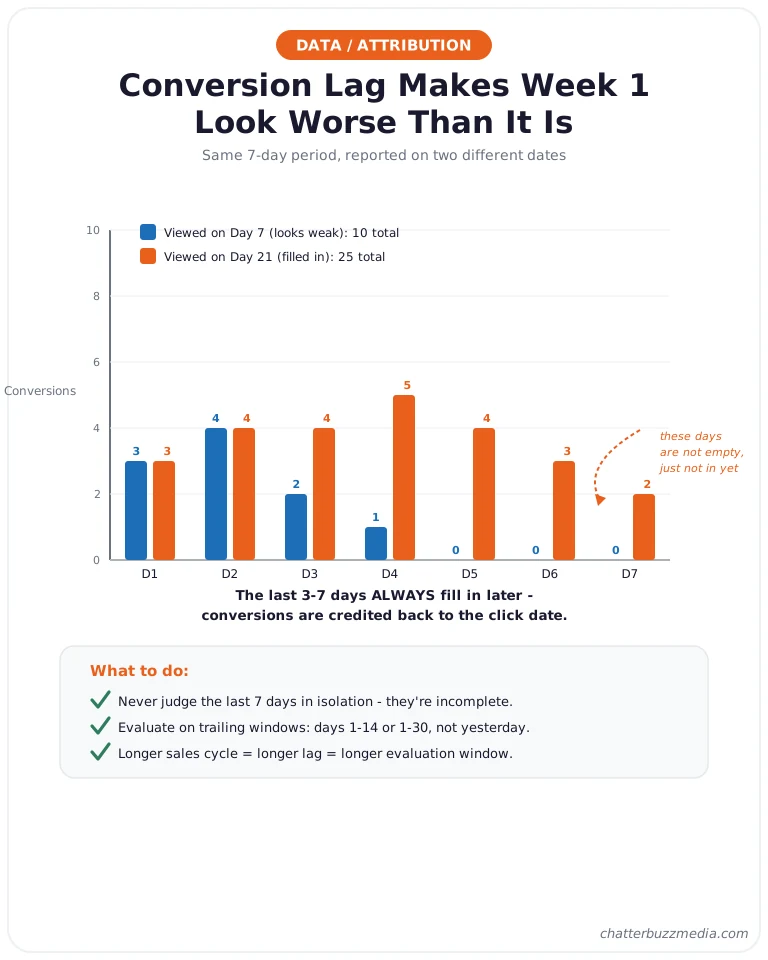
Here is the mechanic. If someone clicks your ad on Monday but does not fill out the form until Thursday, Google eventually reports that conversion on Monday, the click date.
So when you check Monday’s performance on Monday night, it looks like a failure — the conversion has not happened yet and may not for days.
The effect is largest exactly when you are most anxious: the first two weeks. Your last three to seven days will almost always “fill in” with conversions after the fact, which means early cost-per-lead readings are systematically pessimistic.
What this looks like in a typical lead-gen account:
- Day 7, viewed on day 7: you might see 4 conversions and a scary cost per lead.
- Day 7, viewed on day 21: that same period now shows 7–8 conversions as lagged form fills and calls get attributed back.
Different conversion types lag by different amounts, which is why a blended cost-per-lead number can mislead. A phone call often converts within minutes of the click, a form fill within a day or two, and a demo request or quote might not close for weeks — so an account heavy on long-lag actions will look far weaker in its recent days than one driven by instant calls.
You can actually see this in the interface. Google Ads offers a conversion-lag report (and the “days to conversion” view) that shows how long your conversions typically take, and checking it once early in a campaign tells you exactly how long your evaluation window needs to be.
If 20% of your conversions arrive 14+ days after the click, then judging anything inside a two-week window is guaranteed to understate performance.
The practical rules that follow from conversion lag:
- Never judge the last 7 days in isolation — they are incomplete.
- Evaluate on trailing windows like days 1–14 or 1–30, not yesterday.
- Longer sales cycles mean longer lag — a B2B account with a 30-day cycle needs a far longer evaluation window than an eCommerce store.
Conversion lag is tied directly to your attribution and conversion window settings. Google can count a conversion for up to a set number of days after the click (commonly 30, but configurable), so a long window captures more lagged conversions but also means recent days stay “incomplete” longer.
This is also why comparing two time periods incorrectly leads people to kill good campaigns. If you compare a fully-matured month to the most recent, still-filling-in week, the recent week will always look worse — not because performance dropped, but because its conversions have not been credited yet.
Understanding lag changes how you read every report for the rest of the campaign’s life. It also explains why industry matters so much — which is where we go next.
How Long Google Ads Takes by Industry and Budget
Your timeline is set less by Google and more by your industry’s conversion volume and your budget’s ability to generate it. A plumber with same-day emergency calls and a SaaS company with a 90-day evaluation cycle are running the same platform on completely different clocks.
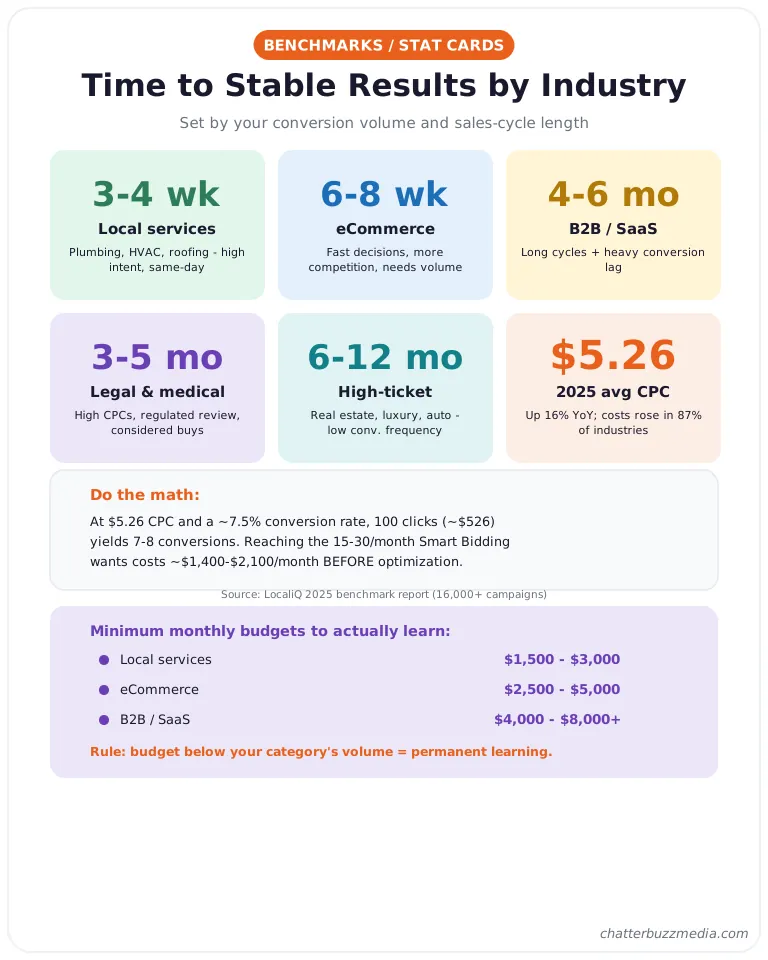
Based on typical conversion cycles and volume, here is how fast different verticals tend to reach stable performance:
- Local services (plumbing, HVAC, roofing): 3–4 weeks. High intent, short cycle, same-day conversions, and often strong local conversion volume.
- eCommerce: 6–8 weeks. Fast purchase decisions but more competition and the need for volume across many products.
- B2B and SaaS: 4–6 months. Long sales cycles and heavy conversion lag mean the data simply takes longer to mature.
- Legal and medical: 3–5 months. High CPCs, regulated review, and considered decisions slow the climb.
- High-ticket (real estate, luxury, auto): 6–12 months. Low conversion frequency makes Smart Bidding slow to calibrate.
Budget is the accelerant. Google Ads is a data engine, and conversions are the fuel — a budget too thin to generate 15–30 conversions a month will keep a campaign in a semi-permanent learning state no matter how long you wait.
The 2025 cost environment makes this concrete. Per LocaliQ’s 2025 benchmark report analyzing more than 16,000 campaigns, the average cost per click was roughly $5.26, the average conversion rate was about 7.5%, and the average cost per lead was $70.11.
Costs rose in 87% of industries year over year, so the pressure on thin budgets is getting worse, not better.
Run the math on a real scenario. At a $5.26 average CPC and a 7.5% conversion rate, every 100 clicks costs about $526 and yields roughly 7–8 conversions — so reaching the 20–30 monthly conversions Smart Bidding wants means spending on the order of $1,400–$2,100 a month in clicks before optimization even begins.
That is the arithmetic behind why a $300/month budget in a competitive category can run for half a year and never stabilize.
This leads to a strategy we call the patience budget: set aside a realistic amount to fund the learning period before you expect profit, and treat it as the cost of buying data rather than buying leads. A campaign funded to generate 20–30 conversions a month will calibrate and start improving; one funded for 5 conversions a month may never fully exit learning.
Rough minimum monthly budget benchmarks, assuming you want enough conversion volume to actually learn:
- Local services: often workable from $1,500–$3,000/month because intent is high and cycles are short.
- eCommerce: typically $2,500–$5,000/month to generate volume across products.
- B2B / SaaS: frequently $4,000–$8,000+/month, since each conversion costs more and cycles are long.
These are starting ranges, not guarantees — your real number depends on your keyword CPCs and conversion rate. The principle holds regardless: budget below the volume your category needs will keep you in learning indefinitely.
If your category runs expensive, pair paid search with a strong conversion-focused landing page so you waste less of every click. Specialized verticals follow the same physics — see how it plays out for manufacturers running Google Ads.
Speaking of other platforms, how does Google compare to Meta, Microsoft, and LinkedIn?
Google Ads vs. Meta, Microsoft & LinkedIn: A Timeline Comparison
Google Ads generally takes longer to stabilize than Meta or Microsoft Ads but less time than LinkedIn, and the difference comes down to intent, cost, and conversion volume. Knowing this helps you set the right expectations for each channel instead of judging them all by the same stopwatch.
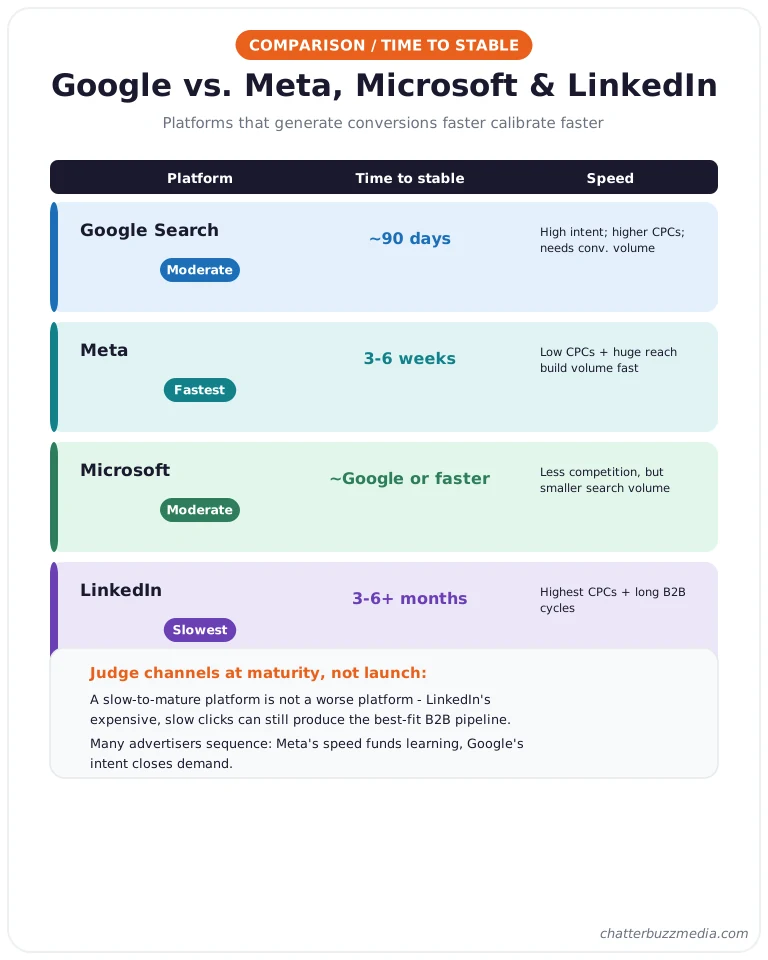
Here is how the major platforms compare on time-to-stable-performance:
- Google Search Ads — moderate (about 90 days). High purchase intent, but higher competition and CPCs, and Smart Bidding needs conversion volume to calibrate.
- Meta (Facebook/Instagram) — often faster (3–6 weeks). Lower CPCs and massive reach generate conversion volume quickly, so the algorithm calibrates sooner — though intent is lower, so creative does more of the work.
- Microsoft Ads — similar to or slightly faster than Google. Lower competition and CPCs in many categories, but smaller search volume can slow data collection.
- LinkedIn — slowest (3–6+ months). The highest CPCs of the major platforms and long B2B cycles mean conversion data accumulates slowly.
The pattern underneath all four is the same: platforms that generate conversion volume faster calibrate faster. That is why a low-CPC Meta campaign can feel “instant” while a premium-CPC LinkedIn campaign feels glacial — it is math, not magic.
This also reframes how you should judge a new channel. A slow-to-mature platform is not necessarily a worse platform — LinkedIn’s expensive, slow-learning clicks can still produce the best-fit B2B pipeline, while a fast, cheap channel can fill the funnel with low-intent volume.
Judge each channel on quality of outcome at maturity, not on how quickly the dashboard lit up. Local and location-based tactics like geofencing advertising add another timing profile worth understanding before you set expectations.
Campaign type matters within Google, too. A Search campaign on high-intent keywords usually matures faster than Performance Max, which spreads spend across Search, Display, YouTube, Gmail, and Discover and needs more data and time to figure out the winning mix.
Demand Gen campaigns behave more like social and lean heavily on creative, so set expectations by campaign type, not just by platform.
Most mid-market advertisers do not pick one; they sequence them. Meta’s speed can fund learning and audience insight while Google’s intent closes demand.
If you run both, keep your creative and measurement consistent across channels — our breakdown of performance creative strategy and the Meta Andromeda targeting shift both affect how fast each platform learns. Now, what if your 30 days are up and it still is not working?
Why Your Ads Aren’t Working Yet — and How to Fix It
If your Google Ads are not performing after 30 days, the cause is almost always one of five fixable problems — or simply the wrong evaluation window. Before you blame the platform, run through this diagnostic, because “slow” and “broken” look identical on the surface and have opposite fixes.
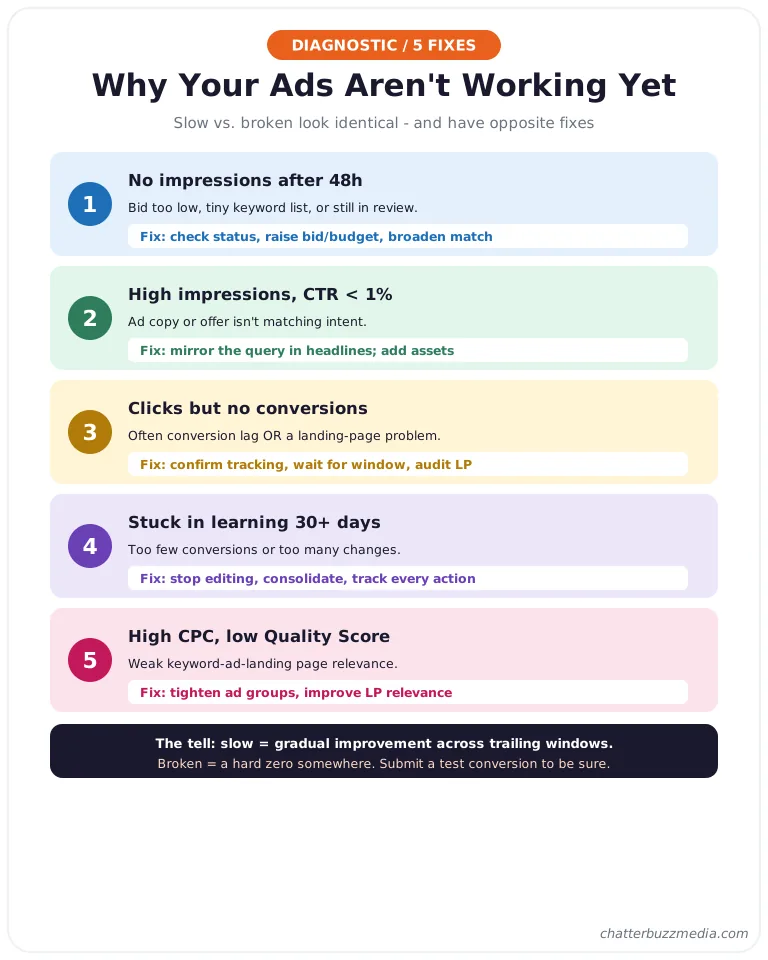
The first question to ask: is the campaign slow, or broken? A slow campaign is collecting data and improving; a broken one has a mechanical fault.
The tell is simple — a slow campaign shows gradual, directional improvement across trailing windows, while a broken one shows a hard zero somewhere (no impressions, no clicks from your area, or no conversions ever recorded despite real form fills).
Here is how to tell them apart and fix each.
- No impressions after 48 hours. Usually a bid too low to enter the auction, a tiny keyword list, or ads still in review. Fix: check ad status, raise bids or budget, and broaden match types cautiously.
- High impressions, low clicks (CTR under 1%). Your ad copy or offer is not matching intent. Fix: rewrite headlines to mirror the search query and add assets like sitelinks and callouts.
- Clicks but no conversions. This is the one that looks like failure but is often conversion lag or a landing page problem. Fix: confirm tracking is firing, wait for the trailing window to fill in, then audit the landing page experience.
- Stuck in learning for 30+ days. Almost always too few conversions or too many changes. Fix: stop editing, consolidate campaigns to concentrate conversion volume, and make sure every meaningful conversion is tracked.
- High CPCs and low Quality Scores. Weak relevance between keyword, ad, and landing page. Fix: tighten ad groups and improve landing page relevance to lift Quality Score and lower cost.
Notice how many of these trace back to conversion tracking and landing pages rather than the ads themselves. More often than not, the ads are fine and the conversion side of the equation is the bottleneck.
One more search-landscape factor is worth naming: AI Overviews are changing click behavior on informational queries, so some older CTR benchmarks run high — our take on how AI search is reshaping results covers the shift.
There is also a measurement trap worth naming. Many “clicks but no conversions” complaints are really tracking that silently broke — a form plugin update, a changed thank-you page URL, or a consent banner blocking the tag.
Before concluding the ads failed, submit a real test conversion and watch it land in both Google Ads and GA4.
If you have confirmed tracking works, your budget supports real conversion volume, and you are evaluating on a trailing window, the honest answer may be that the campaign just needs more time. That is the hardest fix of all — patience — but it is usually the right one.
For the data-visualization side of proving it to stakeholders, clean reporting and dashboards make the trailing-window story obvious at a glance.
Frequently Asked Questions
1. 🔍 How long does it really take for Google Ads to work?
You will see clicks within hours of approval, usable data in 7–14 days, and stable, plannable performance at around 90 days. The exact timeline depends on your industry’s conversion volume, your budget, and your sales-cycle length — high-intent local services mature in weeks, while B2B and high-ticket categories can take several months.
2. 📊 Is $20 a day enough for Google Ads?
It can be enough for a tightly focused local campaign on cheap keywords, but it is often too thin in competitive categories. At a 2025 average cost per click near $5.26, $20 a day buys roughly four clicks — which can be too few conversions for Smart Bidding to calibrate, stretching your timeline for months.
3. ⚡ Can I speed up the Google Ads learning phase?
Yes, by giving the algorithm more conversion data faster: ensure accurate conversion tracking, concentrate budget into fewer campaigns, use a conversion goal with enough volume, and avoid frequent edits. You cannot skip learning, but you can feed it — and you can stop accidentally restarting it with major changes.
4. 🏦 Why are my Google Ads getting clicks but no conversions?
The two most common causes are conversion lag (the conversion has happened but is credited to an earlier click date and has not shown up yet) and a landing page or tracking problem. Confirm your conversion tracking is firing, evaluate on a trailing 14- or 30-day window, and then audit whether your landing page matches the promise in your ad.
5. 🤝 Should I pause my Google Ads if they aren’t working after two weeks?
Almost never — two weeks is inside the learning phase, and pausing forces the system to relearn when you restart. Pause only for clear mechanical problems like a broken landing page, wrong geographic targeting, or faulty tracking, not because early numbers look soft.
6. 💰 How many conversions does Google Ads need to optimize?
Google’s documentation frames learning in conversion cycles rather than a fixed count, but widely used practitioner benchmarks put reliable Smart Bidding at roughly 15–30 conversions per month per campaign. Below that, automated bidding has too little signal and performance stays volatile.
7. 🚀 Does a bigger budget make Google Ads work faster?
Yes, within reason — a larger budget generates conversions faster, which shortens the learning period and gets you to stable performance sooner. But budget only accelerates a well-built campaign; pouring money into poor tracking, weak landing pages, or irrelevant keywords just wastes it faster.
8. 📈 How long before my Quality Score improves?
Quality Score updates as your ads accumulate click and relevance data, so expect movement over the first few weeks as real click-through rate replaces Google’s initial estimate. The fastest lever is tightening the relationship between keyword, ad copy, and landing page so all three point at the same intent.
Conclusion: Your Google Ads Timeline, Start to Finish
Google Ads is not an on-off switch; it is a data engine that gets smarter and cheaper the longer you feed it correctly. Clicks come in hours, signal comes in two weeks, and dependable performance comes at about 90 days — and the advertisers who understand conversion lag and the learning phase stop panicking at the exact moment everyone else blows up their account.
Here is your action plan:
- Weeks 1–2: Build it right and leave it alone. Get ads approved, confirm conversion tracking fires on every meaningful action, and do not judge results yet.
- Weeks 2–4: Read the shape, edit lightly. Add negative keywords weekly, evaluate on trailing windows, and make small, deliberate adjustments only.
- Weeks 5–8: Verify the economics. Confirm your cost per lead is stabilizing, fix any landing page or tracking gaps, and let conversion lag fill in before you draw conclusions.
- Day 90 and beyond: Scale what works. Once performance is stable, increase budget on proven campaigns gradually so you do not restart learning.
The single biggest mistake we see is not a bad campaign — it is a good campaign killed on day 20 by an impatient reaction to incomplete data. If you internalize just one idea from this guide, make it this: early Google Ads numbers are a rough draft, not a verdict.
If you want to go deeper on building the whole engine — not just the ads, but the measurement and conversion side that determines how fast it all matures — our performance marketing guide and our breakdown of where PPC ends and CRO begins are the best next reads. You can also browse the full marketing resource library for deeper dives on measurement and creative.
Give the platform the 90 days it needs, feed it clean data, and let the compounding do its work.

Victoria Wallace
Victoria Wallace is a senior content strategist and marketing writer with 30+ years of experience helping more than 200 brands translate complex business goals into clear, conversion-focused content. Her background spans paid media, marketing strategy, go-to-market planning, brand positioning, and full-funnel campaign development, giving her a deep understanding of how SEO content connects to real business growth.