
 321-236-2899
LinkedIn Ads Cost in 2026: Real CPC, CPL, and Budgets
Search for LinkedIn ads cost and you will find average CPCs of $2 in one guide and $12 in the next. Both can be “right,” and neither tells you what your account will pay.
We compared LinkedIn’s own published minimums against two 2026 third-party cost guides, and the gap between them is 2x to 4x. This post explains why the numbers disagree, which figures come straight from LinkedIn, and how to build a benchmark from your own data instead of borrowing someone else’s average.
By the end, you will know the exact minimum budget LinkedIn requires, the formula that turns CPC into cost per lead, and how to size a test budget before you spend a dollar. If you still need the strategy side, start with our LinkedIn advertising strategy playbook and come back here for the math.
Key Takeaways
- LinkedIn’s hard minimums are $10 per day and $100 lifetime for a new, inactive campaign, in any ad format.
- Published CPC averages range from about $2 to $14+ depending on the source, because audience, format, and survey method differ.
- Seniority and industry targeting move cost the most: one 2026 guide puts job-title targeting above $12 per click and Financial Services at $10–$18.
- CPL equals CPC divided by your conversion rate, so a $10 click at a 10% rate costs $100 per lead.
- Size your test from the outcome backward: target leads multiplied by expected CPL gives your minimum viable budget.
- Benchmark your own account after 30 days instead of trusting any industry average.
LinkedIn Ads Cost in 2026: Why Published Numbers Disagree
LinkedIn ads typically cost somewhere between $2 and $14+ per click, and the right number depends on who you target. The wide spread is not an error; it reflects different audiences, formats, and ways of collecting the data.
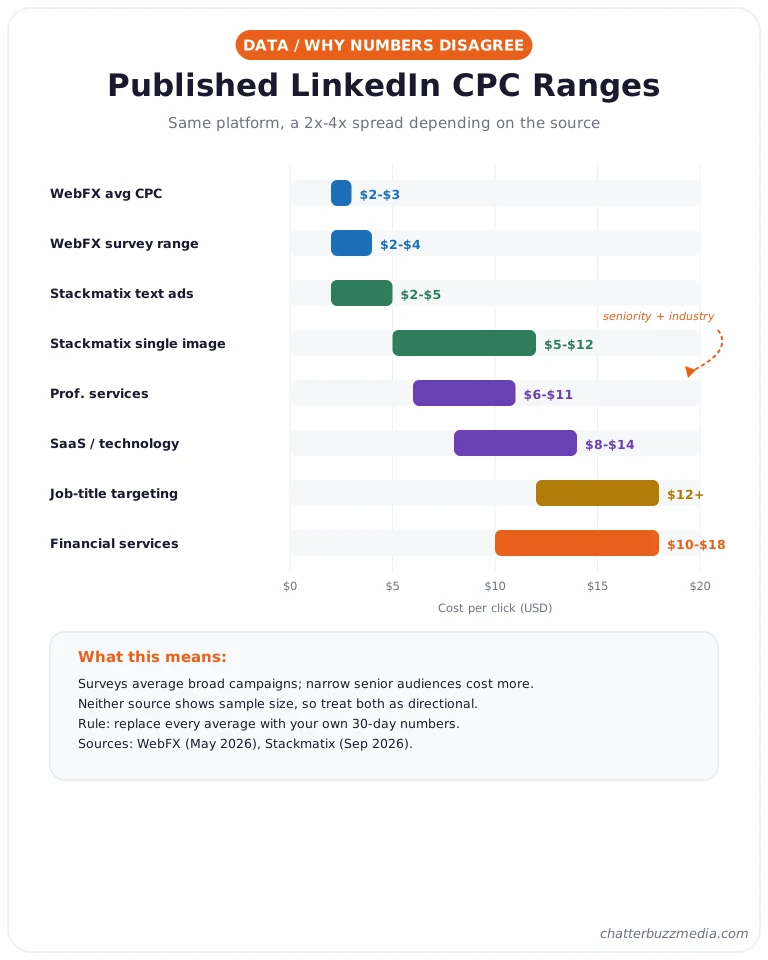
Here is what two recent guides report, side by side. WebFX (updated May 2026) lists an average CPC of $2–$3 and an average CPM of $5.01–$8, based on a survey of marketing professionals.
Stackmatix (September 2026) lists $5–$12 per click for single-image Sponsored Content and $2–$5 for text ads.
Neither guide shows a sample size, a date range, or account-level data. That means both are directional, and both are useful only if you understand what sits behind them.
Three things usually explain a 2x to 4x gap:
- Survey versus platform data. A survey averages what marketers remember paying, while platform data reflects live auctions for specific audiences.
- Who was targeted. Broad audiences clear cheaply, while narrow senior audiences compete with every other B2B advertiser.
- Which format and bid type. Text ads, Sponsored Content, and message ads are priced on different units, so their averages are not comparable.
Publication date matters too. LinkedIn auctions shift with seasonality, advertiser demand, and audience size, so a figure collected a year or two ago can be stale by the time you read it.
The practical takeaway is simple: treat any published average as a rough range, and plan to replace it with your own numbers inside 30 days. Before you can do that, you need to know the one set of figures that is not an estimate.
LinkedIn’s Official Minimum Budgets and Bidding Options
LinkedIn requires a minimum daily budget of $10 for any ad format, and a minimum lifetime budget of $100 for new, inactive campaigns. These come directly from LinkedIn’s budget guidance, so they are the only cost figures in this guide that are not estimates.
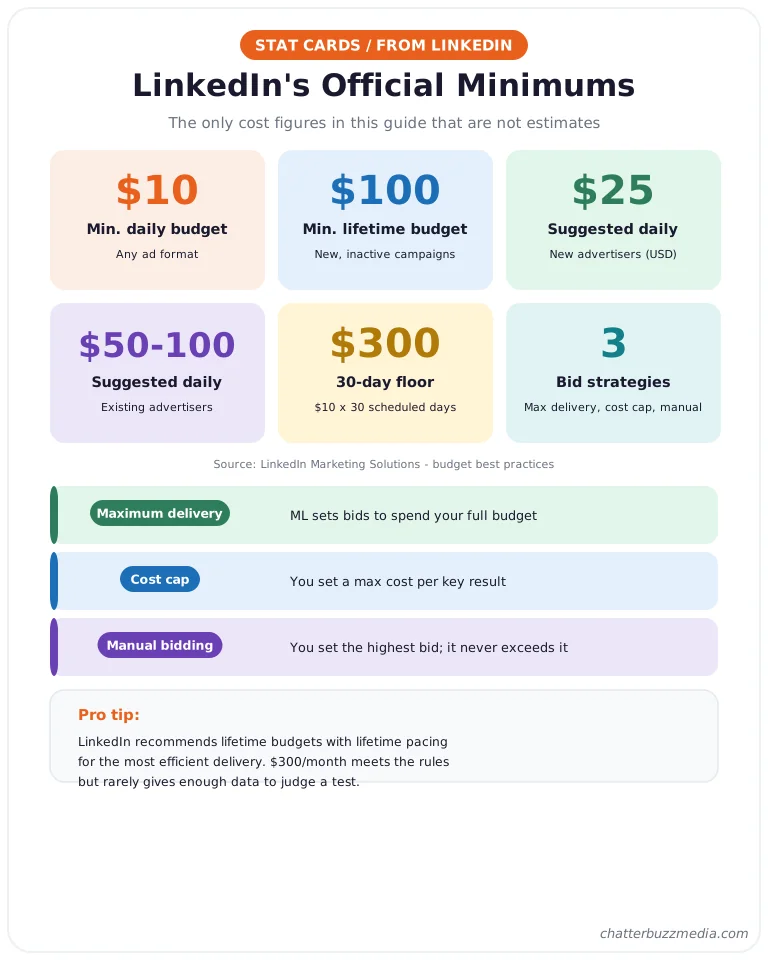
After a campaign launches, the lifetime minimum is recalculated as $10 multiplied by the total scheduled days. A 30-day campaign therefore needs at least $300 in total budget to run.
LinkedIn also suggests defaults: $25 per day for new advertisers and $50–$100 per day for existing advertisers using USD. It recommends lifetime budgets with lifetime pacing for the most efficient delivery.
On bidding, LinkedIn describes three strategies in its bidding guide:
- Maximum delivery: LinkedIn’s machine learning sets bids to deliver your full budget and maximize results.
- Cost cap: you set a maximum cost per key result, and the system adjusts bids to stay near it.
- Manual bidding: you set the highest bid you will pay, and bids never exceed it.
LinkedIn states that ads are chosen in an auction that weighs relevance as well as bid. Your charges depend on your optimization goal and bidding strategy, which is why two advertisers with the same budget can pay very different amounts.
Next, let’s look at what actually pushes your price up or down.
What Drives LinkedIn Ads Cost Up or Down
Audience seniority, audience size, and competition in your industry are among the biggest drivers of LinkedIn ads cost. Because the auction rewards relevance, the same ad can clear at very different prices depending on who sees it.
Stackmatix reports that job-title targeting can push CPCs above $12, and that Financial Services lands at $10–$18 per click versus $6–$11 for Professional Services. Those figures are uncited, so use them to understand direction rather than to set a hard budget.
Audience size deserves special attention. LinkedIn’s targeting lets you stack job title, seniority, industry, and company size, and every filter you add shrinks the pool and raises competition for each remaining person.
Work through the drivers in this order:
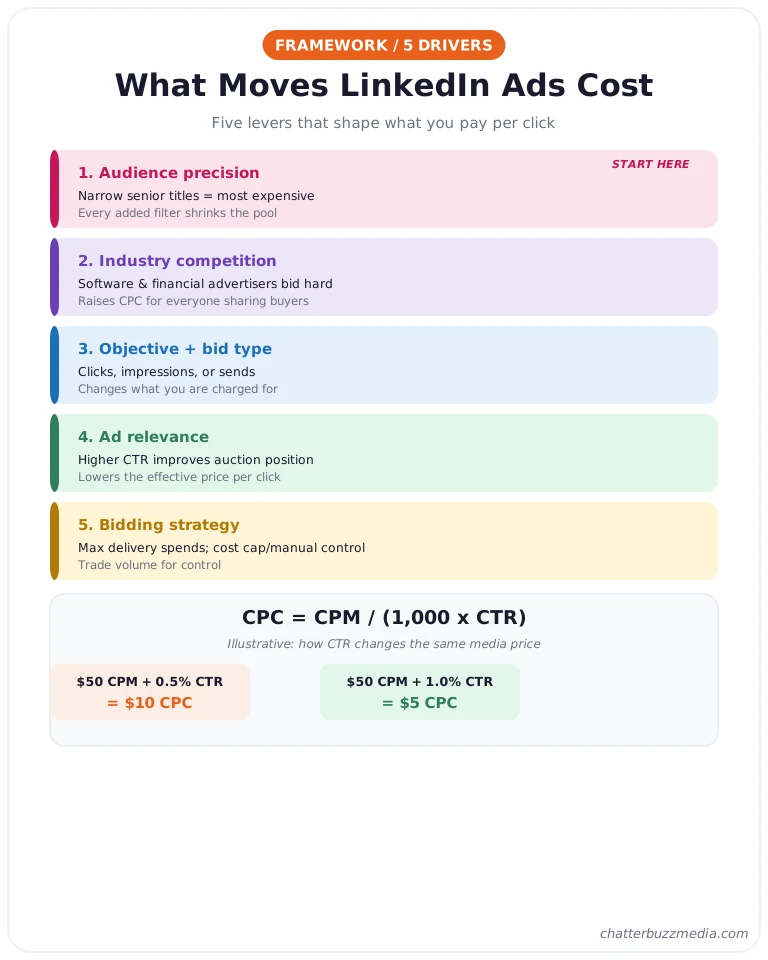
- Audience precision. Narrow lists of senior titles are the most expensive because many advertisers want the same few people.
- Industry competition. Software and financial advertisers bid aggressively, which lifts CPCs for everyone targeting those buyers.
- Objective and bid type. Optimizing for lead forms, clicks, or impressions changes what you are charged for.
- Ad relevance. A stronger click-through rate improves your auction position, which lowers the effective price of each click.
- Bidding strategy. Maximum delivery spends the budget, while cost cap and manual bidding trade volume for control.
CPM and CPC are linked by click-through rate. The formula is CPC = CPM ÷ (1,000 × CTR), so an illustrative $50 CPM with a 0.5% CTR produces a $10 CPC, while the same CPM with a 1% CTR produces a $5 CPC.
That is why creative quality matters as much as targeting, and why our guide to performance creative strategy belongs in your planning.
LinkedIn Ad Formats and What Each One Costs
Each LinkedIn format is priced on a different unit, so you cannot compare them on CPC alone. Sponsored Content and text ads usually charge per click or per thousand impressions, while Sponsored InMail charges per message sent.
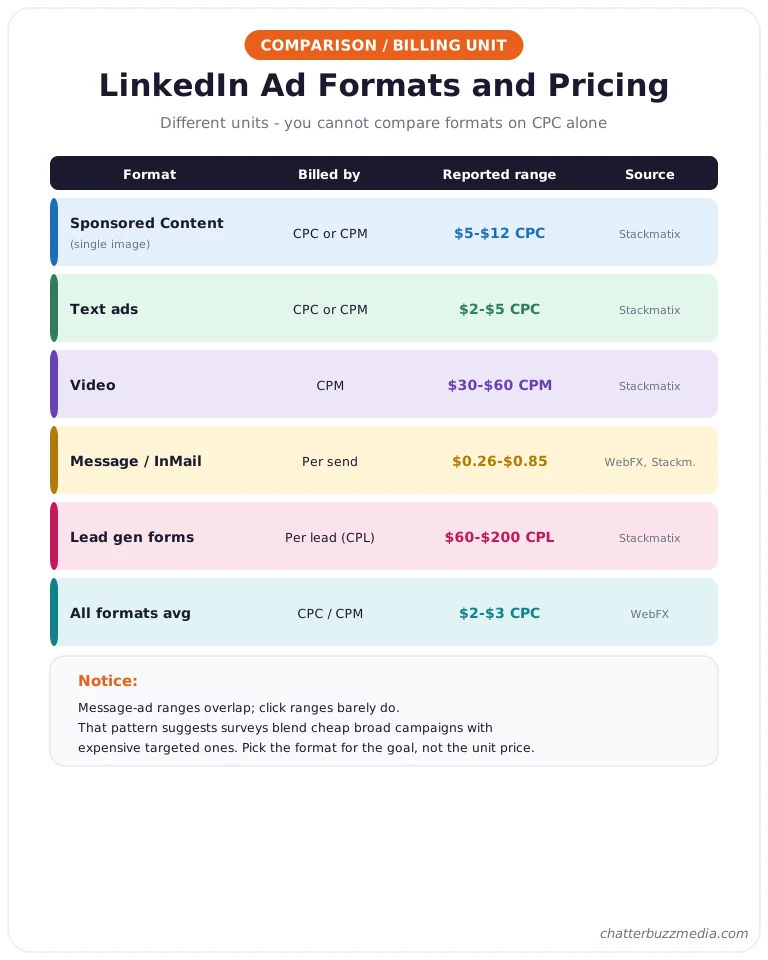
The two guides we reviewed report these ranges, and the differences are worth noting:
- Sponsored Content (single image): Stackmatix reports $5–$12 per click, while WebFX reports an overall average of $2–$3 per click across formats.
- Text ads: Stackmatix reports $2–$5 per click.
- Video: Stackmatix reports a $30–$60 CPM.
- Message ads and Sponsored InMail: WebFX reports $0.26–$0.50 per send, and Stackmatix reports $0.35–$0.85 per send.
- Lead gen forms: Stackmatix reports $60–$200 per lead.
Notice that the message-ad ranges overlap, while the click-based ranges barely do. That pattern suggests the survey averages mix cheap, broad campaigns with expensive, targeted ones.
Bid type changes what a “cost” even means. With cost per click you pay when someone clicks, with cost per impression you pay for exposure whether or not anyone engages, and with cost per send you pay for each delivered message.
Pick the format that matches your goal rather than the cheapest unit price. A $0.50 message that never gets a reply costs more per outcome than a $10 click that books a demo.
For high-intent buyers, pair the ad with a page built to convert, using the tactics in our PPC landing page guide.
From CPC to Cost Per Lead: The Math That Matters
Cost per lead equals cost per click divided by your landing-page or lead-form conversion rate. CPC is a media price, while CPL is the number your pipeline actually depends on.
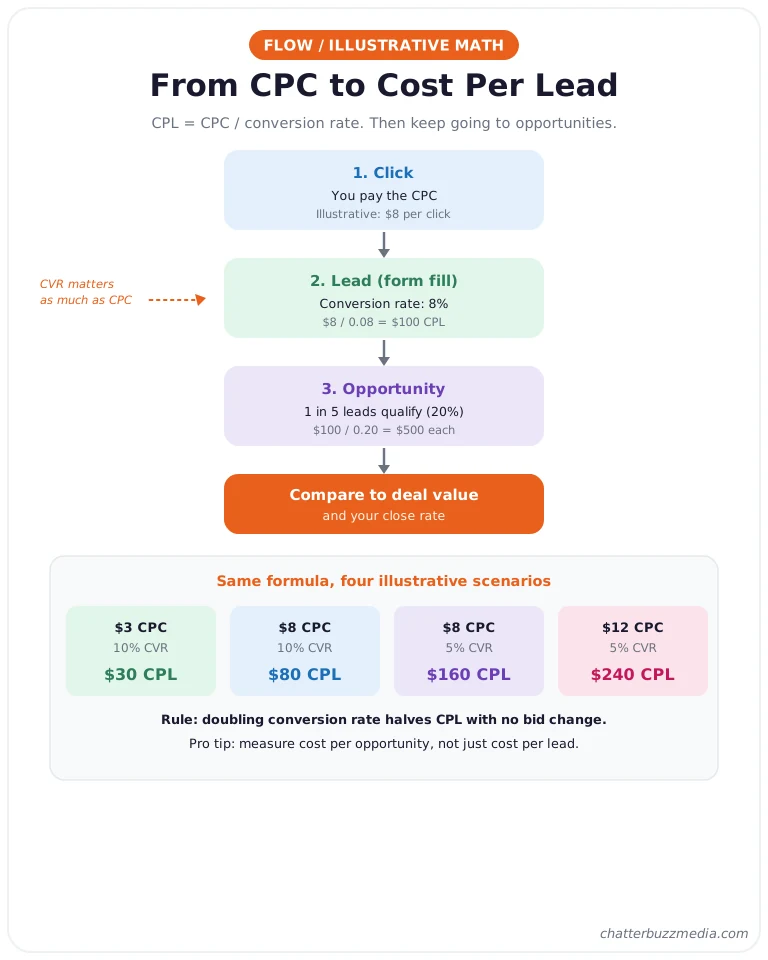
Here is the formula in action. These examples are illustrative, not benchmarks:
- $3 CPC at a 10% conversion rate gives a $30 CPL.
- $8 CPC at a 10% conversion rate gives an $80 CPL.
- $8 CPC at a 5% conversion rate gives a $160 CPL.
- $12 CPC at a 5% conversion rate gives a $240 CPL.
The lesson is that conversion rate moves CPL as much as CPC does. Doubling your conversion rate cuts CPL in half, with no change to your bids.
Also separate lead cost from customer cost. A lead is not a customer, so run the same math one step further: cost per opportunity = CPL ÷ lead-to-opportunity rate.
B2B buyers often need many touches, which is why our guide to PPC versus CRO pushes you to fix the page before you raise the budget.
Here is one illustrative walk-through from click to opportunity. An $8 click at an 8% conversion rate gives a $100 CPL, and if one in five leads becomes a sales opportunity, each opportunity costs $500 in media.
That number is the one to compare against your average deal value and close rate. If the math does not work at that stage, no bid change will rescue it.
Stackmatix puts LinkedIn lead gen form CPL at $60–$200, which brackets the illustrative numbers above. Your real figure will land wherever your audience, offer, and form land, so measure it.
That leads to the question of how much you need to spend to learn it.
How to Size a Minimum Viable LinkedIn Test Budget
Your minimum viable test budget is the number of leads you need to learn from, multiplied by your expected cost per lead. This is more useful than the platform minimum, because $300 a month meets LinkedIn’s rules but rarely produces enough data to judge anything.
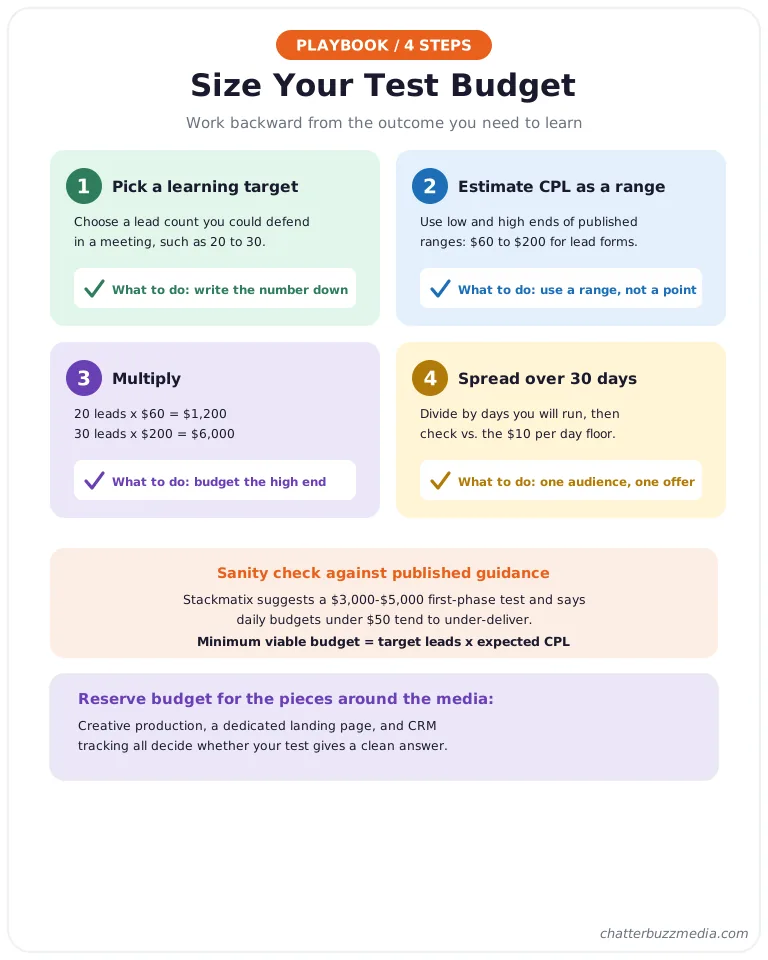
Use this four-step method:
- Choose a learning target. Aim for a lead count you could defend in a meeting, such as 20 to 30.
- Estimate CPL as a range. Use the low and high ends of the published ranges, such as $60 to $200 for lead gen forms.
- Multiply. 20 leads at $60 is $1,200, and 30 leads at $200 is $6,000.
- Spread it over 30 days. Divide by the days you will run, then check the result against LinkedIn’s $10 per day floor.
For comparison, Stackmatix suggests a first-phase test budget of $3,000–$5,000, and says daily budgets under $50 tend to under-deliver. That sits inside the range the formula produces, which is a useful sanity check.
It also helps to budget for the pieces around the media. Creative production, a dedicated landing page, and CRM tracking all affect whether your test produces a clean answer, so reserve time and money for them before launch.
If your range is wider than your budget, narrow the question rather than the audience. Test one offer on one audience for 30 days, and resist adding variables until you have a baseline.
Competing channels deserve the same discipline, as we cover in our cross-channel paid media strategy guide.
How Much Should You Spend on LinkedIn Ads Each Month?
Most B2B advertisers should start with a 30-day test of roughly $3,000 to $5,000, then scale only after cost per lead and lead quality are proven. That range comes from Stackmatix’s planning guidance, which also suggests $5,000 to $15,000 per month once a campaign is working.
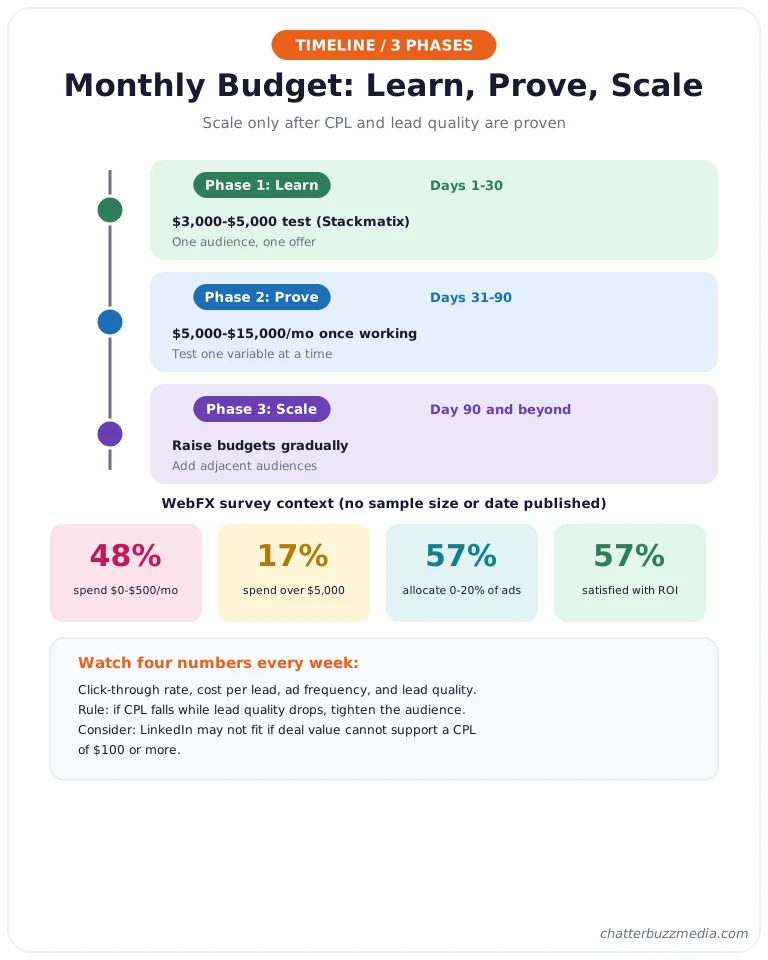
Survey data shows how varied real spending is. In the WebFX survey, 48% of respondents spend $0 to $500 per month on LinkedIn, 17% spend more than $5,000, and 57% say they allocate 0% to 20% of their ad budget to the platform.
The same survey reports that 57% are satisfied with their ROI.
Treat those percentages as context, not targets. The survey does not publish a sample size or date, and a company’s right spend depends on deal size, sales cycle, and how many qualified buyers LinkedIn can reach.
A phased approach keeps you honest:
- Phase 1, learn (days 1–30): run one audience and one offer at a budget that can produce a meaningful lead count.
- Phase 2, prove (days 31–90): keep the winning audience, test one new variable at a time, and track cost per qualified opportunity.
- Phase 3, scale (day 90 and beyond): raise budgets gradually on proven campaigns and add adjacent audiences.
Watch four numbers every week: click-through rate, cost per lead, ad frequency, and lead quality as judged by sales. If lead quality drops while CPL falls, the algorithm is finding cheaper but weaker prospects, and you should tighten the audience.
LinkedIn is not always the right place for the next dollar. If your deal value cannot support a CPL of $100 or more, or your buyers are not concentrated in identifiable job titles, a search channel may be more efficient, as our guide on how long Google Ads takes to work explains.
Once you know what you can afford, the next question is how to bring the cost down.
Measurement is what turns a test into a benchmark. Connect LinkedIn lead data to your CRM so you can see which campaigns produce opportunities, and build a simple weekly view of spend, leads, CPL, and pipeline, as our overview of marketing reporting and data visualization describes.
Without that link to sales outcomes, you will optimize toward the cheapest form fill. With it, you can defend a higher CPL because you can prove what it produced.
7 Ways to Lower Your LinkedIn Ads Cost
The fastest ways to lower LinkedIn ads cost are to improve relevance, widen the audience slightly, and fix the page that converts the click. Most savings come from raising the click-through and conversion rates rather than from bid changes.
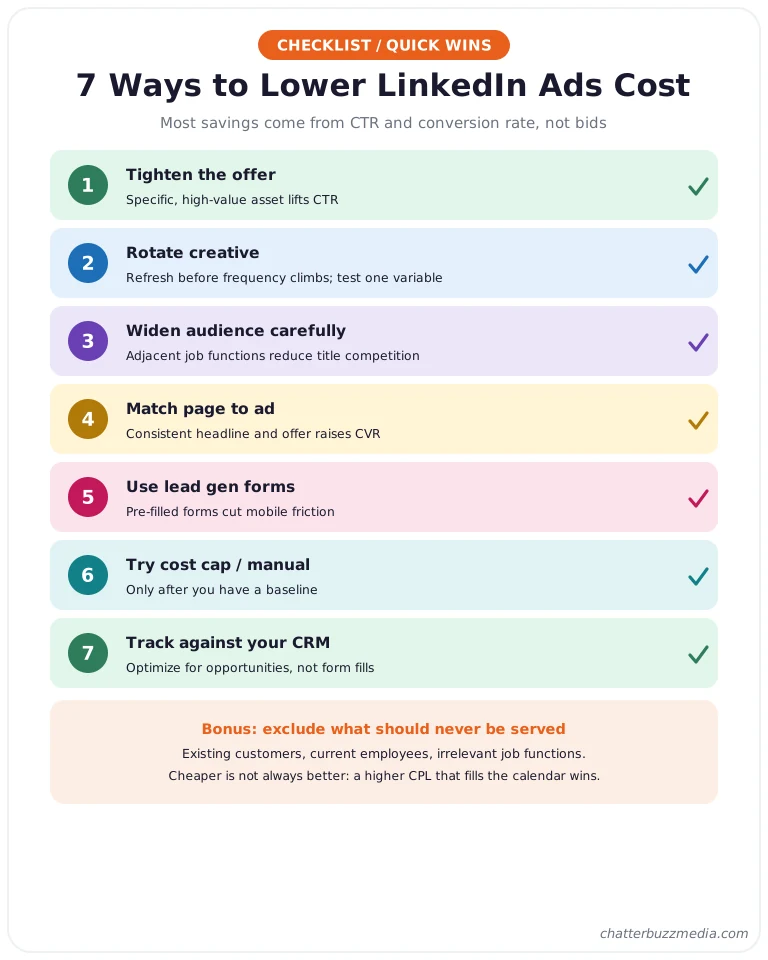
- Tighten the offer. A specific, high-value asset lifts click-through rate, which lowers CPC through the CPM-to-CPC formula above.
- Rotate creative. Refresh ads before frequency climbs, and test one variable at a time, as our ad creative testing framework outlines.
- Widen the audience carefully. Adding adjacent job functions can reduce competition for the same few titles.
- Match the page to the ad. A consistent headline and offer raises conversion rate, which cuts CPL directly.
- Use lead gen forms for mobile traffic. Pre-filled forms reduce friction compared with sending people to a slow page.
- Try cost cap or manual bidding once you have data. These give control after maximum delivery has shown you a baseline.
- Track against your CRM. Judge campaigns by qualified opportunities, not just form fills, so you do not optimize toward cheap, low-quality leads.
One more lever is exclusion. Excluding existing customers, current employees, and irrelevant job functions keeps spend on people who could actually buy, which raises lead quality without touching a single bid.
Remember that cheaper is not always better on LinkedIn. A higher CPL that fills your sales calendar beats a low CPL that fills your spreadsheet.
If your buyers are in manufacturing, see how that plays out in our guide to Google Ads for manufacturers, then compare channels honestly.
Frequently Asked Questions
1. 🔍 How much do LinkedIn ads cost in 2026?
Published CPC averages range from about $2 to $14+, depending on the source and audience. LinkedIn itself only publishes minimums: $10 per day and $100 lifetime for new campaigns.
2. 💰 What is the minimum budget for LinkedIn ads?
LinkedIn requires at least $10 per day for any ad format, and a $100 lifetime budget for new, inactive campaigns. LinkedIn suggests $25 per day for new advertisers and $50–$100 per day for existing ones.
3. 📊 Why do LinkedIn ads cost more than other platforms?
You are paying for access to professional audiences that many B2B advertisers want at once, which raises auction prices. Narrow job-title and industry targeting increases competition further.
4. ⚡ What is a good cost per lead on LinkedIn?
There is no universal benchmark. One 2026 guide reports $60–$200 for lead gen forms, but a good CPL is one that your sales team can close profitably, so calculate it from your own close rates.
5. 🎯 Should I use maximum delivery, cost cap, or manual bidding?
Start with maximum delivery to gather data, then consider cost cap or manual bidding once you know your baseline. LinkedIn describes maximum delivery as best for delivering your full budget, and manual bidding as best for controlling your bid.
6. 🚀 How long should I run a LinkedIn test before judging results?
Run it for about 30 days so you can reach a meaningful lead count and let conversion lag settle. Judging a campaign in its first week usually understates performance.
7. 📈 Is LinkedIn worth the higher cost?
It can be when your buyers are senior decision-makers and your deal value supports a higher CPL. Compare cost per qualified opportunity across channels rather than cost per click.
Conclusion: Build Your Own LinkedIn Ads Cost Benchmark
LinkedIn ads cost is not one number, and the 2x to 4x gap between published averages proves it. The only figures you can fully trust are LinkedIn’s own minimums and the ones you measure in your account.
Here is your action plan:
- Set the floor. Confirm your daily and lifetime budget clear LinkedIn’s $10 and $100 minimums.
- Size the test. Multiply your target leads by a CPL range to get your minimum viable budget.
- Run 30 days on one audience and one offer. Keep variables constant so the data means something.
- Replace the averages with your own. Calculate your actual CPC, CPL, and cost per opportunity, then adjust.
Context matters across industries as well. Buyers in manufacturing, financial services, and software behave differently, so compare your numbers against peers in your own market, starting with our look at manufacturing marketing strategy and the differences between B2B and B2C buyer journeys.
For the bigger picture on targeting named accounts, read our account-based marketing guide and our overview of B2B demand generation. For measurement, a clear reporting setup makes the 30-day review much easier, and our resource library collects the rest.

Victoria Wallace
Victoria Wallace is a senior content strategist and marketing writer with 30+ years of experience helping more than 200 brands translate complex business goals into clear, conversion-focused content. Her background spans paid media, marketing strategy, go-to-market planning, brand positioning, and full-funnel campaign development, giving her a deep understanding of how SEO content connects to real business growth.