
 321-236-2899
PPC Landing Pages: 7 Steps to Build Pages That Convert Paid Traffic

This guide walks you through the 7 steps to building PPC landing pages that convert paid traffic into leads and sales — not just clicks into bounces. Every step is actionable, specific, and backed by performance data from real campaigns.
Dedicated PPC landing pages consistently convert 30–50% higher than homepages for paid traffic. The difference is not subtle — it is the difference between profitable campaigns and wasted ad spend. After managing paid media across hundreds of B2B and e-commerce campaigns, the pattern is clear: the landing page is where most ad budgets go to die or thrive.
By the end of this post, you will know exactly how landing page design affects your Google Ads Quality Score — and why improving it can lower your cost per click while increasing conversions at the same time. Let’s start with why PPC pages need fundamentally different design than organic pages.
Key Takeaways
Dedicated PPC landing pages convert 30–50% higher than homepages because they eliminate distractions and maintain message match with the ad.
Message match is the single highest-impact factor — your landing page headline, offer, and visuals must mirror the ad the visitor clicked.
Page speed directly affects your CPC — Google uses Landing Page Experience as a Quality Score factor, so slow pages cost more per click.
Multi-step forms lift completion rates 15–25% compared to single-page forms with the same number of fields.
Test headlines first, always — they are seen by 100% of visitors and produce the highest-impact conversion improvements.
Every PPC page needs one goal, one CTA, and zero navigation — removing the nav bar alone can increase conversions up to 336%.
Why PPC Landing Pages Need Different Design Than Organic Pages
PPC landing pages require a fundamentally different design approach than organic pages because paid visitors arrive with different expectations, higher intent, and zero patience for irrelevant content. Sending paid traffic to your homepage instead of a dedicated landing page wastes 30–50% of your ad spend on visitors who never find what they clicked for.
Organic visitors browse. They discovered your page through a search result and are willing to explore. Paid visitors are transactional. They clicked a specific ad with a specific promise, and they expect the page to deliver exactly that promise within seconds.
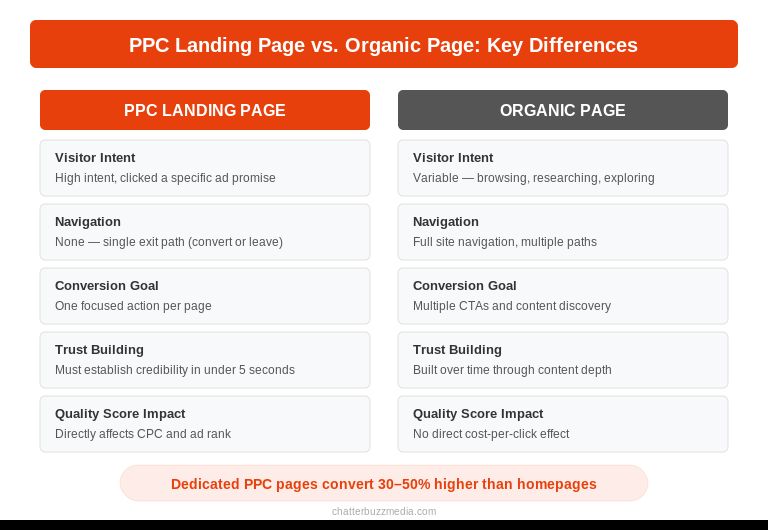
This distinction matters because Google Ads uses Landing Page Experience as one of three Quality Score factors. A poor landing page experience raises your cost per click, lowers your ad rank, and burns through budget faster. A strong one does the opposite — it reduces CPC while improving conversion rates simultaneously.
The difference comes down to three principles. Organic pages can serve multiple intents and offer navigation to related content. PPC pages serve one intent and remove every path except the conversion action. Organic pages build authority over time. PPC pages need to establish credibility in under 5 seconds because the visitor paid nothing to get there and will leave just as easily.
Understanding these differences is the foundation for every step that follows.
Step 1 — Match Your Ad Copy to Your Landing Page
Message match — the alignment between what your ad promises and what your landing page delivers — is the single highest-impact factor in PPC landing page performance. When your headline, offer, and visual design mirror the ad the visitor just clicked, conversion rates can increase by up to 50%.
Think of it as a handshake. Your ad makes a promise. Your landing page confirms that promise. If there is any gap between the two — different headline, different offer, different imagery — the visitor immediately questions whether they are in the right place.
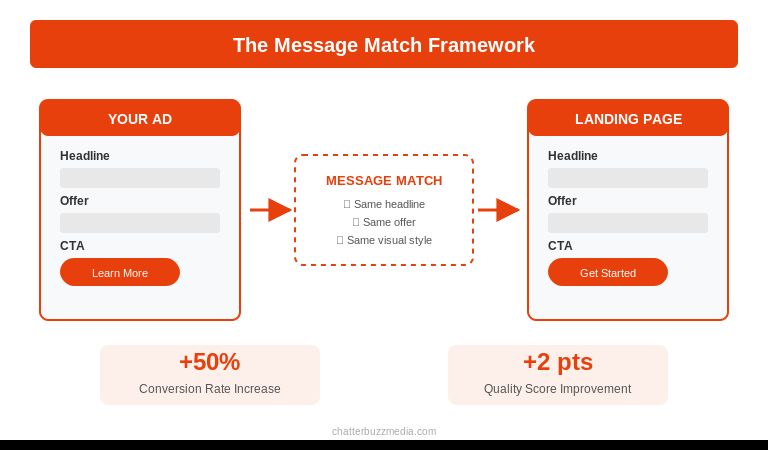
Here is how to nail message match across every element:
- Headline continuity. If your ad says “Get a Free SEO Audit in 24 Hours,” your landing page headline should say the same thing — not “Welcome to Our SEO Services.” Repeat the exact language from the ad in your H1.
- Offer consistency. The specific offer, discount, or lead magnet mentioned in the ad must appear above the fold on the landing page. Do not make visitors scroll to find what they clicked for.
- Visual alignment. If your ad uses a product image or specific color scheme, carry that through to the landing page. Visual continuity builds subconscious trust. Your brand messaging should carry through from ad to page seamlessly.
- Keyword echo. The primary keyword from your PPC campaign should appear in the landing page headline, subheadline, and first paragraph. This signals relevance to both the visitor and Google’s Quality Score algorithm.
One campaign, one ad group, one landing page. The more specific the match, the higher the Quality Score, the lower the CPC, and the better the conversion rate.
Step 2 — Design for One Conversion Goal
Every high-converting PPC landing page is built around a single conversion goal. One page, one offer, one action. The moment you add a second goal — a newsletter signup next to a demo request, a product link alongside a lead form — you split the visitor’s attention and dilute conversions.
Research from VWO’s conversion research shows that removing the navigation bar from a landing page can increase conversions by up to 336%. That single change eliminates every exit path except the conversion action and the back button.
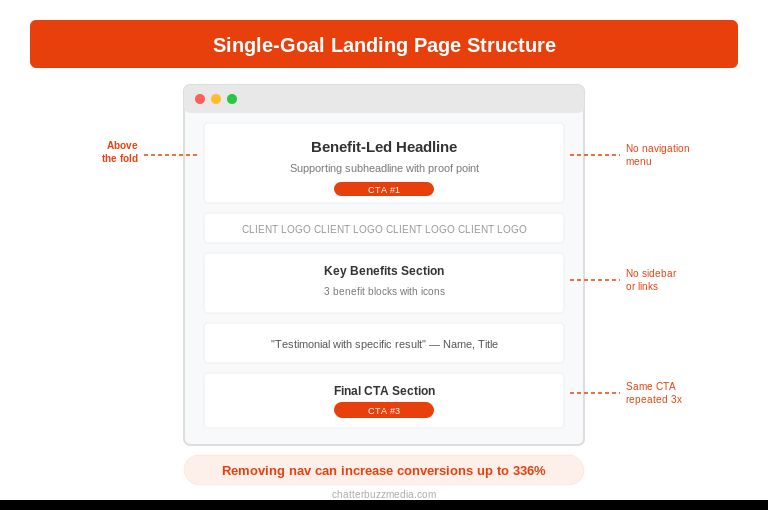
Apply these design principles to keep visitors focused:
- Remove navigation menus. No header nav, no footer links, no sidebar. The only clickable elements should be your CTA, your privacy policy, and your logo (which links back to your homepage as a safety valve, not a distraction).
- Use a single CTA repeated strategically. Place your primary CTA above the fold, after your strongest benefit section, and at the bottom of the page. Same button, same action, same text — three placements.
- Eliminate competing links. Every link on the page that does not lead to your conversion action is a leak. Audit your page and remove blog links, social media icons, and “learn more” buttons that navigate away.
- Design a clear visual hierarchy. Use size, color, contrast, and whitespace to guide the eye from headline to value proposition to CTA. The visitor should not have to think about where to look next. Good content design guides attention without the visitor noticing.
The formula is simple. One ad leads to one page that asks for one action. If your product requires multiple conversion paths, build multiple landing pages — not one page with multiple options. This approach also improves your marketing KPIs by making attribution cleaner.
Step 3 — Build Headlines That Mirror Search Intent
Your landing page headline has roughly 3 seconds to confirm the visitor made the right click. That headline must mirror the search intent behind the keyword — not just include the keyword, but answer the specific question or need that triggered the search.
Search intent falls into three categories for PPC, and each requires a different headline approach.
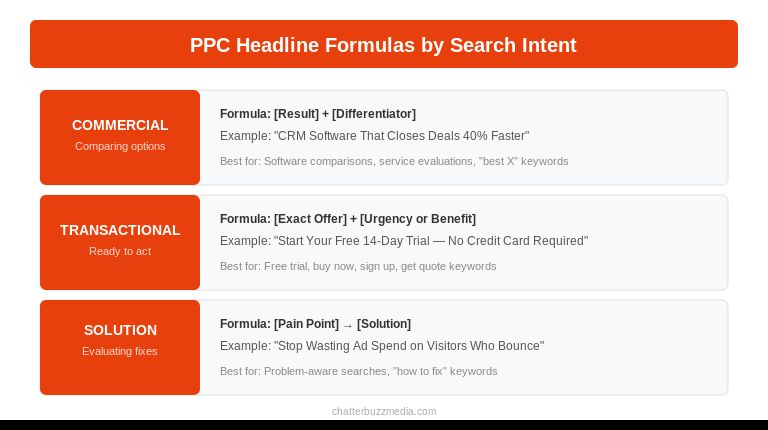
Commercial investigation intent — the visitor is comparing options. Headline formula: “[Result] + [Differentiator].” Example: “CRM Software That Closes Deals 40% Faster.”
Transactional intent — the visitor is ready to buy or sign up. Headline formula: “[Exact Offer] + [Urgency or Benefit].” Example: “Start Your Free 14-Day Trial — No Credit Card Required.”
Solution-aware intent — the visitor knows the problem but is evaluating solutions. Headline formula: “[Pain Point] → [Solution].” Example: “Stop Wasting Ad Spend on Visitors Who Bounce.”
The subheadline does the work your headline cannot. It expands on the promise, adds a supporting detail, or introduces proof. If your headline is “Cut Your CPC by 30% With Better Landing Pages,” your subheadline might be “See why 2,400 marketers switched to dedicated PPC pages last quarter.”
Write multiple headline variations before you launch. A/B testing headlines consistently produces the highest-impact improvements in landing page performance because the headline is the first element every visitor evaluates. Even small changes — adding a number, switching from passive to active voice, leading with a result instead of a feature — can shift lead generation performance significantly. Align your headline strategy with your overall marketing strategy for consistency across channels.
Step 4 — Optimize Page Speed to Lower CPC and Boost Conversions
Page speed affects PPC performance twice: it directly impacts your Quality Score (which determines your CPC) and it directly impacts your conversion rate. According to Portent’s research, a landing page that loads in 1 second converts at roughly double the rate of a page that loads in 5 seconds.
Google Ads evaluates Landing Page Experience partly based on load speed, particularly on mobile devices where over 70% of PPC clicks now originate. A slow page does not just lose visitors — it makes every remaining click more expensive.
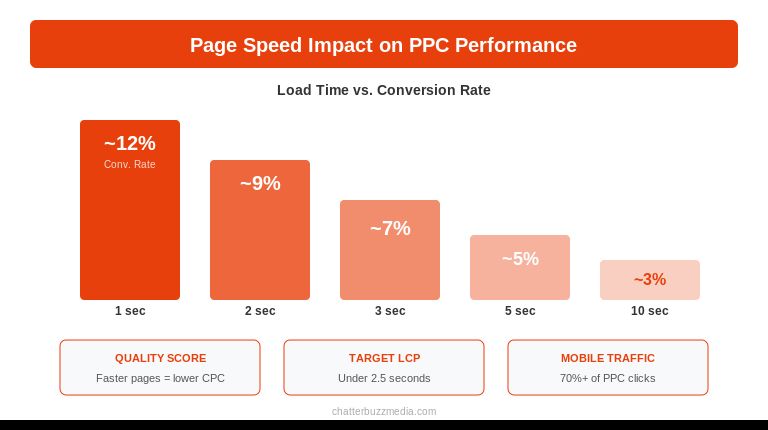
Hit these speed benchmarks for PPC landing pages:
- Target under 2.5 seconds for Largest Contentful Paint (LCP). This is the Core Web Vital that measures when the main content becomes visible. For PPC pages, the “main content” is your headline and hero section — the elements that confirm message match.
- Compress all images to under 100KB. Use WebP format, lazy-load anything below the fold, and specify width and height attributes to prevent layout shift. Your hero image matters for conversions, but a 2MB file kills your load time.
- Minimize third-party scripts. Every analytics tag, chat widget, heatmap tool, and retargeting pixel adds load time. Audit your scripts and remove anything that does not directly contribute to the conversion goal. Load non-essential scripts asynchronously.
- Use a CDN and edge caching. Serve your landing page from the location closest to the visitor. This matters especially for local campaigns targeting specific geographic areas.
Test your landing page speed with Google PageSpeed Insights and prioritize the recommendations it flags. A 1-second improvement in load time can improve conversion rates by 7% — and on a page receiving paid traffic, that translates directly to lower cost per acquisition. For campaigns running through paid search alongside organic, fast landing pages benefit both channels. If you are running retargeting campaigns, speed is even more critical because those visitors have already shown intent.
Step 5 — Add Trust Signals That Move Paid Visitors to Action
Paid visitors are inherently more skeptical than organic visitors because they know they clicked an ad. That awareness creates a trust deficit your landing page must overcome before any conversion happens. Trust signals bridge that gap by showing evidence that other people have already taken the action you are asking them to take.
The key is placement and relevance. A trust signal at the right moment in the page flow can eliminate the specific objection that was about to stop the visitor from converting.
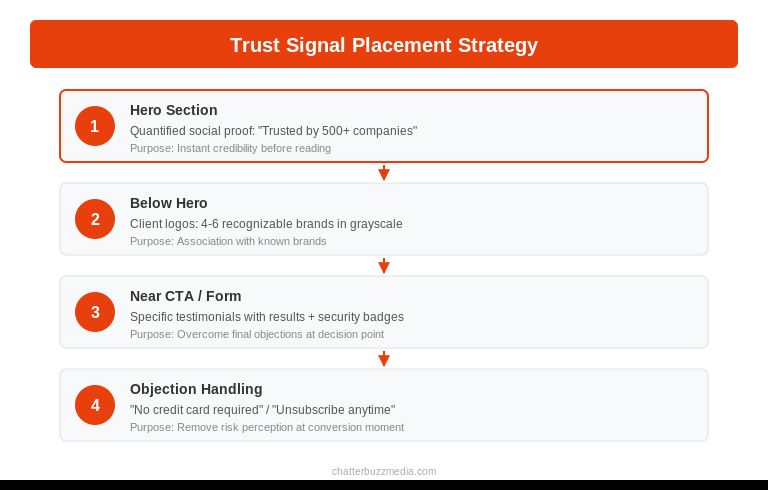
Layer these trust signals strategically:
- Client logos near the headline. Place 4-6 recognizable brand logos directly below your hero section. This immediately signals credibility before the visitor reads a single paragraph. Use grayscale logos to avoid visual competition with your CTA.
- Specific testimonials near the CTA. Generic praise (“Great company!”) does nothing. Use testimonials that reference specific results: “We cut our cost per lead by 42% in the first 90 days.” Place these adjacent to or directly above your form or CTA button.
- Security and compliance badges near the form. SSL certificates, industry certifications, privacy policy links, and payment security badges reduce anxiety at the exact moment the visitor is deciding whether to submit personal information.
- Quantified social proof in the headline area. “Join 10,000+ marketers” or “Trusted by 500 B2B companies” gives the visitor evidence of scale. Numbers work better than adjectives because they are harder to fake and easier to evaluate. Check your case studies for specific metrics you can feature.
Address objections directly on the page. If your offer requires a credit card, state “No credit card required” next to the CTA. If visitors worry about spam, add “We send 2 emails per month. Unsubscribe anytime.” Every objection you fail to address on the page becomes a reason to leave. Think about the objections your sales team hears most often and answer them proactively.
Step 6 — Reduce Form Friction With Smart Design
Every form field you add to a PPC landing page increases friction and decreases conversions. The goal is to collect the minimum information needed to qualify the lead at this stage of the funnel — and not a single field more.
Multi-step forms consistently outperform single-page forms with the same number of fields, lifting completion rates by 15–25%. Breaking a 7-field form into two steps makes the commitment feel smaller even though the total information requested is identical.
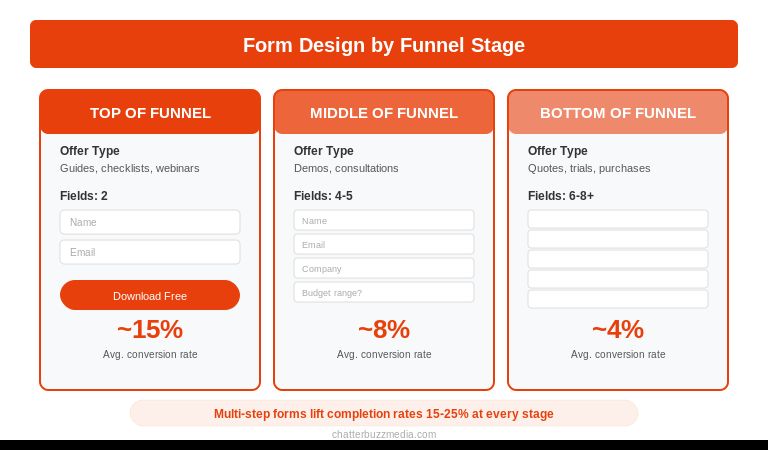
Match your form length to the funnel stage:
- Top of funnel (guides, checklists, webinars): Name and email only. Two fields. Do not ask for phone number, company size, or job title at this stage. You are asking for attention, not a sales conversation.
- Middle of funnel (demos, consultations, audits): Name, email, company, and one qualifying question. Four to five fields maximum. The qualifying question (budget range, team size, timeline) helps your sales team prioritize without adding excessive friction.
- Bottom of funnel (quotes, trials, purchases): Collect what you need to deliver. If the visitor is requesting a custom quote, asking for project details is expected and appropriate. More fields are acceptable here because the intent is higher.
Additional form optimization techniques that compound:
- Use smart defaults and autofill. Enable browser autofill for standard fields (name, email, phone). Pre-select the most common option in dropdown menus. Every keystroke you eliminate reduces abandonment.
- Show a progress indicator for multi-step forms. “Step 1 of 2” or a simple progress bar sets expectations and reduces the perceived effort of completion.
- Place your form above the fold on desktop. On mobile, place a sticky CTA button that scrolls to the form or opens it in a modal. Mobile visitors should never have to hunt for the conversion action.
- Label fields clearly and use inline validation. Show errors as the visitor fills in each field, not after they hit submit. A red border and “Please enter a valid email” in real time prevents the frustration of a full-page error message.
For lead generation campaigns, test replacing traditional forms with conversational formats — chatbot-style qualification, calendar booking widgets, or click-to-call buttons. These alternatives often outperform standard forms for mobile PPC traffic because they match how people interact on their phones. Consider integrating your forms with HubSpot or your CRM so leads route to sales immediately.
Step 7 — Test, Measure, and Iterate Systematically
The first version of your PPC landing page is never your best version. Systematic testing turns a good landing page into a great one, but most teams waste testing cycles on low-impact changes. Prioritize tests by expected revenue impact, not by what is easiest to change.
Start with the elements that influence the most visitors:
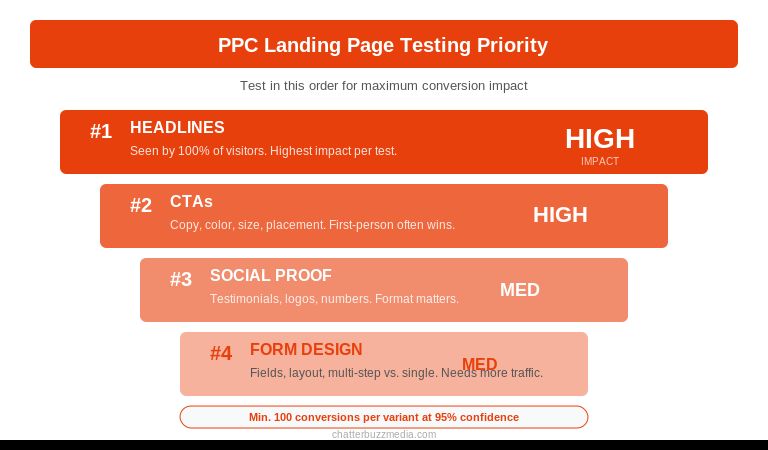
- Test headlines first. Your headline is seen by 100% of visitors. A 10% improvement in headline effectiveness moves the needle more than a 50% improvement in footer design. Test benefit-led vs. feature-led, question vs. statement, and short vs. long.
- Test CTAs second. Button color, size, copy, and placement all influence click-through. Test “Start Free Trial” vs. “Get Started Free” vs. “See It in Action.” First-person phrasing (“Start My Free Trial”) often outperforms second-person (“Start Your Free Trial”).
- Test social proof third. Try testimonials vs. client logos, video testimonials vs. text, specific numbers vs. general praise. The format that builds the most trust depends on your audience and industry.
- Test form design fourth. Length, layout, field labels, button text, and multi-step vs. single-page. These tests require more traffic to reach significance but often produce durable improvements.
Track these metrics to evaluate PPC landing page performance:
- Conversion rate — the percentage of visitors who complete the desired action. Benchmark: 2–5% for most industries, 10%+ for highly targeted campaigns.
- Cost per conversion — your total ad spend divided by conversions. This is the metric that determines whether the campaign is profitable.
- Quality Score — Google’s 1–10 rating of your keyword, ad, and landing page combination. A Quality Score of 7+ significantly reduces your CPC.
- Bounce rate — the percentage of visitors who leave without interacting. A bounce rate above 70% on a PPC landing page signals a message match problem or a speed issue.
Wait for statistical significance before declaring winners. You need at least 100 conversions per variant at 95% confidence to trust the result. Running a test for “a few days” and picking the version with more conversions is not testing — it is guessing. Use tools like Google Optimize, analytics dashboards, or dedicated landing page platforms with built-in significance calculators. A well-structured marketing funnel with proper landing pages at each stage makes testing easier because each page has a clear, measurable goal.
Frequently Asked Questions
1. 🔍 What is the difference between a PPC landing page and a regular landing page?
A PPC landing page is designed specifically for visitors who click paid ads, with a single focused conversion goal, no navigation, and messaging that matches the ad copy exactly. A regular landing page may serve organic traffic with broader content, multiple CTAs, and site navigation. The key difference is intent alignment — PPC pages match the specific promise made in the ad, while regular pages may serve multiple search intents.
2. 📊 What is a good conversion rate for PPC landing pages?
According to WordStream’s industry benchmarks, the median conversion rate across industries is around 4–5%, but top-performing PPC landing pages convert at 10% or higher. Conversion rate varies significantly by industry — legal services and B2B SaaS tend to see higher rates than e-commerce. The better metric to optimize for is cost per conversion relative to customer lifetime value, not conversion rate alone.
3. ⚡ Does my landing page speed really affect Google Ads costs?
Yes. Google uses Landing Page Experience as one of three Quality Score factors. A slow-loading page lowers your Quality Score, which increases your cost per click and decreases your ad rank. Pages that load in under 2.5 seconds consistently earn higher Quality Scores and pay less for the same ad positions.
4. 🏦 Should I use my homepage as a PPC landing page?
No. Homepages are designed for exploration with multiple navigation paths, broad messaging, and varied CTAs. PPC visitors need a page that confirms the specific promise they clicked on. Dedicated landing pages convert 30–50% higher than homepages for paid traffic because they eliminate distractions and maintain message match.
5. 🤝 How many landing pages should I create per campaign?
Create one landing page per ad group at minimum. If your ad groups target different keywords with different intents, each needs its own landing page with matching messaging. This is especially important for B2B campaigns where buyer intent varies significantly across the funnel. According to HubSpot research, companies with 30+ landing pages generate 7x more leads than those with fewer than 10. More pages means more precise message matching.
6. 💰 What is the most important element to A/B test first?
Test your headline first. It is the element seen by 100% of visitors and has the highest impact on both engagement and conversion rate. After headlines, test CTA button copy and placement, then social proof format and positioning. Always wait for at least 100 conversions per variant before declaring a winner.
7. 🚀 How do I improve my landing page Quality Score?
Focus on three factors: relevance (match your landing page content to the keywords and ad copy in your campaign), speed (achieve LCP under 2.5 seconds, especially on mobile), and usability (ensure the page is easy to navigate on all devices with clear CTAs). Also make sure your page content is original, transparent about your business, and easy for visitors to find what they need.
8. 📈 Should I include pricing on my PPC landing page?
It depends on your funnel stage and sales model. For transactional offers (e-commerce, SaaS free trials), showing pricing reduces friction and attracts qualified buyers. For complex B2B services where pricing is customized (like marketing services), showing a starting price or price range can pre-qualify visitors without committing to a fixed number. If your competitors show pricing and you do not, the visitor may leave to find it elsewhere.
Turn Clicks Into Conversions With Better Landing Pages
Building PPC landing pages that convert is not about design trends or creative intuition. It is a systematic process of matching ad promises to page content, removing friction, building trust, and testing what works.
The seven steps covered in this guide work together as a system:
- Audit your current pages for message match. Pull up your top 5 ads and compare the headline, offer, and CTA to the landing pages they link to. Fix any gaps before doing anything else.
- Simplify each page to one goal. Remove navigation, competing links, and secondary CTAs. One page, one action.
- Test your page speed. Run Google PageSpeed Insights on every PPC landing page and fix anything that pushes LCP above 2.5 seconds.
- Launch your first A/B test. Start with the headline. Write 2–3 variations, run the test, and let the data decide.
Every improvement compounds. Better message match improves Quality Score, which lowers CPC, which gives you more budget to drive traffic, which gives you more data to test with.
For a deeper look at how paid and organic strategies work together, explore our performance marketing guide or review our approach to conversion rate optimization. You can also explore our resource library for more tactical guides on paid media, SEO, and content marketing ROI.

Victoria Wallace
Victoria Wallace is a senior content strategist and marketing writer with 30+ years of experience helping more than 200 brands translate complex business goals into clear, conversion-focused content. Her background spans paid media, marketing strategy, go-to-market planning, brand positioning, and full-funnel campaign development, giving her a deep understanding of how SEO content connects to real business growth.