
 321-236-2899
Manufacturing website design is the practice of building a company’s website to serve two very different audiences at once: engineers evaluating your technical capabilities and procurement buyers qualifying you as a supplier. Get it right, and your site becomes a 24/7 sales engineer that pre-qualifies leads before your team ever picks up the phone.
Get it wrong, and you have an expensive digital brochure that nobody trusts enough to request a quote from.
Here’s the number that should keep every manufacturing marketing leader up at night: 40% of industrial buyers say their purchasing decisions are directly shaped by how a supplier’s website looks and functions, according to Thomasnet research. Most manufacturing websites look professional on the surface.
Photography is clean, the logo is centered, the “About Us” page reads well — and the site still generates almost no qualified RFQs.
This guide breaks down what actually converts on a manufacturing website, from homepage architecture to RFQ form design to the technical SEO and AI visibility factors most agencies never mention. We built this as the guide we wish existed when we started working with manufacturers.
Consider it a working reference, not a sales pitch — though if you want help executing any of it, that’s what our manufacturing marketing team does every day.
We work with job shops, contract manufacturers, and multi-plant operations across the country, and the patterns in this guide hold true regardless of size. You can browse the rest of what we do for industrial and B2B clients on our homepage, but the goal here is to give you a genuinely useful reference, whether or not we ever work together.
Key Takeaways
- Manufacturing websites must serve two audiences simultaneously: engineers evaluating technical capabilities and procurement buyers qualifying suppliers.
- 90% of B2B buyers start their purchasing journey with an online search — your website functions as your sales floor before a rep ever gets involved.
- RFQ-optimized websites with clear, unique capability pages generate significantly more qualified leads than generic “digital brochure” sites.
- Technical SEO — schema markup, site speed, and mobile performance — determines whether buyers find you at all, regardless of how good your design looks.
- The best manufacturing websites cost $30,000–$80,000 to build correctly and deliver measurable ROI within 18–24 months.
Why Most Manufacturing Websites Fail
Most manufacturing websites fail for a simple reason: they were built to look credible, not to convert. Below, we break down the trap most manufacturers fall into and what each of your two buyer types actually needs to see.
By the end of this section, you’ll know exactly why your current site isn’t producing the RFQ volume it should.
The Digital Brochure Trap
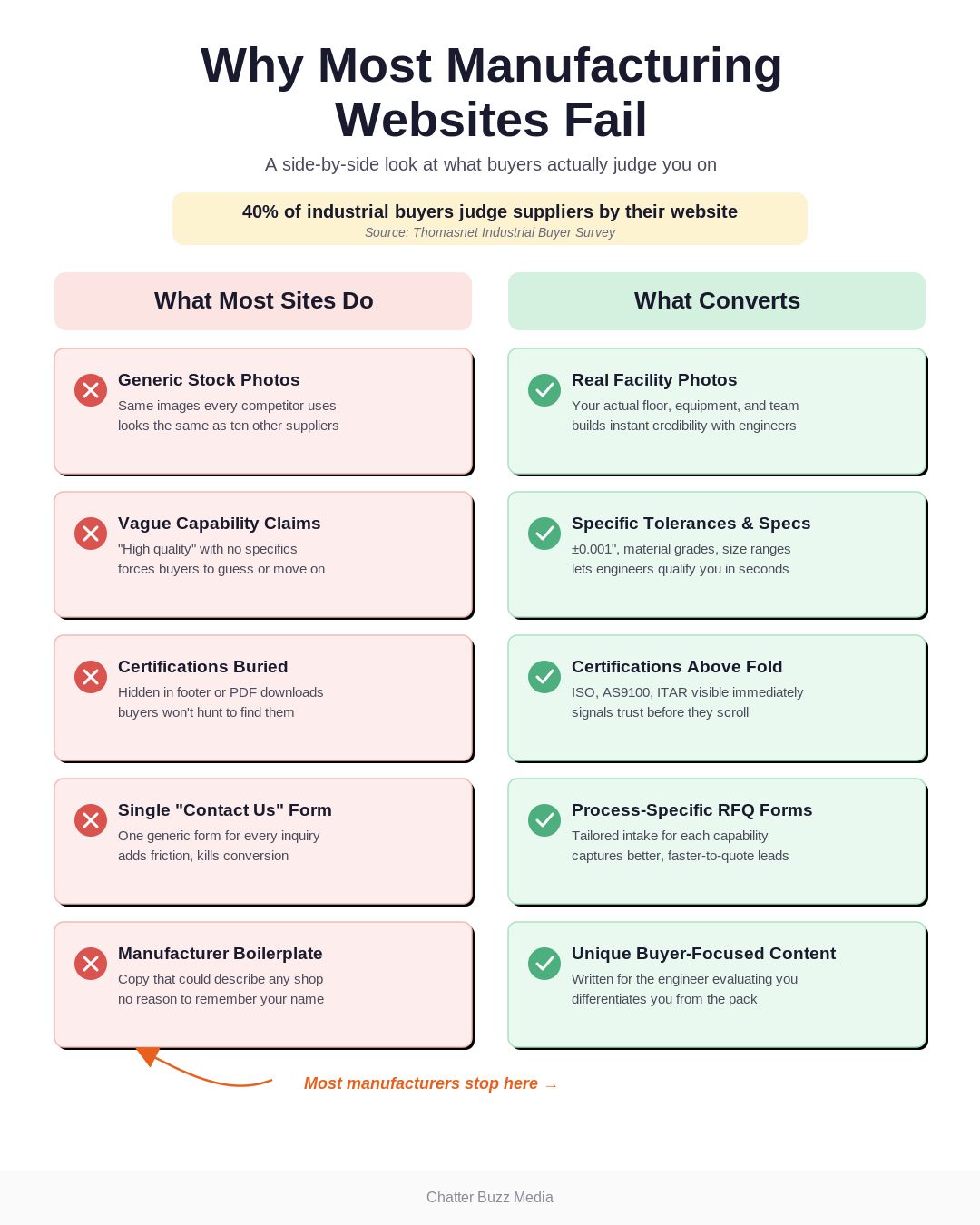
Many manufacturing websites are built like a print catalog that happened to get uploaded to the internet. They list products and processes, but they rarely answer the two questions every visitor actually has: can you do what I need, and can I trust you to do it well?
This happens because manufacturing websites are often designed by generalist agencies with no B2B industrial experience. The result is generic stock photography, vague capability statements, and a single “Contact Us” form buried in the footer.
The brochure trap also shows up in how content gets written. Pages get filled with association boilerplate and generic process descriptions instead of the specific, buyer-focused language that actually builds trust, which is a core problem covered in our inbound marketing guide.
The fix isn’t a prettier template. It’s rebuilding the site around buyer intent, which we cover throughout the rest of this guide.
What Engineers Actually Look for on Your Site
Engineers are technical buyers, and they arrive with specific evaluation criteria. They want equipment lists with exact specs, tolerances, materials capabilities, and finish options — not marketing adjectives like “state-of-the-art.”
They also want proof: CAD files, spec sheets, drawings, and sample data they can drop directly into their own evaluation documents. If your capability page doesn’t answer “can this vendor hit my tolerance and my volume,” an engineer will bounce to a competitor’s page in under a minute.
Engineers are also comparing you against two or three other suppliers open in adjacent browser tabs, so friction matters more than most manufacturers assume. A capability page that makes an engineer hunt for a spec sheet or fill out a form just to see a tolerance range loses to a competitor whose page answers the question in plain view.
What Procurement Buyers Need to See
Procurement buyers ask a different set of questions. They want certifications (ISO 9001, AS9100, ITAR, industry-specific quality standards), lead times, minimum order quantities, and evidence of financial and operational stability.
They’re also assessing risk on behalf of their organization, so testimonials, case studies, and named customer logos matter more to them than technical depth. A site that buries certifications on a hard-to-find “Quality” page is asking procurement to do extra work — and they won’t.
Procurement teams are also increasingly involved earlier in the buying process than they used to be, often screening suppliers before an engineer ever gets looped in. That earlier involvement is one reason 67% of B2B buyers now say they prefer a rep-free buying experience, according to Gartner — your website has to do the convincing that a salesperson used to do in person.
Most manufacturing websites serve neither audience particularly well because they were built for one generic “visitor” persona. The next section shows exactly how to structure a homepage and navigation that speaks to both engineers and procurement without forcing either one to dig.
The Anatomy of a High-Converting Manufacturing Website
A high-converting manufacturing website design has a predictable anatomy: a homepage that filters visitors fast, navigation that mirrors how buyers actually search, and capability pages built to pre-qualify. We’ll walk through each piece below with the specific elements that need to appear above the fold.
Homepage Blueprint for Manufacturers
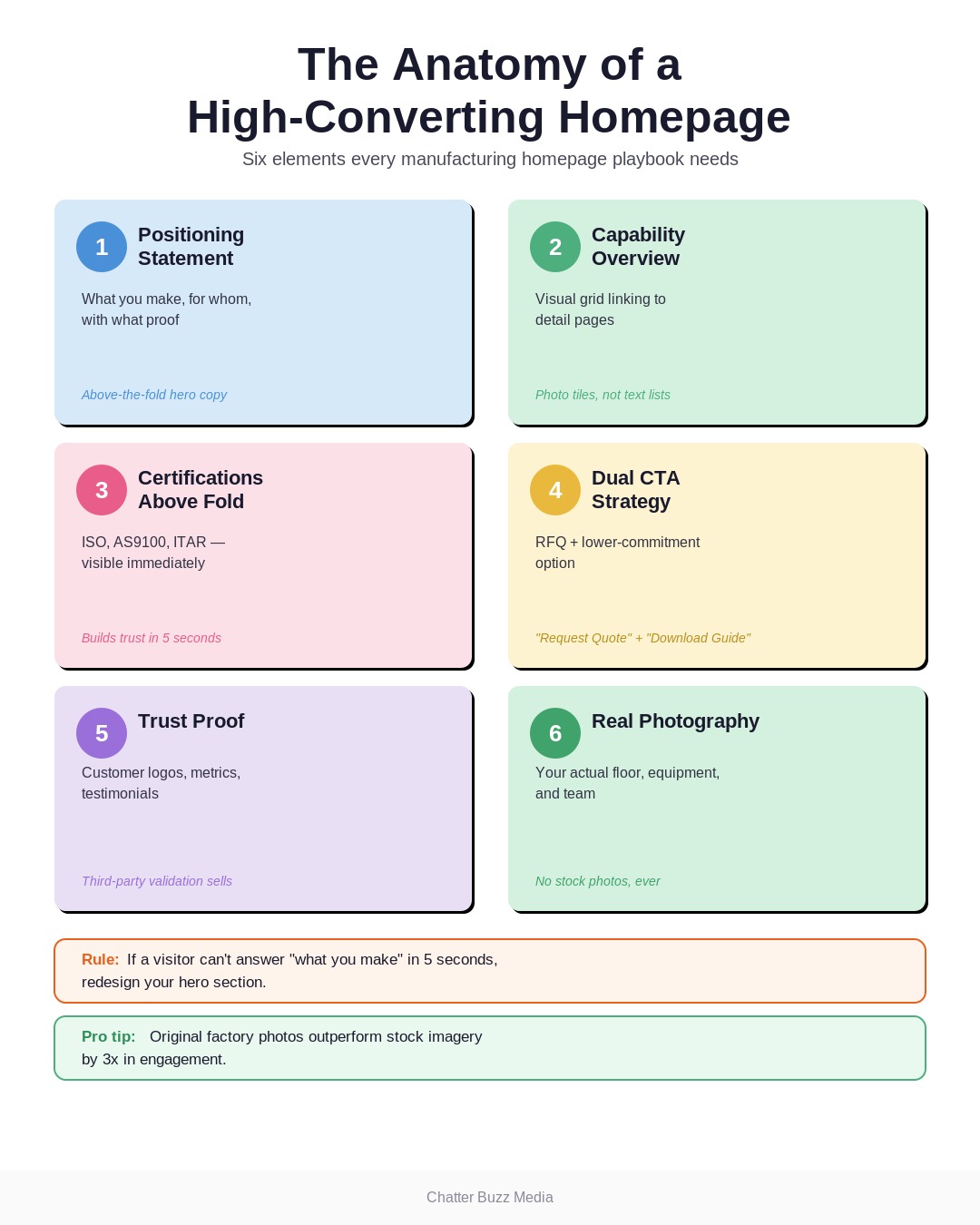
Your homepage has about five seconds to answer “what do you make, for whom, and can I trust you.” Every high-performing manufacturing homepage we’ve built or audited includes the same core elements, arranged in roughly this order:
- A specific positioning statement — not “quality manufacturing since 1987,” but the processes, materials, and industries you specialize in.
- A capability overview with visual icons or a short grid linking directly to detailed capability pages.
- Certifications and quality marks displayed above the fold, not buried in the footer.
- A primary CTA (“Request a Quote”) paired with a secondary, lower-commitment CTA (“Talk to an Engineer” or “Download Capability Guide”).
- Proof elements — customer logos, a specific project metric, or a short testimonial — within the first two scrolls.
Notice what’s missing: a giant stock photo of a handshake or an unrelated factory. Real photography of your actual floor, equipment, and people builds far more trust than generic imagery, which we cover in more detail later in this guide.
Photography deserves its own budget line, not an afterthought. Stock photos of unrelated factories are easy for a trained eye — and increasingly for buyers themselves — to spot, and they quietly undercut the trust you’re trying to build with every other element on the page.
Original photos and short video of your actual equipment running, your floor, and your team consistently outperform stock imagery in engagement and time on page.
Navigation That Matches How Buyers Search
Buyers don’t browse your site the way they browse a retail store — they arrive searching for a specific process, material, or industry application. Your navigation needs to mirror that search behavior, which usually means a mega menu organized by process (CNC machining, injection molding, metal stamping), material (aluminum, stainless, engineering plastics), and industry (aerospace, medical, automotive).
A flat navigation bar with “Products,” “Services,” and “About” forces buyers to guess where their answer lives. Organizing by all three dimensions — process, material, industry — lets an engineer searching for “5-axis CNC aluminum aerospace parts” land on exactly the right page in one click.
Capability Pages That Pre-Qualify Leads
Every capability page should do double duty: convince the right buyers you can help, and quietly filter out the ones you can’t serve. That means stating your minimum order quantities, tolerance ranges, volume capacity, and typical lead times directly on the page rather than making a buyer request a quote just to find out you’re not a fit.
This might feel counterintuitive — won’t you lose leads by disqualifying people upfront? In practice, it improves lead quality dramatically, because the RFQs that do come through are from buyers who already know you can deliver.
It also saves your sales engineers real time, since every hour spent quoting a job you were never going to win is an hour not spent on a job you can. Manufacturers who add clear qualifying detail to capability pages consistently report fewer but higher-quality RFQs within the first few months of launch.
A strong homepage and intuitive navigation earn you the click. What happens on the capability page itself determines whether that click turns into a quote request — which is exactly what we cover next.
How to Build Product and Capability Pages That Drive RFQs
Capability pages are the workhorses of a manufacturing website, and they’re also the most commonly neglected. Below, we outline the essential elements every page needs, how to present equipment and certifications convincingly, and how to write technical content that actually converts instead of reading like a spec sheet nobody asked for.
Essential Elements Every Capability Page Needs
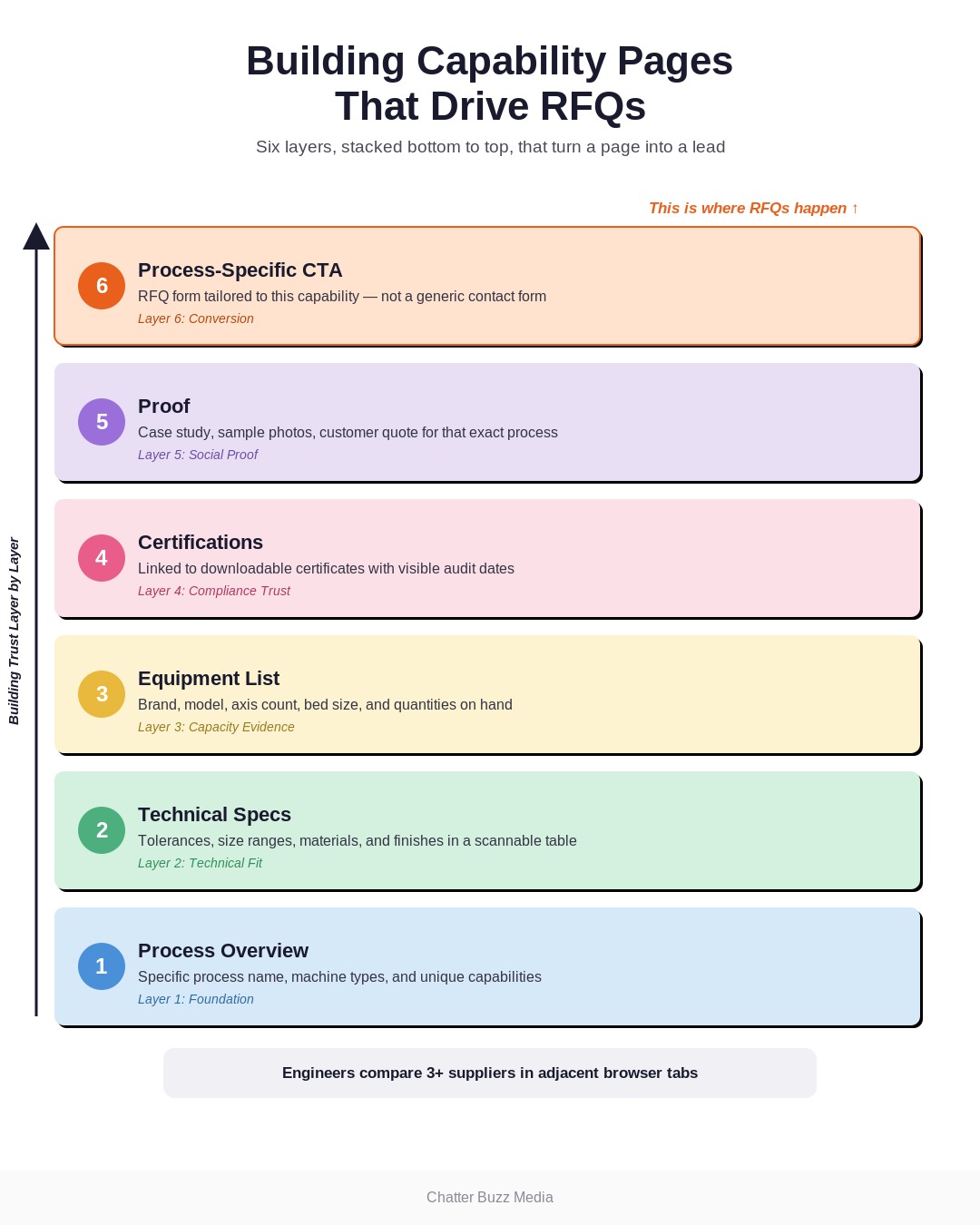
The table below shows the difference between a capability page that converts and one that doesn’t.
| Element | What It Must Include |
|---|---|
| Process overview | Specific process name, machine types, and unique capabilities — not generic descriptions. |
| Technical specs | Tolerances, size ranges, materials, finishes, and volume capacity in a scannable table. |
| Equipment list | Named machines, model numbers, and quantities — engineers use this to gauge real capacity. |
| Certifications | Relevant quality and compliance certifications tied directly to that process. |
| Proof | A relevant case study, sample part photo, or customer quote specific to that process. |
| CTA | A process-specific RFQ form, not a generic “Contact Us” link. |
Equipment Lists and Certifications That Build Trust
Listing your actual equipment — brand, model, axis count, bed size — signals real capability in a way that vague language never will. This level of specificity is also what separates a credible manufacturer website from a template-driven one, since competitors copying boilerplate text can’t replicate a real equipment list.
Certifications deserve the same specificity. Don’t just display a badge — link to a downloadable certificate, note your certifying body, and state your most recent audit or renewal date so procurement can verify without emailing you first.
The same logic applies to quality systems and inspection equipment. If you run CMM inspection, first-article inspection, or statistical process control, name the specific equipment and process rather than a generic “rigorous quality control” claim — procurement teams are trained to look past vague language.
Writing Technical Content That Converts
The biggest content mistake on manufacturing websites is reusing manufacturer or association boilerplate that ten other competitors also paste onto their sites. Unique, specific content — written in your own language, with your own numbers — is what search engines reward and what buyers actually trust.
Write each page to answer the exact questions a buyer would ask an engineer on a plant tour: what can you hold, what can you handle, what’s your capacity, and what’s the proof. This is also the content that AI search tools pull from when answering buyer questions, which we cover in the AI visibility section below.
Strong capability pages generate interest — but interest only becomes revenue if your RFQ system is built to capture and route it correctly. That’s the architecture we cover next.
RFQ Systems and Lead Generation Architecture
The RFQ form is the single highest-leverage element on a manufacturing website, and it’s usually the most poorly designed. This section covers exact field-by-field form guidance, a multi-path conversion strategy for buyers who aren’t ready to request a quote yet, and how to connect your RFQ system to your CRM and ERP so leads don’t die in an inbox.
Designing Forms That Actually Get Completed
Every field you add to an RFQ form reduces completion rate, so each one needs to earn its place. Here’s the field structure that consistently performs best for manufacturing RFQ forms:
- Required fields only: name, company, email, phone, and a project description field.
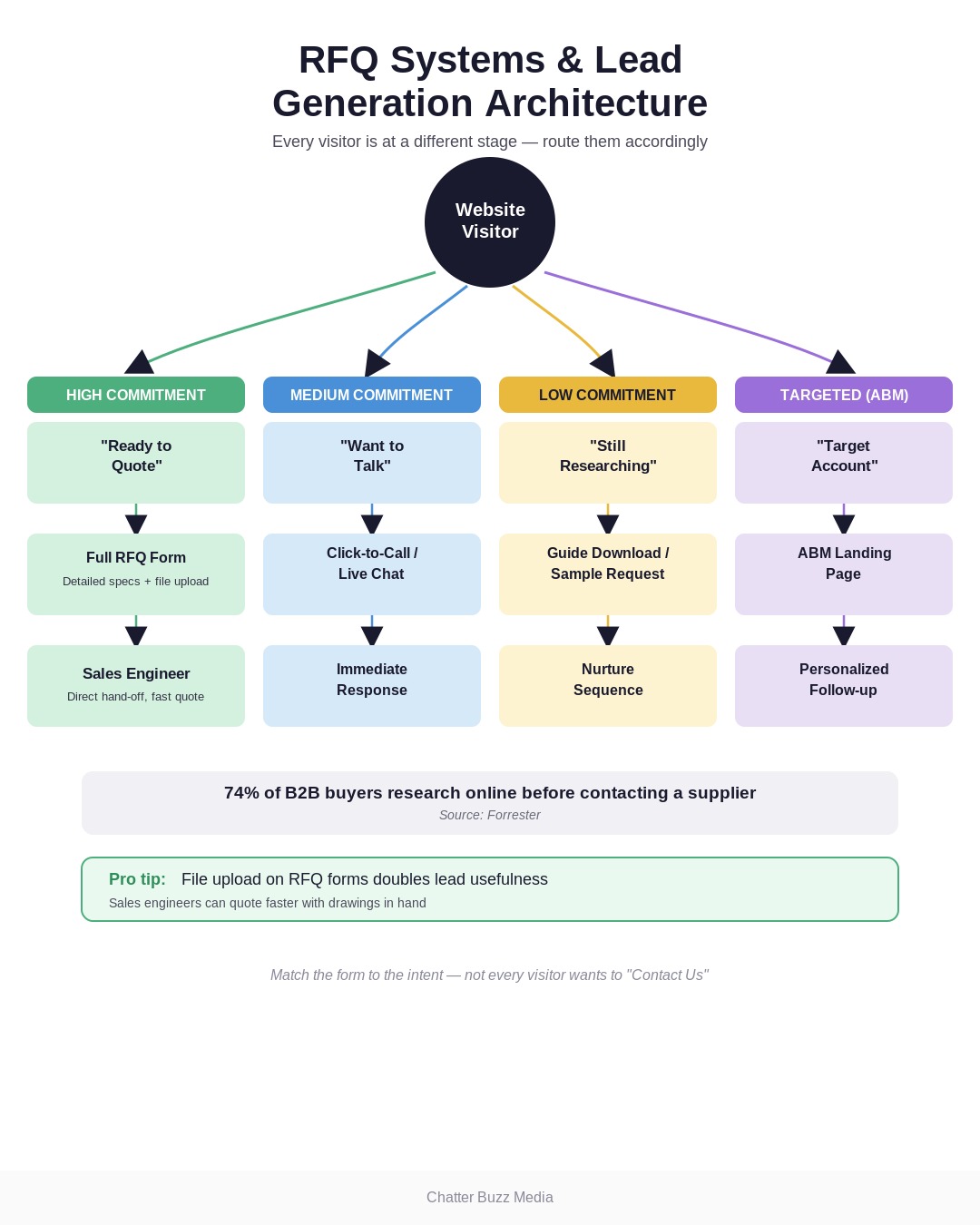
- File upload for drawings, CAD files, or specs — this alone can double the usefulness of leads you receive.
- Dropdown for process or material so leads route automatically to the right sales engineer.
- Quantity and timeline fields to help your team triage and prioritize follow-up.
- Optional fields below the fold — budget range, target unit cost — for buyers willing to share more.
Long forms with 15+ required fields feel like an interrogation, and buyers abandon them. Progressive disclosure — asking for the essentials first, then optional detail after — consistently converts better.
Multi-Path Conversion Strategy
Not every visitor is ready to request a quote on their first visit, so a single CTA leaves conversions on the table. The strongest manufacturing websites offer multiple conversion paths at different commitment levels: a full RFQ form, a “Call an Engineer” click-to-call, a live chat widget staffed during business hours, and a lower-commitment option like a sample request or capability guide download.
This layered approach captures buyers earlier in their research, which matters given that 74% of B2B buyers conduct more than half of their research online before ever contacting a supplier, according to Forrester. Capturing that early-stage interest — even before they’re ready for a formal quote — feeds your manufacturing lead generation pipeline instead of letting it walk away.
If you sell to a defined list of target accounts — a common scenario for manufacturers serving aerospace, defense, or medical device primes — your website should support that strategy directly. Dedicated landing pages for named accounts or industry segments, built around account-based marketing principles, consistently outperform generic capability pages for high-value target accounts.
CRM and ERP Integration
An RFQ form that dumps submissions into a shared inbox guarantees slow follow-up and lost leads. Connecting your website forms directly to your CRM — and where possible, your ERP for inventory and lead-time context — lets sales engineers respond with accurate information in minutes instead of days.
This integration also gives marketing visibility into which pages, keywords, and campaigns actually produce revenue, not just form fills. If your team is still manually forwarding RFQ emails between departments, that’s a marketing automation gap worth closing before you invest further in traffic generation.
A well-designed RFQ system captures and routes demand efficiently — but none of it matters if buyers can’t find your site or it loads too slowly to stick around. That’s where technical SEO comes in.
Technical SEO for Manufacturing Websites
Technical SEO determines whether your manufacturing website design shows up when engineers and procurement buyers search — regardless of how good the design itself looks. This section covers site speed for catalog-heavy sites, the schema markup types manufacturers need, and mobile optimization for buyers researching from the plant floor.
Site Speed for Catalog-Heavy Sites
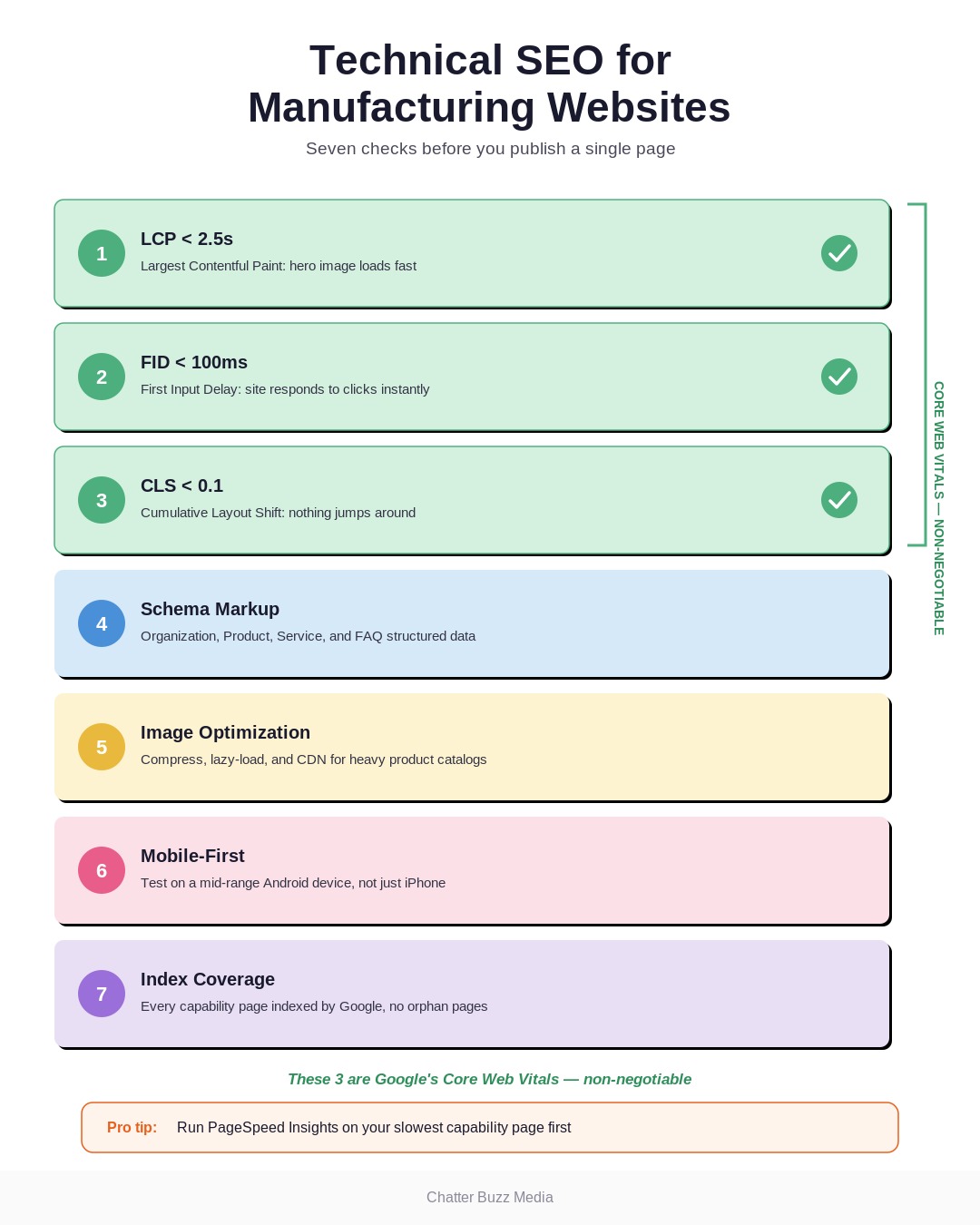
Manufacturing websites often carry hundreds of product and capability pages with heavy images, PDFs, and spec tables — and that weight tanks load times if the site isn’t built correctly. Google’s Core Web Vitals set the bar: Largest Contentful Paint under 2.5 seconds, First Input Delay under 100 milliseconds, and Cumulative Layout Shift under 0.1.
Missing these thresholds doesn’t just hurt user experience — it directly affects search rankings. Image compression, lazy loading, and a properly configured CDN are non-negotiable for any manufacturer with a large product catalog.
Schema Markup for Products and Services
Structured data tells search engines exactly what’s on a page instead of making them guess, and manufacturers routinely skip it. At minimum, implement Organization schema, Product schema for catalog items, Service schema for capability pages, and FAQ schema for common buyer questions.
This markup is also what determines whether your capability pages show up in rich results and AI Overviews — a topic important enough that we’ve dedicated the next full section to it. If your team hasn’t audited schema coverage recently, it’s one of the fastest wins available in a manufacturing SEO engagement.
Mobile Optimization for Field Buyers
A meaningful share of your B2B buyers are researching from a phone on the plant floor, in a supplier meeting, or between tasks — not at a desktop. Mobile navigation needs the same process/material/industry logic as desktop, and RFQ forms need to be genuinely usable with a thumb, including easy file uploads from a phone’s camera roll.
Test your own site on a mid-range Android device, not just the newest iPhone, since that’s closer to what many field-based buyers actually carry. A site that’s fast and functional on desktop but clunky on mobile is quietly losing a meaningful share of its RFQ volume.
Technical SEO isn’t a one-time project — algorithms change, competitors catch up, and new page templates get added without the same rigor as the original build. Treating it as an ongoing part of your broader digital marketing services program, rather than a launch checklist item, is what keeps a manufacturing website performing years after it goes live.
Technical SEO gets buyers to your site through traditional search — but a newer, faster-moving channel is reshaping how suppliers get discovered in the first place. That’s AI search, and it’s the biggest gap we see in manufacturing website design today.
AI Visibility and Answer Engine Optimization
AI Overviews, ChatGPT, and Perplexity are increasingly where procurement teams start their supplier research — and almost no manufacturing website is built to be understood by them. This section covers how AI search is reshaping supplier discovery and exactly how to structure your content so AI tools can find, understand, and cite it.
How AI Search Is Changing Supplier Discovery
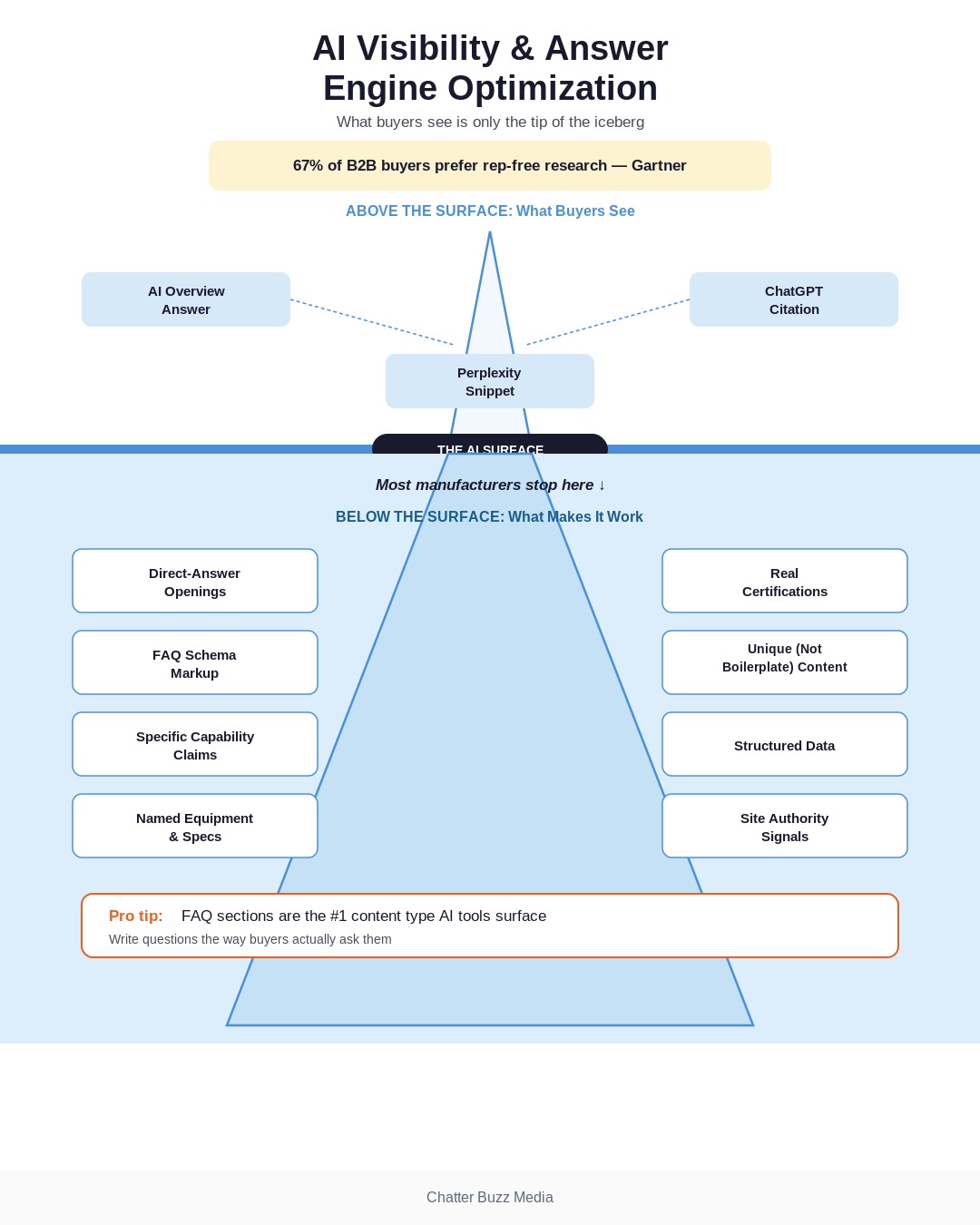
Buyers increasingly ask AI tools questions like “which manufacturers can CNC machine titanium in low volume” instead of typing a keyword into Google and clicking through ten results. Gartner projects that 67% of B2B buyers now prefer a rep-free buying experience, and AI tools are becoming a primary way they self-serve that research before ever contacting a vendor.
This is a genuine opportunity, because almost none of your competitors have optimized for it yet. Answer Engine Optimization (AEO) applies the same content quality and structure principles as traditional SEO, just formatted for how large language models parse and cite content.
Structuring Content for AI Overviews
AI tools favor content that answers a specific question directly, in plain language, near the top of the page — not buried under three paragraphs of throat-clearing. Structure your capability pages with a direct-answer opening sentence, followed by supporting detail, specs, and proof.
FAQ sections (like the one at the end of this guide) are especially valuable for AI visibility because they map directly to the question-and-answer format these tools are built to surface. Combine that structure with proper FAQ schema markup, and you meaningfully increase the odds that an AI tool cites your page when a buyer asks about your exact capabilities.
None of this replaces solid fundamentals — AI tools still favor pages that are well-structured, fast, and backed by genuine authority signals like certifications and real case studies. Manufacturers who treat AEO as an extension of good content strategy, rather than a separate trick, are the ones seeing early citations in AI-generated answers.
Getting found — whether through traditional search or AI tools — only matters if the underlying site and team executing it are built to last. That brings us to platform and partner selection.
Choosing the Right Platform and Development Partner
Platform choice and agency selection are where most manufacturing website projects go wrong before a single page gets designed. This section breaks down WordPress versus custom versus SaaS platforms, what to actually look for in a manufacturing web design agency, and realistic costs and timelines so you can budget accurately.
WordPress vs. Custom vs. SaaS
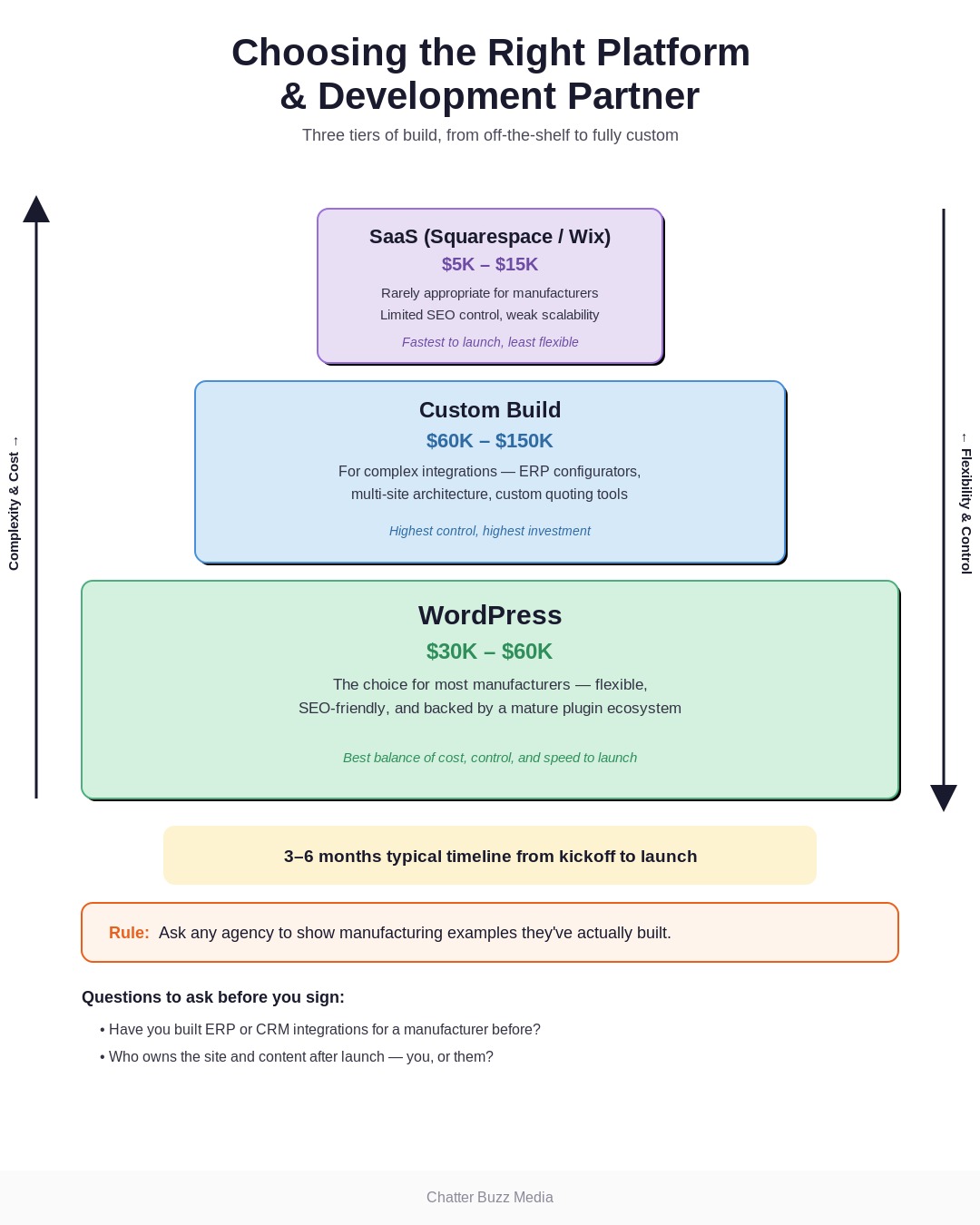
WordPress is the right default for most manufacturers — it’s flexible, SEO-friendly, has a massive plugin ecosystem, and doesn’t lock you into a single vendor for future development. Custom-built platforms make sense only when you need deep, non-standard integrations (complex ERP-driven product configurators, for example) that off-the-shelf systems can’t handle.
SaaS website builders (Squarespace, Wix, and similar tools) are rarely appropriate for a serious B2B manufacturer — they limit schema flexibility, page architecture, and the kind of technical SEO control this guide has emphasized throughout. Unless your catalog and integration needs are genuinely minimal, WordPress remains the safest long-term choice.
What to Look for in a Manufacturing Web Design Agency
Ask any agency you’re evaluating to show you manufacturing website examples they’ve actually built — not generic B2B portfolio pieces. Look specifically for evidence they understand RFQ optimization, technical SEO, and the dual-audience problem this entire guide is built around.
A good litmus test: ask how they’d structure a capability page for a five-axis CNC shop targeting both aerospace engineers and procurement. If the answer is vague, that’s a signal they’re a generalist shop applying a B2C template to a B2B manufacturing website redesign.
Realistic Costs and Timelines
Budget expectations vary widely based on scope, and the table below reflects what we typically see across manufacturing website engagements.
| Tier | Investment | What’s Included |
|---|---|---|
| Basic | $15,000–$30,000 | Template-based WordPress build, standard capability pages, basic RFQ form. |
| Standard | $30,000–$60,000 | Custom design, full technical SEO buildout, CRM integration, original photography. |
| Complex | $60,000–$150,000 | ERP integration, product configurators, multi-site/multi-language architecture. |
Most manufacturers land in the Standard tier, and most projects run 3–6 months from kickoff to launch depending on content volume and integration complexity. If you need help scoping which tier fits your business, our fractional CMO team can walk through the tradeoffs with you.
Whichever tier you land in, budget separately for ongoing maintenance, content updates, and SEO — a website is not a one-time expense. We work with manufacturers across the country, including several near our Orlando office, and the same cost and timeline ranges above hold true regardless of geography.
Choosing the right platform and partner sets your project up to succeed — but the work doesn’t end at launch. The next section covers how to actually measure whether your new site is working.
Measuring Website Performance for Manufacturers
Launching a redesigned manufacturing website is a milestone, not a finish line — the real proof is in the metrics that follow. This section covers the KPIs that actually matter for industrial sites and how to connect website traffic all the way through to revenue.

KPIs That Matter for Industrial Sites
Generic marketing metrics like pageviews and session duration tell you almost nothing about whether your manufacturing website design is working. Track these instead:
- RFQ conversion rate — the percentage of capability page visitors who submit a quote request.
- Time-to-RFQ — how many sessions or days it takes a visitor to convert, which reveals friction in your funnel.
- Bounce rate on capability pages specifically — a high bounce rate here usually means your content isn’t answering the buyer’s real question.
- Organic visibility for target process and material terms — are you ranking for the searches your actual buyers use?
- Form abandonment rate — where in the RFQ form buyers drop off, which points directly to field-level fixes.
From Traffic to Revenue Attribution
The goal isn’t traffic for its own sake — it’s connecting website activity to closed revenue, so your CRM integration from earlier in this guide is essential here. Tag every RFQ with source, page, and campaign data so you can prove which capability pages and keywords actually generate business, not just leads.
This kind of attribution is also what justifies continued investment in your site, since a leadership team funding a $50,000 redesign wants to see the revenue trail, not just a traffic report. If your reporting doesn’t currently connect website activity to pipeline, that’s a natural next step alongside a broader B2B demand generation strategy.
Reviewing these numbers on a regular cadence — monthly at minimum, weekly if you’re actively investing in traffic growth — is what separates manufacturers who treat their website as a living sales asset from those who launch it and forget it. Building that discipline into a broader performance marketing practice ensures every dollar spent driving traffic to the site is actually accountable to pipeline and revenue.
Everything in this guide — from homepage structure to RFQ forms to AI visibility — exists to move these exact numbers. A manufacturing website design that gets the fundamentals right doesn’t just look better; it produces measurably more qualified RFQs, shortens sales cycles, and gives your team real data to act on.
If you’re evaluating a redesign or auditing your current site against everything covered here, that’s exactly the kind of work our B2B digital marketing team does daily for industrial clients. Below are quick answers to the questions we hear most often from manufacturers starting this process.
Frequently Asked Questions
What should a manufacturing website include?
A strong manufacturing website includes clear capability pages organized by process, material, and industry, visible certifications, an optimized RFQ form, real equipment lists, and original photography of your actual facility. It should also include technical SEO fundamentals — schema markup, fast load times, and mobile optimization — so buyers can actually find it.
How much does manufacturing website design cost?
Most manufacturing website redesigns cost between $30,000 and $60,000 for a standard build with custom design, full technical SEO, and CRM integration. Basic template builds start around $15,000, while complex projects with ERP integration or product configurators can run $60,000–$150,000.
How long does a manufacturing website redesign take?
A typical manufacturing website redesign takes 3 to 6 months from kickoff to launch. Timelines extend for projects with large product catalogs, custom integrations, or extensive original content and photography needs.
What platform is best for a manufacturing website?
WordPress is the best platform for most manufacturers because of its flexibility, SEO control, and broad plugin ecosystem for integrations. Custom-built platforms only make sense for manufacturers with complex configurator or ERP-driven needs that WordPress can’t handle out of the box.
How do I get more RFQs from my manufacturing website?
The fastest way to increase RFQs is to rebuild capability pages around specific buyer questions, streamline your RFQ form to essential fields only, and offer multiple conversion paths beyond a single contact form. Pairing this with strong technical SEO ensures the traffic reaching those improved pages is already qualified.
Should manufacturing websites have e-commerce?
Some manufacturers benefit from e-commerce for standardized, off-the-shelf parts sold in smaller quantities. Custom or made-to-order manufacturers typically see better results from a robust RFQ system rather than a full e-commerce buildout, since most B2B purchases still involve a quote and negotiation step.
How often should a manufacturer redesign their website?
Most manufacturers should plan a full redesign every 3 to 5 years, with ongoing content and technical updates in between. If your site can’t currently support technical SEO best practices, mobile buyers, or AI search visibility, that’s a sign a redesign is due sooner rather than later.