
 321-236-2899
Conversion Rate Optimization for Paid Media: Why Your Ads Work But Your Pages Don’t
Your ads are doing their job. The clicks are coming in, the click-through rate looks healthy, and the cost-per-click is under control. Yet the leads never show up in the volume the traffic promised.
Over the past decade of running paid media across financial services, manufacturing, healthcare, and home builders, one pattern repeats in nearly every underperforming account we audit. The ads are fine. The page that receives the click is where the money leaks out.
Conversion rate optimization for paid media is the discipline that closes that leak, and it is the single highest-leverage lever most advertisers ignore. In this guide you will learn a step-by-step system for turning expensive ad clicks into actual pipeline, starting with the one fix that recovers the most revenue for the least effort.
Key Takeaways
- The post-click page, not the ad, is where most paid budgets are wasted — yet marketers spend roughly 80% of optimization time inside the ad platform.
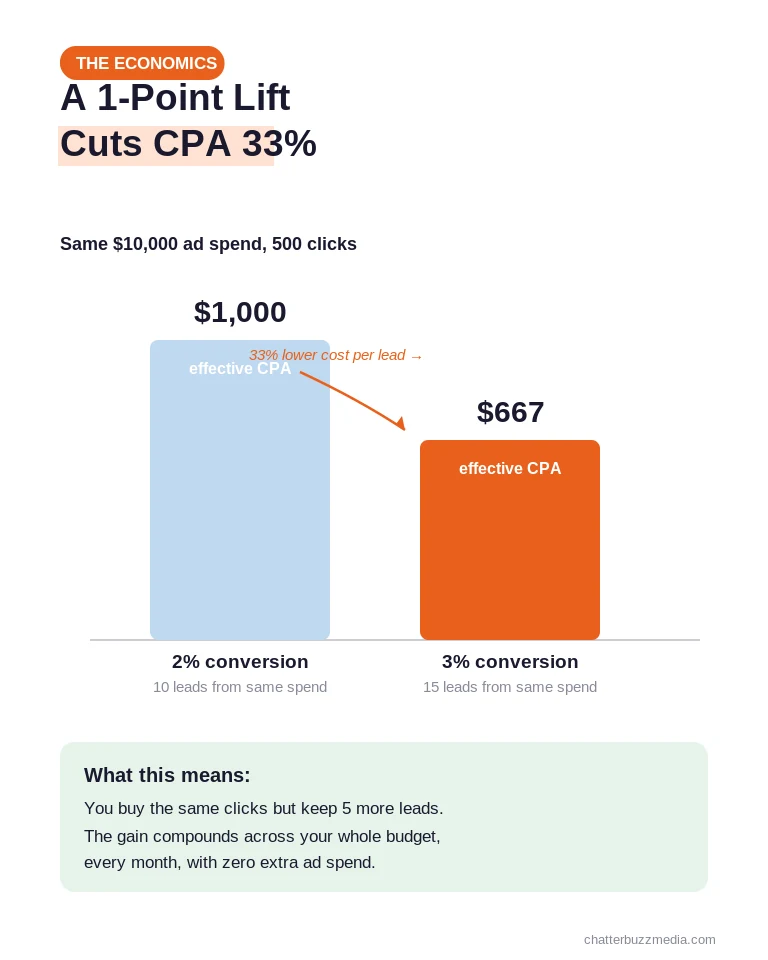
- Lifting landing page conversion from 2% to 3% cuts your effective cost-per-acquisition by 33% without adding a single dollar of ad spend.
- Ad-to-page message match is the most common and most overlooked failure in paid traffic programs.
- Page speed is a revenue metric: a one-second delay can cut conversions by about 7%, and slow pages raise your Google Ads costs through Quality Score.
- Structured, continuous testing wins — 82% of companies that use a structured CRO process report improved conversion rates.
- You cannot optimize what you do not measure; bridge ad-platform data to on-page analytics and segment by ad group, not just campaign.
Why Your Ads Work But Your Pages Don’t
The reason great ads still produce weak results is structural: ad optimization and page optimization live in two different worlds. Ad performance is tuned inside Google Ads or Meta Ads Manager, while the landing page lives on your website, in a page builder, and in your CRM.
Because the post-click experience crosses tool boundaries, it falls through the cracks. Most performance marketers spend the vast majority of their time adjusting bids, audiences, and creative, and almost none improving the page that actually asks for the conversion.
The economics make this a costly blind spot. If paid traffic converts at 2% and you lift it to 3%, you have cut your effective cost-per-acquisition by a third, which is mathematically identical to reducing your cost-per-click by 33%.
That gain then multiplies across your entire budget, every month, for as long as the page stays live. No bid strategy delivers that kind of compounding return.
There is a second, quieter payoff. A stronger page lowers your effective customer acquisition cost, which frees budget you can reinvest into the campaigns that already work.
It also feeds back into the ad platform itself. Higher on-page conversion improves the signal your conversion tracking sends back to Google and Meta, so their algorithms optimize toward better prospects over time.
The disconnect is measurable. A typical paid landing page converts in the low single digits, while Unbounce’s benchmark data pegs the median landing page conversion rate at 6.6% and top performers well above 11%. The gap between your page and the best pages is the revenue you are leaving on the table.
This is also why conversion rate optimization and paid media are not separate disciplines but two halves of the same system, a relationship we unpack in our comparison of PPC versus CRO. The following steps move in the order that recovers the most revenue first. Start at the top and work down.
Step 1: Match Your Landing Page to the Ad
Message match — how closely your landing page reflects the exact promise of the ad — is the first thing to fix because it breaks trust before a visitor reads a word. When someone clicks an ad for a specific offer and lands on a generic homepage, the intent signal and the page no longer agree.
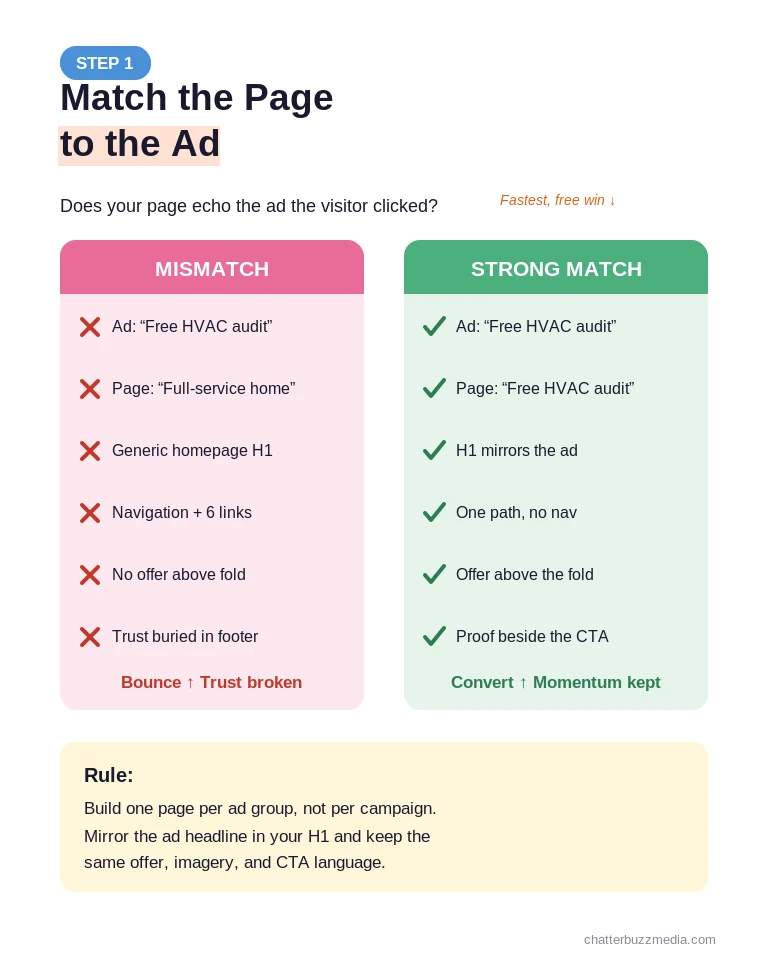
That gap is where paid traffic evaporates. A user who clicks “same-day HVAC repair in Tampa” and arrives on a page about “full-service home solutions” feels the mismatch instantly and leaves.
Strong message match means the landing page headline mirrors the ad’s core claim, the imagery reinforces the same context, and the call-to-action language stays consistent. The visitor should feel they landed exactly where they expected, because they did.
Here is how to build message match into every campaign:
- Mirror the ad headline in the H1. If the ad promises a free audit, the page headline should lead with the free audit, not your brand tagline.
- Match the offer precisely. The discount, guarantee, or deliverable named in the ad must appear above the fold on the page.
- Build a page per ad group, not per campaign. One page serving ten ad groups is a message-match problem waiting to happen.
- Use dynamic text replacement to swap the headline based on the keyword or audience segment when you run many closely related ads.
Message match also extends past the words. If your ad shows a product, a promotion, or a specific industry, the page’s hero image should carry that same visual language so nothing feels like a bait-and-switch.
A useful test: read your ad, then look at your page’s first screen with fresh eyes and ask whether a stranger would believe they clicked the same message twice. If the answer is no, you have found your fastest win, and it costs nothing but an edit.
If you send paid clicks to a page built for organic visitors, you are almost certainly leaking conversions here, a mistake we detail in why your landing page may be inviting users to leave. A dedicated, matched page is the foundation everything else builds on, which is why building PPC landing pages that convert paid clicks is a discipline of its own and why understanding the purpose of a landing page matters before you build one.
Step 2: Fix Page Speed Before Anything Else
Once the message matches, speed is the next revenue lever, because the first second of a visit is a rendering problem before it is a messaging problem. A page that takes four seconds to load on mobile loses a large share of visitors before your headline ever appears.
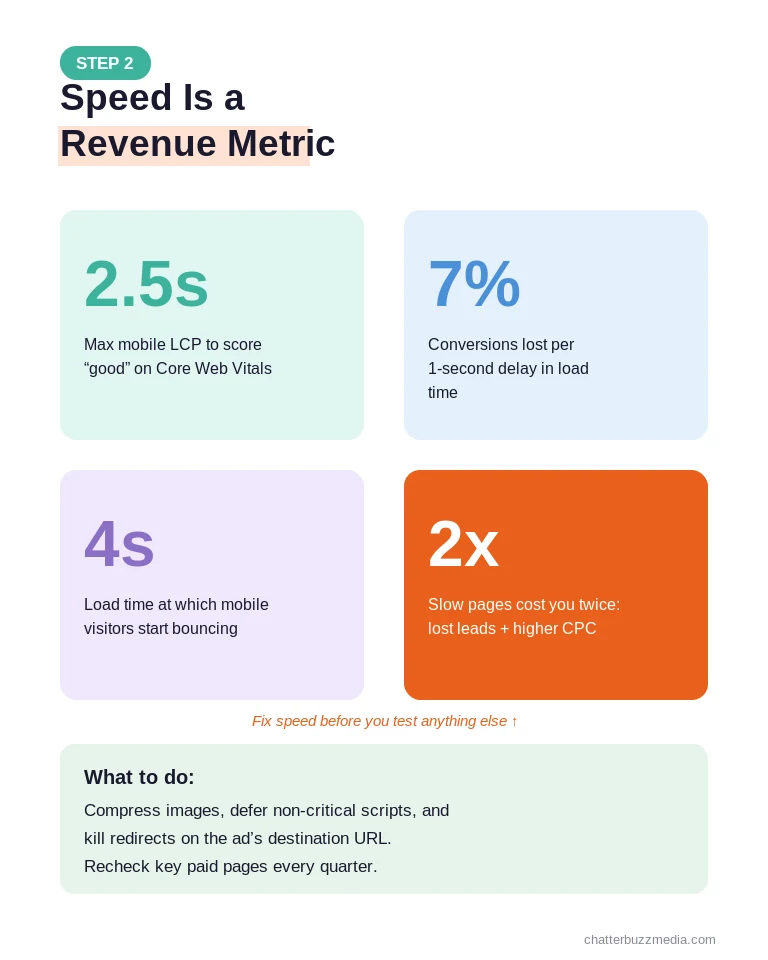
Speed hurts you twice on paid traffic. You lose the conversion, and you also pay more per click, because Core Web Vitals feed directly into Google Ads Quality Score, and a lower Quality Score raises your costs and lowers your ad position.
The benchmark to hit is a Largest Contentful Paint under 2.5 seconds on mobile, the threshold Google’s Core Web Vitals guidance defines as “good.” If you are not measuring this, you are flying blind on a metric that moves revenue directly.
The fastest wins are almost always these:
- Compress and correctly size images. Oversized images are the most common cause of slow landing pages.
- Defer non-critical scripts. Chat widgets, heat-map tools, and third-party tags stack up and block rendering.
- Eliminate redirects on the ad’s destination URL. Every hop adds latency before the page even starts to load.
- Prioritize above-the-fold content so the visitor sees a usable page while the rest loads.
Because even a one-second delay can reduce conversions by roughly 7% according to WordStream’s conversion research, speed work usually pays for itself before any other test finishes.
Treat speed as an ongoing standard, not a one-time cleanup. New tags, tracking scripts, and page-builder widgets creep back in over time, so recheck your key paid pages every quarter and after any major site change.
Speed is also where CRO and campaign efficiency overlap most directly. A faster page lifts your Quality Score, and a higher Quality Score is one of the cleanest ways to lower cost-per-click inside your paid search management, so the same fix improves both conversion and media cost at once.
Step 3: Win the First Five Seconds Above the Fold
With a fast, matched page, attention now shifts to what the visitor sees first. The above-the-fold section is where people decide to stay or leave, and that decision happens in about five seconds.
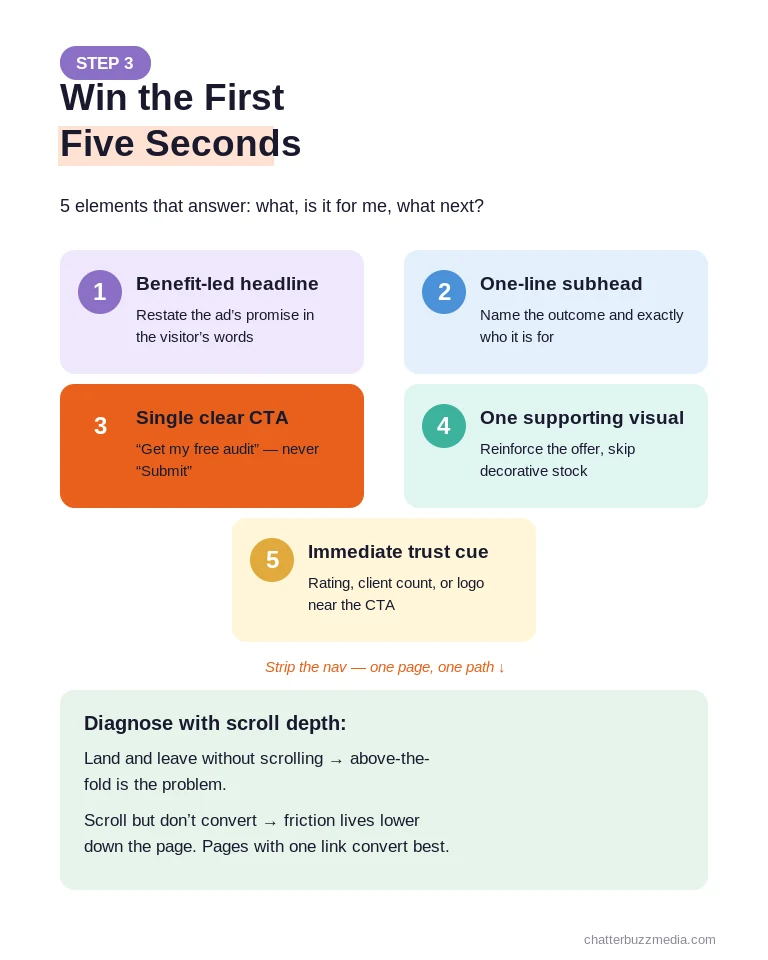
If the value proposition is not clear almost immediately, or the page feels generically corporate rather than relevant to the visitor’s specific intent, they bounce. Your job above the fold is to answer three questions fast: what is this, is it for me, and what do I do next.
A high-converting above-the-fold section usually contains these elements working together:
- A benefit-led headline that restates the ad’s promise in the visitor’s language, not your internal jargon.
- A one-line subhead that names the specific outcome and who it is for.
- A single, obvious call-to-action with action-oriented text such as “Get my free audit,” never “Submit.”
- One supporting visual that reinforces the offer rather than a decorative stock photo.
- An immediate trust cue, such as a rating, client count, or recognizable logo, within eyeshot of the CTA.
Watch scroll depth combined with time-on-page to diagnose this section. If visitors land and leave without scrolling, the above-the-fold experience is the problem; if they scroll but do not convert, the friction lives further down.
Removing distractions matters as much as adding clarity. Landing pages with a single link convert far better than pages with five or more competing links, so strip the navigation and give the visitor one path forward, a principle we cover in the elements of a landing page that converts.
The headline itself deserves outsized attention because most visitors read it and little else. A clear, customer-centered headline built on a proven structure like the StoryBrand framework for landing pages consistently outperforms a clever one that makes the reader work to understand the offer.
Step 4: Cut Friction From Your Forms and CTAs
The conversion stage is where interest turns into a lead, and it is usually killed by friction the marketer stopped noticing months ago. Every extra field, vague button, and moment of hesitation costs conversions.
The goal is to make converting feel effortless and low-risk. That means asking for the least information you actually need and making the next step unmistakable.
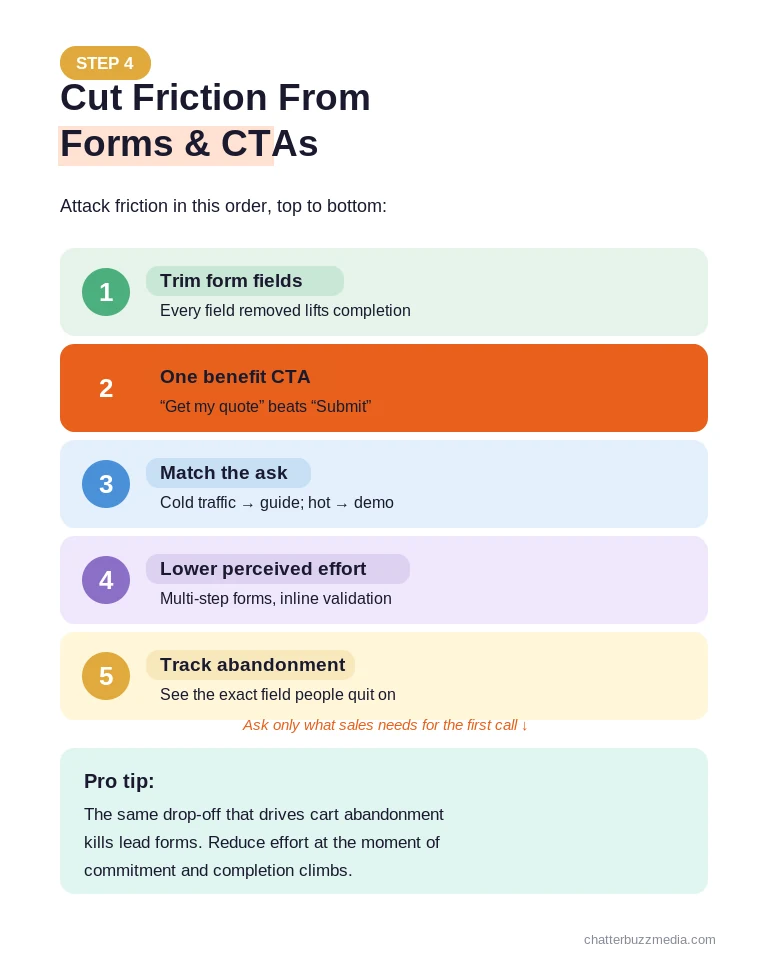
Attack friction in this order:
- Cut form fields to the essentials. Every field you remove lifts completion; ask for phone or job title only when your sales process truly requires it.
- Use one specific, benefit-oriented CTA. “Get my custom quote” beats “Submit” because it names the payoff.
- Match the ask to the traffic temperature. Cold prospect traffic converts better on a low-commitment offer like a guide, while high-intent search traffic can handle a demo or quote request.
- Reduce perceived effort with multi-step forms, inline validation, and progress indicators that make a longer form feel shorter.
- Track form abandonment so you can see exactly which field visitors quit on and fix it.
Form friction is also where you lose visitors who were ready to convert but hesitated at the last step. The same drop-off logic that drives shopping cart abandonment applies to lead forms: the more effort and doubt at the moment of commitment, the more people quit.
One practical rule: for every field, ask whether sales genuinely needs it to have the first conversation. If the answer is no, cut it now and enrich the record later.
Do not treat the button as an afterthought. Clear, benefit-led copy and a single dominant CTA consistently outperform generic labels, and pairing that with persuasive, customer-focused copy is why storytelling copywriting that converts leads belongs in your CRO toolkit.
Step 5: Add Trust Signals Where Doubt Peaks
People look to their peers before making a decision, so the right proof at the right moment can be the difference between a bounce and a lead. Social proof is often the leading factor that pushes a visitor to convert.
The mistake most pages make is placing all their proof in one block at the bottom, long after doubt has already set in. Trust should appear exactly where hesitation peaks: next to the headline, beside the form, and near the price or commitment.
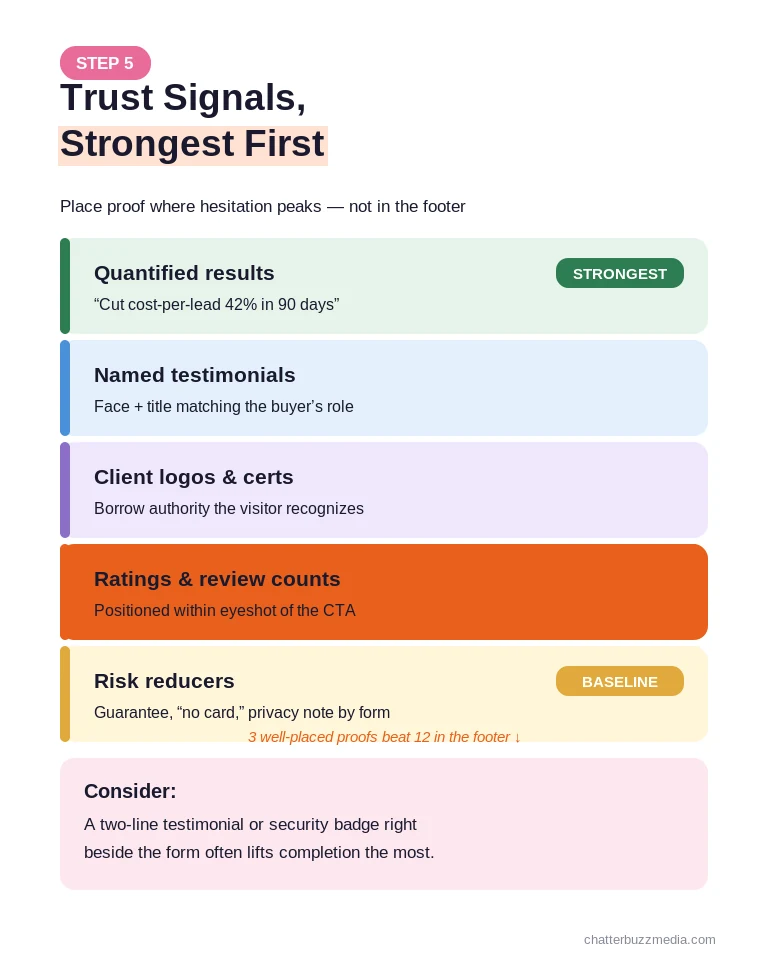
Layer these trust signals across the page, strongest first:
- Specific, quantified results such as “cut cost-per-lead 42% in 90 days” carry more weight than vague praise.
- Named testimonials with a face and title that match your target buyer’s role and industry.
- Recognizable client logos or certifications that borrow authority instantly.
- Third-party ratings and review counts placed within eyeshot of the call-to-action.
- Risk reducers like guarantees, “no credit card required,” or a clear privacy assurance beside the form.
Match the proof to the visitor. A credit union prospect wants to see other financial institutions; a manufacturer wants to see industrial results, an idea we expand on in our look at landing page CRO for a regulated vertical.
Placement beats volume. Three well-chosen proof points positioned at the moments of hesitation will outperform a dozen testimonials buried in a footer no one reaches.
Pay special attention to the area immediately around your form and CTA, because that is where the visitor weighs effort against payoff. A short reassurance there, such as a two-line testimonial or a security badge, often lifts completion more than any change to the form fields themselves.
Relevant, specific proof lowers the risk the visitor feels and gives them permission to act.
Step 6: Test and Measure Post-Click Performance
Everything above gives you a strong starting page; testing is what turns it into a compounding asset. Companies that test more, and use more optimization methods, consistently see higher conversion rates over time.
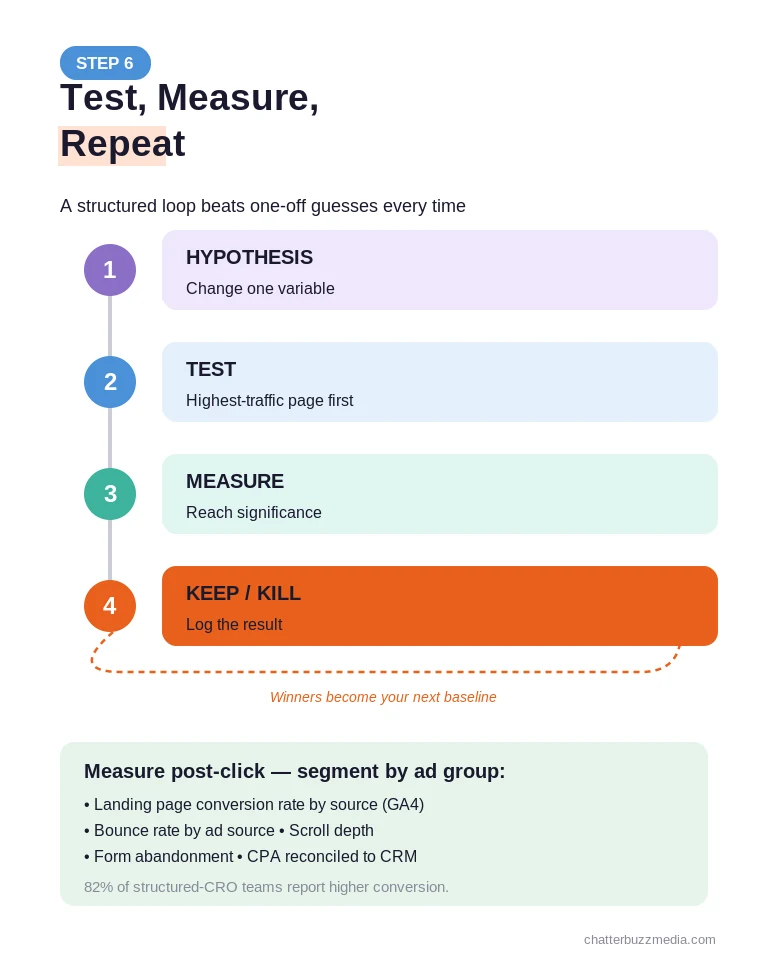
The discipline matters more than any single test. A structured process — hypothesis, test, measure, keep or discard — is why 82% of companies with a structured CRO approach report improvements, per Econsultancy’s conversion research.
Standard ad metrics like impressions, clicks, and CPC stop at the click, so post-click measurement means bridging that data to what happens on the page. Track these connected metrics and segment every one by ad group, not just campaign:
- Landing page conversion rate by source in GA4, so you know which ads send traffic that actually converts.
- Bounce rate by ad source to flag message-match and speed problems early.
- Scroll depth and form abandonment to pinpoint where visitors drop out.
- Cost-per-acquisition reconciled to the CRM, so a high-volume ad that produces low-quality leads gets caught.
Run one meaningful test at a time, prioritizing changes to the highest-traffic pages where a small lift moves the most revenue. Give each test enough conversions to reach significance before you call it.
Sequence your tests by impact and effort. Start with the big, cheap swings such as headline, hero image, and form length, then move to finer changes like button color or microcopy once the obvious leaks are sealed.
Keep a simple log of every test, its hypothesis, and its result. Over a year that log becomes a private benchmark of what your specific audience responds to, which is worth more than any generic best-practice list.
Remember that low-converting traffic is not always a page problem. If a channel sends poorly matched visitors, no amount of page work will fix it, so pair post-click optimization with tighter targeting and a healthy retargeting strategy that re-engages the visitors who left without converting.
Prioritize your testing roadmap the same way you would prioritize creative. The disciplined, hypothesis-led mindset behind ad creative testing applies just as cleanly to landing pages: change one variable, define what winning looks like in advance, and let the data decide.
If you are not sure where the leaks are, start with a structured review rather than guessing. A digital marketing audit will surface the highest-impact pages and the exact stages where paid visitors drop out.
Connecting ad spend all the way to confirmed lead quality is the difference between optimizing for clicks and optimizing for pipeline, which is where a disciplined reporting and data visualization practice earns its keep.
Frequently Asked Questions
1. 🔍 What is conversion rate optimization for paid media?
Conversion rate optimization for paid media is the practice of improving the landing page and post-click experience that receives your ad traffic, so more of the visitors you already paid for become leads or customers. It focuses on message match, page speed, above-the-fold clarity, form friction, trust signals, and testing — everything that happens after the click rather than inside the ad platform.
2. 📊 What is a good conversion rate for paid traffic?
Most paid landing pages convert in the 2–5% range, while the median across landing pages is about 6.6% and top performers exceed 11%. The right target depends on your offer, industry, and traffic intent, so treat these as directional benchmarks and focus on beating your own baseline.
3. ⚡ Why do my ads get clicks but no conversions?
The most common causes are post-click, not ad-side: weak message match between the ad and the page, slow load times, a cluttered above-the-fold section, or a form that asks for too much. Because these issues live on the page rather than in the ad platform, they are easy to miss and account for most wasted paid spend.
4. 🏦 How much does landing page conversion rate affect cost-per-acquisition?
Enormously. Lifting conversion from 2% to 3% reduces your effective cost-per-acquisition by 33% without changing ad spend, and that saving compounds across your entire budget for as long as the page stays live.
5. 🤝 What is ad-to-page message match?
Message match is how closely your landing page reflects the specific promise of the ad that drove the click, from the headline to the offer to the imagery. Strong message match confirms the visitor landed where they expected and sustains momentum toward conversion, while a mismatch breaks trust and drives bounces.
6. 💰 Should I send paid traffic to my homepage or a dedicated landing page?
Almost always a dedicated landing page. Homepages serve many audiences and offer many paths, which dilutes intent, while a dedicated page matched to the ad gives one audience one clear next step and converts far better.
7. 🚀 How fast should a paid landing page load?
Aim for a Largest Contentful Paint under 2.5 seconds on mobile. Beyond losing visitors who leave before the page renders, slow pages lower your Google Ads Quality Score, which raises your cost-per-click.
8. 📈 How do I measure post-click performance?
Bridge your ad-platform data to on-page analytics in GA4 and your CRM, tracking landing page conversion rate, bounce rate by source, scroll depth, and form abandonment. Segment everything by ad group, then reconcile cost-per-acquisition against actual lead quality in the CRM.
Conclusion
Your ads are not the problem. The page that receives the click almost always is, and that is good news, because the post-click experience is the part of your funnel you fully control.
Here is the action plan to recover the revenue leaking out of your paid campaigns:
- Audit message match first. Pull your top five ad groups and confirm each destination page mirrors the ad’s headline and offer.
- Fix speed and above-the-fold clarity. Get mobile Largest Contentful Paint under 2.5 seconds and make the value proposition obvious in five seconds.
- Strip friction and add proof. Cut form fields to the essentials, use one benefit-led CTA, and place trust signals where doubt peaks.
- Measure and test continuously. Connect ad data to on-page analytics, segment by ad group, and run one prioritized test at a time.
Work through these in order and you will spend the same on ads while pulling far more pipeline from the traffic you already buy. When post-click optimization is tied to a clear marketing strategy and plan, every point of conversion lift makes your entire paid media program more efficient.
For a deeper walkthrough of the discipline and where it fits in your funnel, explore our conversion rate optimization resource and the broader marketing resource library.

Victoria Wallace
Victoria Wallace is a senior content strategist and marketing writer with 30+ years of experience helping more than 200 brands translate complex business goals into clear, conversion-focused content. Her background spans paid media, marketing strategy, go-to-market planning, brand positioning, and full-funnel campaign development, giving her a deep understanding of how SEO content connects to real business growth.