
 321-236-2899
Meta Conversions API: The Complete Guide to Better Tracking and Higher ROAS
If you’re running Meta ads in 2026, relying on the Meta Pixel alone means you’re flying blind on over half your conversions. Browser-based tracking has been steadily dismantled by iOS privacy restrictions, ad blockers installed on 42% of desktop browsers, and consent frameworks that block JavaScript from firing.
Meta’s Conversions API is the server-side tracking solution that closes that gap. We’ve implemented CAPI across dozens of paid media accounts and consistently see 15–20% ROAS improvement once Event Match Quality is optimized.
This guide covers the three setup methods, the exact parameters that determine your data quality, how to configure event deduplication, and the most common mistakes that silently wreck campaign performance. Let’s start with what CAPI actually does under the hood.
Key Takeaways
- Meta Conversions API sends conversion data server-to-server, bypassing ad blockers, iOS privacy restrictions, and cookie limitations that cause the Pixel to miss over 50% of conversions.
- Three setup methods exist — CAPI Gateway (no-code, $10–$400/mo), Server-Side GTM (multi-platform, $10–$50/mo), and Direct API (full control, $500–$5K one-time).
- Event Match Quality (EMQ) directly impacts your ROAS — sending hashed email adds up to 4 points, hashed phone adds 3 points, and scores above 8.0 unlock optimal ad delivery.
- Event deduplication is mandatory when running Pixel + CAPI together — use matching event_id values to prevent double-counting conversions.
- CRM integration unlocks deeper funnel optimization — send qualified lead, demo booked, and closed-won events so Meta optimizes for revenue, not just form fills.
What Is Meta Conversions API (and Why It Matters in 2026)
Meta Conversions API is a server-to-server tracking interface that sends conversion events directly from your server to Meta’s advertising platform. Unlike the Meta Pixel, which runs JavaScript in the user’s browser, CAPI operates independently of the browser environment entirely.
When someone completes a purchase, submits a lead form, or adds an item to their cart, CAPI sends that event data from your backend infrastructure to Meta. Even when a browser blocks the Pixel, fails to load JavaScript, or restricts cookies, Meta still receives your conversion data.
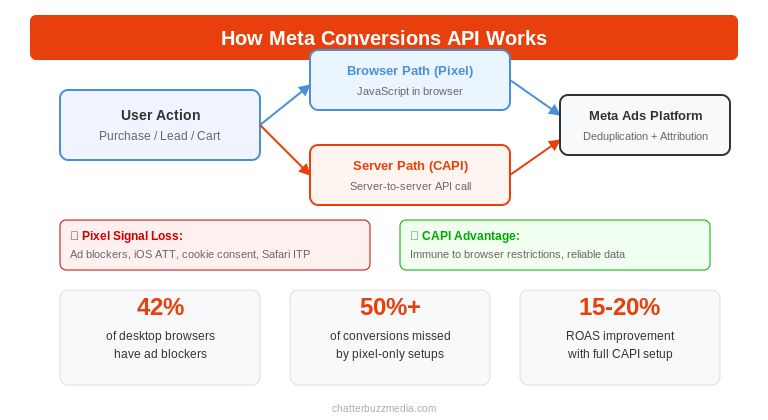
Here’s why this matters right now: ad blockers are installed on 42% of desktop browsers globally as of 2025. iOS App Tracking Transparency lets users opt out of cross-app tracking, and most do. Safari’s Intelligent Tracking Prevention actively blocks tracking scripts. The result is that pixel-only setups now miss over half of actual conversions.
Meta designed CAPI as the long-term replacement for browser-dependent tracking. It now handles both online and offline conversion events through a single unified integration, which became critical after Meta discontinued its separate Offline Conversions API in May 2025.
For advertisers running social media advertising campaigns, the shift from browser-based to server-side tracking isn’t optional anymore. It’s the foundation that determines whether Meta’s algorithm can actually optimize your campaigns or whether it’s working with incomplete data.
Meta Conversions API vs. the Meta Pixel: Key Differences
Understanding the difference between CAPI and the Pixel is essential before deciding how to implement your tracking. They serve the same purpose — getting conversion data to Meta — but they take fundamentally different paths to get there.
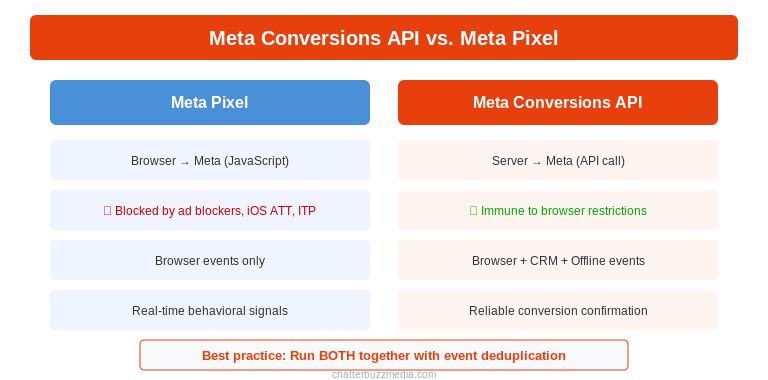
The Meta Pixel is a JavaScript snippet that fires in the user’s browser. When someone visits your site or completes a conversion event, the Pixel sends that data to Meta through the browser. This worked reliably for years, but privacy changes have steadily eroded its effectiveness.
The Meta Conversions API sends the same event data from your server rather than the browser. Because server-to-server communication isn’t affected by ad blockers, cookie restrictions, or browser privacy features, CAPI captures conversions that the Pixel misses entirely.
The key differences break down across four dimensions:
- Data transmission path. The Pixel sends data from the browser to Meta. CAPI sends data from your server to Meta.
- Reliability. The Pixel depends on JavaScript execution, cookie availability, and uninterrupted page loads. CAPI depends on your server being operational — far more reliable and within your control.
- Data richness. The Pixel can only capture what happens in the browser. CAPI can send data from any source your server accesses, including CRM records, point-of-sale systems, lead generation platforms, and offline events.
- Privacy resilience. The Pixel is directly affected by iOS ATT, ad blockers, and consent frameworks. CAPI operates server-side and isn’t impacted by these browser-level restrictions.
Should you use both? Yes. Meta explicitly recommends running the Pixel and CAPI together in what’s called dual tracking. The Pixel captures browser-side signals like scroll behavior, page views, and real-time user interactions. CAPI ensures conversion events are captured reliably regardless of browser conditions. Together, they provide the most complete data picture for reporting and data visualization.
When you run both, you need event deduplication (covered below) to prevent double-counting.
3 Ways to Set Up Meta Conversions API
There are three primary methods for implementing Meta CAPI, each with different levels of complexity, cost, and flexibility. The right choice depends on your technical resources, platform, and whether you advertise exclusively on Meta or across multiple platforms.
Method 1: Meta Conversions API Gateway (Simplest Setup)
The CAPI Gateway is a managed, no-code solution that Meta provides for advertisers who want server-side tracking without custom development. It works alongside your existing Pixel to automatically send server-side copies of Pixel events to Meta.
The Gateway monitors your Pixel events. Whenever it detects a Pixel event firing in the browser, it simultaneously sends a server-side copy to Meta. Event deduplication is handled automatically.
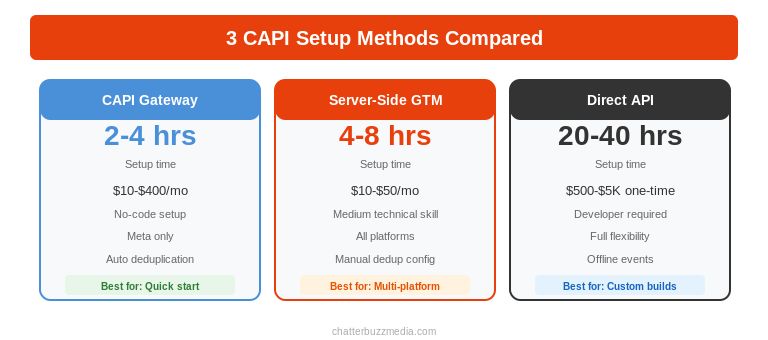
Setup time: 2 to 4 hours. Cost: $10 to $400+ per month depending on event volume. Best for: Advertisers who need a low-maintenance, automated setup. Stores on Shopify or WooCommerce that want server-side tracking without developer involvement. Meta-only advertisers who don’t need to send events to Google, TikTok, or other platforms.
Key limitation: The Gateway mirrors what the Pixel sees. If a user’s browser blocks the Pixel from firing in the first place, the Gateway has nothing to mirror. It also only works with Meta and doesn’t serve as a centralized tracking hub for other ad platforms.
Method 2: Server-Side Google Tag Manager (Best Balance)
Server-side GTM runs in a cloud environment rather than the user’s browser. It receives events from your client-side GTM container and forwards them to Meta’s CAPI endpoint, as well as to any other PPC advertising platform you use.
Your website sends events to a GA4 web tag, which forwards them to your server-side GTM container hosted in a cloud environment. The server-side container then processes these events and sends them to Meta via CAPI, to Google via their server-side tags, and to any other platform you configure.
Setup time: 4 to 8 hours. Cost: $10 to $50 per month for server hosting. Best for: Advertisers running campaigns across multiple platforms who want a single centralized tracking infrastructure. Organizations with moderate technical resources.
Key advantage over Gateway: sGTM isn’t Meta-specific. It serves as a universal server-side tracking hub, meaning you set up server-side infrastructure once and use it for every ad platform.
Method 3: Manual / Direct API Implementation (Most Customizable)
Manual implementation means your development team writes server-side code that captures conversion events and sends them directly to Meta’s CAPI endpoint via HTTP POST requests. No intermediary platform sits between your server and Meta.
Your backend application detects a conversion event — a purchase completing, a lead form submission, an appointment booking — and constructs a POST request containing the event name, event time, user data parameters, and custom data.
Setup time: 20 to 40 hours of developer time. Cost: $500 to $5,000+ one-time development cost, no ongoing hosting fees. Best for: Businesses with custom-built platforms, complex funnels, or non-standard conversion events. Organizations that need to send offline events that never touch a website.
Key advantage: Total flexibility. You control exactly what data is sent, when it’s sent, and how it’s structured. This is the only method that can reliably capture events that never touch a browser at all, such as CRM lifecycle changes and offline conversions.
Setup Method Comparison
| Feature | CAPI Gateway | Server-Side GTM | Manual / Direct API |
|---|---|---|---|
| Setup Time | 2–4 hours | 4–8 hours | 20–40 hours |
| Technical Skill | Low (no-code) | Medium | High (developer) |
| Monthly Cost | $10–$400+ | $10–$50 | $0 (self-hosted) |
| Multi-Platform | Meta only | All platforms | Meta only (per build) |
| Best For | Quick Meta-only setup | Multi-platform advertisers | Custom platforms & offline events |
The Parameters That Determine Your Data Quality
The quality of your Conversions API implementation depends entirely on the parameters you send with each event. Sending incomplete or improperly formatted data degrades your Event Match Quality, which directly reduces how effectively Meta can optimize your campaigns.
Here’s what you need to get right.
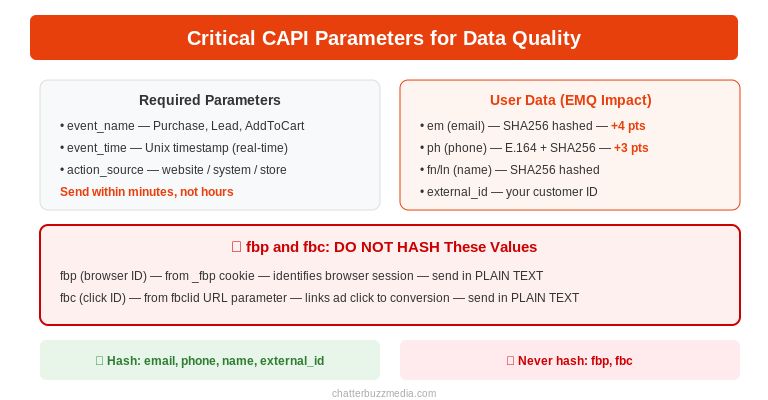
Required Parameters
- event_name. The name of the conversion event (Purchase, AddToCart, Lead, CompleteRegistration, ViewContent, InitiateCheckout). Must match Meta’s standard event naming conventions.
- event_time. A Unix timestamp representing when the event occurred. Send this as close to real-time as possible. Meta accepts events up to 7 days old, but delays beyond one hour reduce optimization effectiveness.
- action_source. Tells Meta where the event originated. For website events, use “website.” For CRM or offline events, use “system_generated” or “physical_store.”
User Data Parameters
These parameters live inside the user_data object and determine how well Meta can match each event to a Facebook user profile.
- em (email). Hashed with SHA256 before sending. This is the single highest-impact parameter for Event Match Quality, typically improving your score by up to 4 points.
- ph (phone). Formatted in E.164 international format, then hashed with SHA256. Adds approximately 3 points to your EMQ score.
- fn and ln (first name and last name). Lowercased and hashed with SHA256.
- external_id. Your internal user or customer ID, hashed with SHA256. Helps Meta maintain consistent identity matching across sessions.
The fbp and fbc Parameters (Critical)
These two parameters are critical for matching server events to browser sessions — and they have specific formatting requirements that many implementations get wrong.
fbp (browser ID) comes from the _fbp first-party cookie that the Meta Pixel sets. It identifies the browser session. fbc (click ID) comes from the fbclid URL parameter that Meta appends when a user clicks your ad.
Critical rules: These values must NOT be hashed. Hashing them breaks matching entirely. Only set fbc when a real fbclid exists in the URL. Never fabricate an fbc value — this degrades data integrity and can harm campaign optimization.
To send these values server-side, capture them from the browser via hidden form fields, cookie reading on your server, or client-side JavaScript that passes them to your backend.
How to Configure Event Deduplication
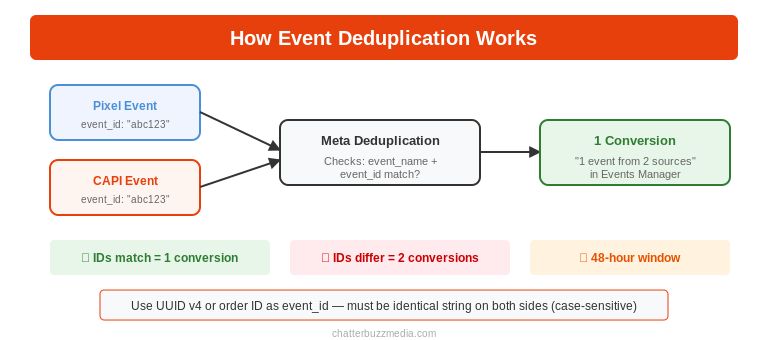
If you’re running the Meta Pixel and Conversions API together (which Meta recommends), you must configure event deduplication to prevent the same conversion from being counted twice. Without it, Meta would think you got double the actual conversions.
Here’s exactly how it works and how to set it up correctly.
How Deduplication Works
When Meta receives an event from the Pixel and a matching event from CAPI within a 48-hour window, it uses two fields to determine if they represent the same user action: event_name and event_id. If both fields match, Meta recognizes them as duplicates and counts the conversion only once.
Important: Deduplication does not rely on user identifiers like email, phone, fbp, or fbc. Those parameters help with user matching (connecting the event to a Facebook profile), not event deduplication. Deduplication only checks event_name and event_id.
How to Generate and Pass event_id
- Generate a unique identifier when a conversion event occurs. Use a UUID v4, ULID, or any other method that produces a reliably unique string.
- Pass this identifier to the Meta Pixel as the eventID parameter in your fbq(‘track’) call.
- Pass the same identifier to CAPI as the event_id parameter in your server-side POST request.
- Ensure both values are identical strings. Any mismatch — even a difference in casing or whitespace — causes deduplication to fail and the event gets double-counted.
Testing Deduplication
After implementation, verify deduplication is working in Events Manager. Compare the total event count from “Browser” events and “Server” events individually against the deduplicated total. If the combined total roughly equals the individual totals rather than doubling them, deduplication is working correctly.
If your total event count appears doubled, review your event_id implementation. The most common failure points are mismatched strings, missing event_id on one side, or inconsistent event naming. Good marketing KPI tracking starts with clean data, and deduplication is the foundation.
How to Improve Your Event Match Quality Score
Event Match Quality (EMQ) is a score from 0 to 10 that Meta assigns to each of your conversion events. It measures how effectively Meta can match your server-side events to Facebook user profiles. Higher EMQ means better attribution, smarter audience optimization, and stronger campaign performance.
Here’s what to target and how to get there.
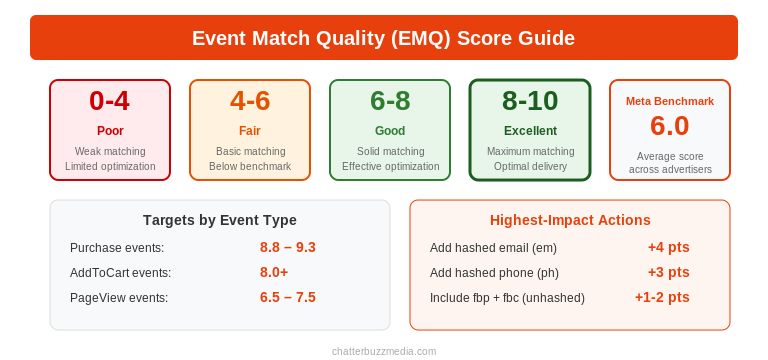
EMQ Benchmarks by Event Type
- Purchase events: 8.8 to 9.3 is the ideal range. These events typically carry the most user data because the user has completed a transaction.
- AddToCart events: Target 8.0 or above.
- PageView events: 6.5 to 7.5 is normal. Users haven’t provided personal data at this stage, so matching is more limited.
- General benchmark: Meta’s internal benchmark sits around 6 out of 10. Scores above 8 are excellent.
The Highest-Impact Improvements
Send hashed email with every event. This is the single biggest lever. Adding the em parameter typically improves EMQ by up to 4 points. Hash all email addresses with SHA256 before sending. Lowercase the email first, remove leading and trailing whitespace, then hash.
Send hashed phone number. Format in E.164 international format (example: +14155551234), then hash with SHA256. This typically adds 3 points to your EMQ score.
Include fbp and fbc. These browser and click identifiers connect server events to browser sessions. Remember: do not hash these values.
Send multiple identifiers together. Meta’s matching confidence increases dramatically when you send email + phone + external_id + fbp + fbc together rather than any single identifier alone.
Enable Advanced Matching. Turn on Advanced Matching in your Events Manager settings. This allows the Pixel to automatically capture additional user data from form fields on your website, which supplements the data you send through CAPI.
Monitoring EMQ
Check your EMQ scores in Events Manager at least weekly. Navigate to Events Manager, select your Pixel, click on any event (like Purchase), and look for the Event Match Quality score. If any event scores below 6.0, prioritize adding the missing user data parameters outlined above.
Performance impact — lower CPA, higher ROAS — typically shows within 2 to 4 weeks as Meta’s algorithm adapts to improved signal quality. Brands report 15 to 20% campaign performance improvement on average with full CAPI implementation, according to Meta’s developer documentation.
How to Connect Your CRM for Deeper Funnel Optimization
One of the most powerful applications of the Conversions API is sending CRM lifecycle events to Meta. This allows Meta to optimize campaigns based on what happens after the initial conversion — when a lead becomes a qualified opportunity, books a demo, or closes as a customer.
Without CRM integration, Meta only sees the initial form fill or signup. It can’t distinguish between high-quality and low-quality leads when optimizing your campaigns.
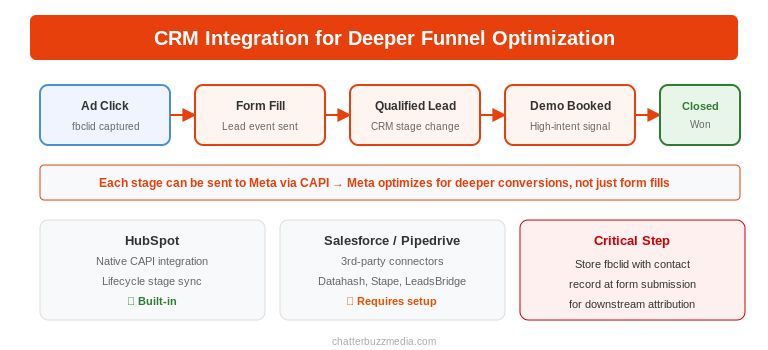
Why CRM Integration Changes Everything
When you send CRM events through CAPI, Meta can optimize for deeper funnel outcomes. Instead of optimizing for “lead” events (which may include unqualified submissions), you can optimize for “qualified lead,” “demo booked,” or “closed-won” events. This fundamentally changes the quality of traffic Meta sends you.
For B2B companies running marketing funnel automation, this is the difference between filling your pipeline with tire-kickers and filling it with decision-makers.
Platform-Specific Integration Options
HubSpot offers a built-in Conversions API integration. After connecting your Facebook Ads account in HubSpot’s settings, you can create conversion events that sync CRM lifecycle stage changes and form submissions directly to Meta through CAPI. Only HubSpot-created forms are supported — external forms embedded in HubSpot can’t sync through the native integration.
Salesforce, Pipedrive, and other CRMs without native Meta CAPI integrations can use third-party connectors like Datahash, Stape, or LeadsBridge. Alternatively, configure webhooks that fire whenever a deal changes stage, sending relevant data to your CAPI endpoint. If you’ve already implemented sGTM, route CRM events through the same server-side container that handles your website events.
The Critical Detail: Preserving Click IDs
When a user clicks your Meta ad and lands on your website, the URL contains an fbclid parameter. To enable Meta to connect a CRM conversion (which may happen days or weeks later) back to the original ad click, you must capture and store the fbclid value with the contact record in your CRM at the time of initial form submission.
When you later send the CRM event through CAPI, include this stored fbc value in the user_data object. Without this, Meta can’t attribute the downstream conversion to the original ad click — and your marketing ROI data will be incomplete.
Common CAPI Mistakes That Quietly Wreck Your Campaigns
Even well-intentioned CAPI implementations can underperform if these issues go unaddressed. These are the mistakes that don’t throw errors — they just silently degrade your ad performance.
Here are the most common ones and how to fix them.
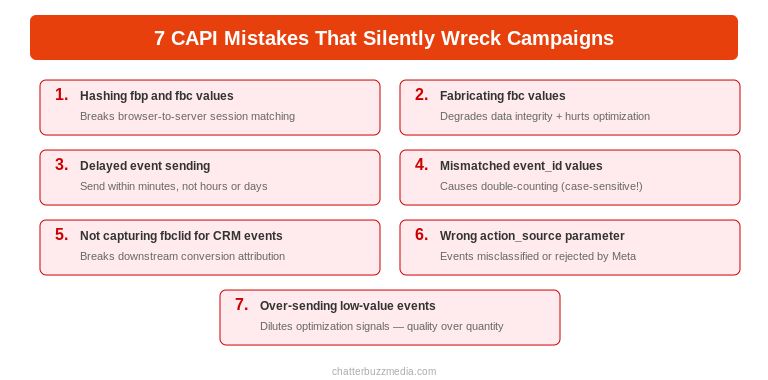
Hashing fbp and fbc. These browser and click identifier parameters must be sent in plain text. Hashing them breaks Meta’s ability to match server events to browser sessions. This is the single most common implementation error.
Fabricating fbc values. Only send an fbc parameter when a real fbclid exists in the URL from an actual ad click. Sending fabricated click IDs degrades your data integrity and can harm campaign optimization.
Delayed event sending. Send events as close to real-time as possible, ideally within minutes of the conversion. Events sent hours or days later provide less optimization value to Meta’s algorithm. Meta accepts events up to 7 days old, but timeliness matters for performance.
Mismatched event_id values. If the event_id in your Pixel call doesn’t exactly match the event_id in your CAPI request — including casing and whitespace — deduplication fails and events are double-counted.
Forgetting to capture fbclid for CRM events. If you plan to send downstream CRM events through CAPI, you must capture the fbclid from the landing page URL at the time of initial conversion and store it with the contact record. Without this, Meta can’t attribute the CRM event back to the original ad click.
Using the wrong action_source. Website events should use “website.” CRM events should use “system_generated.” Offline or in-store events should use “physical_store.” Using the wrong value can cause events to be misclassified or rejected.
Over-sending low-value events. Flooding Meta with every micro-interaction dilutes optimization signals. Focus on sending the events that actually matter for your business: purchases, qualified leads, and high-intent actions. Quality of signal data trumps quantity, especially as Meta’s algorithm uses these signals to build your conversion-optimized audiences.
Frequently Asked Questions
1. 🔍 What is Meta CAPI and do I really need it?
Meta CAPI (Conversions API) is a server-to-server tracking interface that sends conversion event data directly from your server to Meta’s advertising platform. It works alongside the Meta Pixel to improve tracking accuracy and bypass browser-based privacy restrictions. In 2026, Meta recommends every advertiser running paid campaigns implement CAPI in addition to the Pixel. If you’re spending money on social media advertising, you need it.
2. 📊 Do I still need the Meta Pixel if I have CAPI?
Yes. Meta recommends running both together. The Pixel captures real-time browser events and user behavior signals. CAPI ensures reliable conversion tracking even when browser limitations prevent the Pixel from firing. Together, they provide the most complete data. When running both, configure event deduplication using matching event_id values to prevent double-counting.
3. ⚡ How much does Meta Conversions API cost to set up?
CAPI Gateway hosting runs $10 to $400+ per month. Server-side GTM hosting costs $10 to $50 per month. Manual/direct API implementation has no ongoing hosting cost but requires $500 to $5,000+ in developer time for the initial build. Platform-native integrations (like Shopify’s built-in CAPI connector) are typically free.
4. 🏦 What happened to Meta’s Offline Conversions API?
Meta permanently discontinued the Offline Conversions API in May 2025. All offline conversion tracking — in-store purchases, phone conversions, CRM events — now flows through the standard Conversions API. When sending offline events, use the action_source parameter set to “physical_store” or “system_generated” to identify them correctly.
5. 🤝 How do I connect my CRM to Meta Conversions API?
HubSpot offers a native CAPI integration that syncs lifecycle stage changes and form submissions directly to Meta. For Salesforce, Pipedrive, and other CRMs, use third-party connectors (Datahash, Stape, LeadsBridge) or configure webhooks that send data to your CAPI endpoint when deals change stages. The critical step is capturing and storing the fbclid click ID with each contact record.
6. 💰 What is a good Event Match Quality score?
For Purchase events, target 8.8 to 9.3. For AddToCart, target 8.0+. For PageView events, 6.5 to 7.5 is normal. Meta’s internal benchmark is around 6 out of 10. The highest-impact improvement is sending hashed email addresses with every event, which can increase your EMQ score by up to 4 points.
7. 🚀 How long does it take to see results after setting up CAPI?
Most advertisers see improved attribution data within 48 hours. Event Match Quality scores update every 48 hours. Meaningful performance improvements — lower CPA, higher ROAS — typically appear within 2 to 4 weeks as Meta’s algorithm adapts to improved signal quality.
8. 📈 Is CAPI compliant with GDPR and CCPA?
Yes, when implemented correctly. Advertisers control what data is sent and can pass consent and data-processing flags — such as Limited Data Use (LDU) — through the Conversions API. Meta then automatically applies the appropriate restrictions based on the user’s preferences and regional privacy requirements. You’re responsible for collecting consent on your website or app before sending data.
Conclusion
Meta Conversions API is no longer a nice-to-have technical upgrade. It’s the infrastructure that determines whether Meta’s algorithm can actually optimize your campaigns with accurate data. Browser-based tracking has been permanently degraded by privacy changes, ad blockers, and platform restrictions — and that gap will only widen.
The advertisers who implement CAPI correctly, optimize their Event Match Quality, and connect their CRM data will see measurably better ROAS. Those who keep relying on the Pixel alone will continue flying blind on over half their conversions.
Here’s your action plan:
- Choose your setup method — Gateway for simplicity, sGTM for multi-platform, or direct API for maximum control.
- Implement dual tracking with the Pixel and CAPI, and configure event deduplication with matching event_id values.
- Optimize your Event Match Quality by sending hashed email and phone with every event, and including fbp and fbc parameters (unhashed).
- Connect your CRM to send deeper funnel events, and preserve fbclid values with contact records for downstream attribution.
For a comprehensive look at how paid media management and server-side tracking fit into a complete marketing strategy, explore our resource guides or request a free digital marketing audit.

Victoria Wallace
Victoria Wallace is a senior content strategist and marketing writer with 30+ years of experience helping more than 200 brands translate complex business goals into clear, conversion-focused content. Her background spans paid media, marketing strategy, go-to-market planning, brand positioning, and full-funnel campaign development, giving her a deep understanding of how SEO content connects to real business growth.