
 321-236-2899
Google Ads Audit: How to Find (and Stop) Wasted Ad Spend in 30 Minutes
Most Google Ads accounts are quietly leaking money, and the owners have no idea where it goes. Industry analyses consistently find that 20% to 40% of the average paid search budget is spent on clicks that will never convert.
The good news: you do not need a week or an expensive consultant to find those leaks. A focused Google ads audit follows a fixed order, and the highest-impact problems tend to hide in the same three or four places every time.
This guide is a step-by-step, 30-minute google ads account audit you can run yourself. You will learn exactly which reports to open, what “good” looks like at each step, and how to turn a pile of findings into a prioritized fix list that actually moves your cost per acquisition. Let’s start where the money hides.
Key Takeaways
- Fix tracking first. If your conversion data is wrong, every other decision in the audit is built on sand.
- The search terms report is the fastest win. Irrelevant queries are the single largest source of wasted ad spend in most accounts.
- Impression share tells you why you’re losing. Lost budget and lost rank are two very different problems with two different fixes.
- Structure and settings drain money silently. Display expansion, broad location targeting, and leftover defaults quietly burn budget.
- An audit is only useful if it ends in action. Score every finding by impact and effort, then fix the top three first.
Step 1: Confirm Your Conversion Tracking Is Actually Working
Before you judge a single campaign, confirm that your conversion tracking is accurate, because a google ads audit built on broken data will point you in the wrong direction. Bad tracking is the most common and most expensive problem in any account.
This matters because Google’s automated bidding optimizes toward whatever you tell it a conversion is. If a “conversion” fires on every page load, or counts the same lead three times, the algorithm learns to chase the wrong signal and spends more to get worse results.
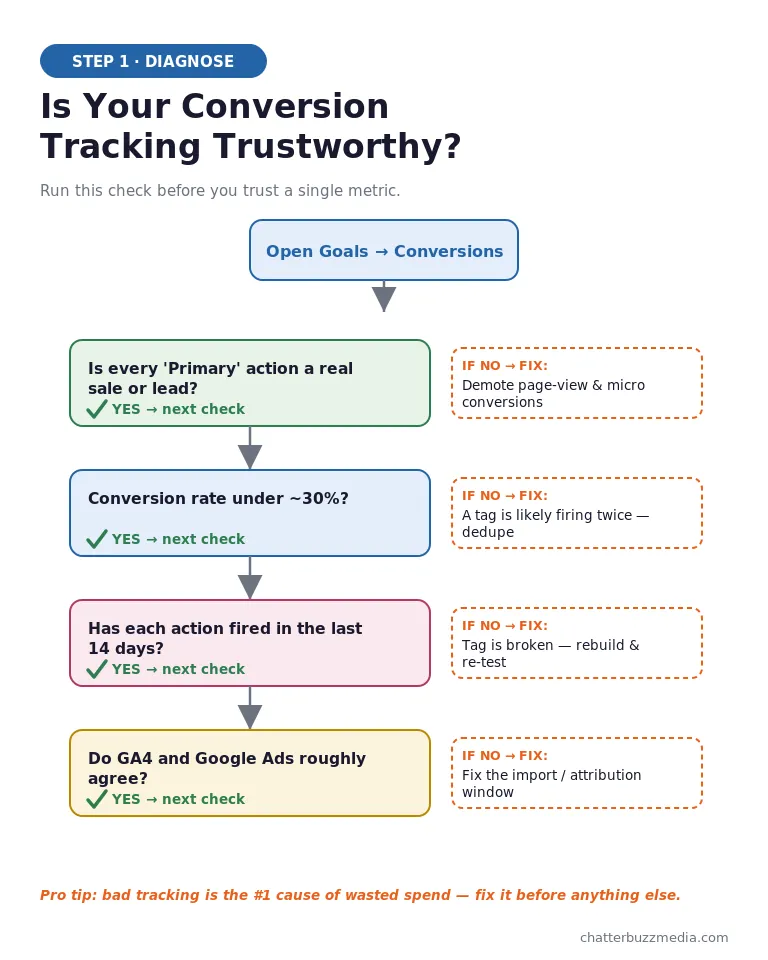
Open your conversions from the Goals menu and work through this quick check.
- Verify every primary action is real. Only true business outcomes (a lead form, a call, a purchase) should be marked as “Primary” and used for bidding.
- Look for duplicate counting. A conversion rate above 30% on a lead-gen account usually means a tag is firing more than once.
- Check the “last recorded” date. If a conversion action hasn’t fired in weeks, the tag is likely broken.
- Confirm GA4 and Google Ads agree. Wildly different numbers between the two platforms signal an import or attribution problem.
Google’s own conversion tracking documentation is the fastest reference for setup issues. If you run lead gen offline, make sure enhanced conversions or offline import is feeding real sales data back in, the same discipline that powers a strong server-side tracking setup on Meta.
Once you trust your numbers, you can finally read the metrics that reveal where budget is working. That’s the next step.
Step 2: Set a Baseline With the Metrics That Matter
A useful audit starts with a baseline, so pull the last 30 to 90 days of data and read five metrics before you touch anything. These numbers tell you where you stand and which campaigns deserve scrutiny.
Context is everything here. A “high” cost per click is only a problem relative to the revenue that click produces, so always read cost metrics alongside conversion metrics.
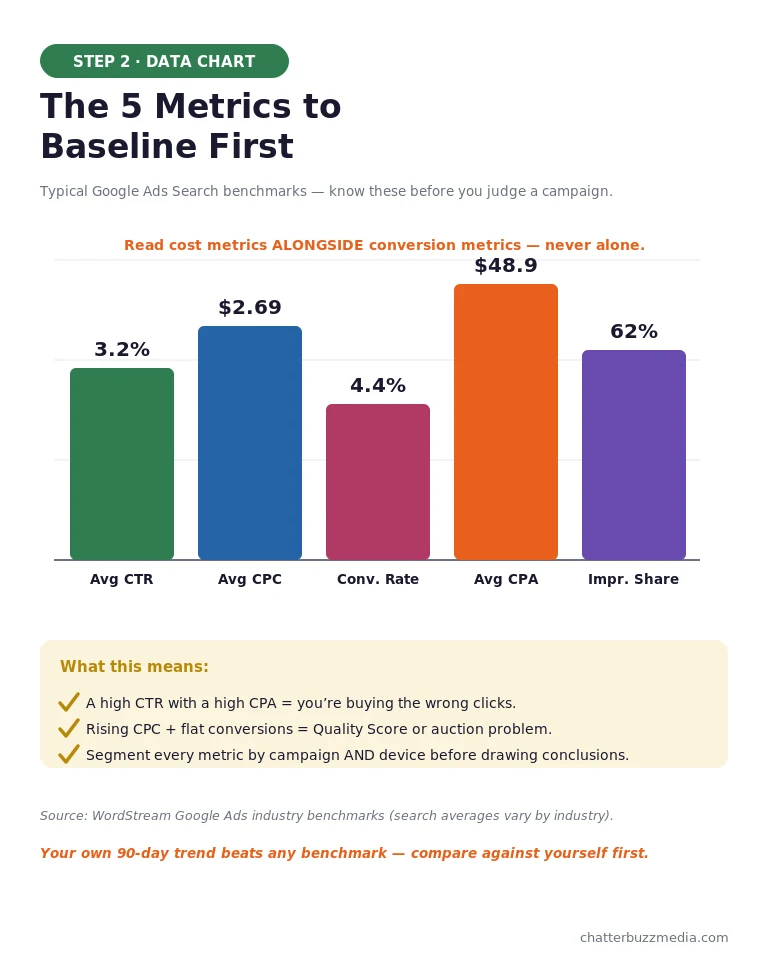
Focus on these five, in this order:
- Click-through rate (CTR). Low CTR signals weak relevance; a high CTR with few conversions often means you’re paying for the wrong clicks.
- Cost per click (CPC). Rising CPC with flat conversions is a red flag for auction or Quality Score problems.
- Cost per acquisition (CPA). This is your north star for lead gen; high CPA with low volume means budget is being wasted, so know how to calculate customer acquisition cost correctly.
- Return on ad spend (ROAS). The profitability metric for ecommerce; segment it by campaign to find the drains.
- Impression share. How often you show up when eligible, the setup for Step 4’s diagnosis.
Compare each metric against your own historical trend first, then against published industry benchmarks. Segment by campaign and device so a single weak spot doesn’t get buried in an account-wide average, a discipline that also underpins clean performance reporting.
With a baseline set, you’re ready to attack the biggest source of waste in almost every account. Head to the search terms report.
Step 3: Mine the Search Terms Report to Kill Wasted Spend
The search terms report is where you’ll find the fastest, largest savings in your entire ppc audit, because it shows the actual queries that triggered your ads, not the keywords you bid on. The gap between the two is pure waste.
This single report routinely exposes 15% to 30% of a budget spent on irrelevant searches, from job seekers, DIY researchers, free-seekers, and competitor lookups that will never buy.
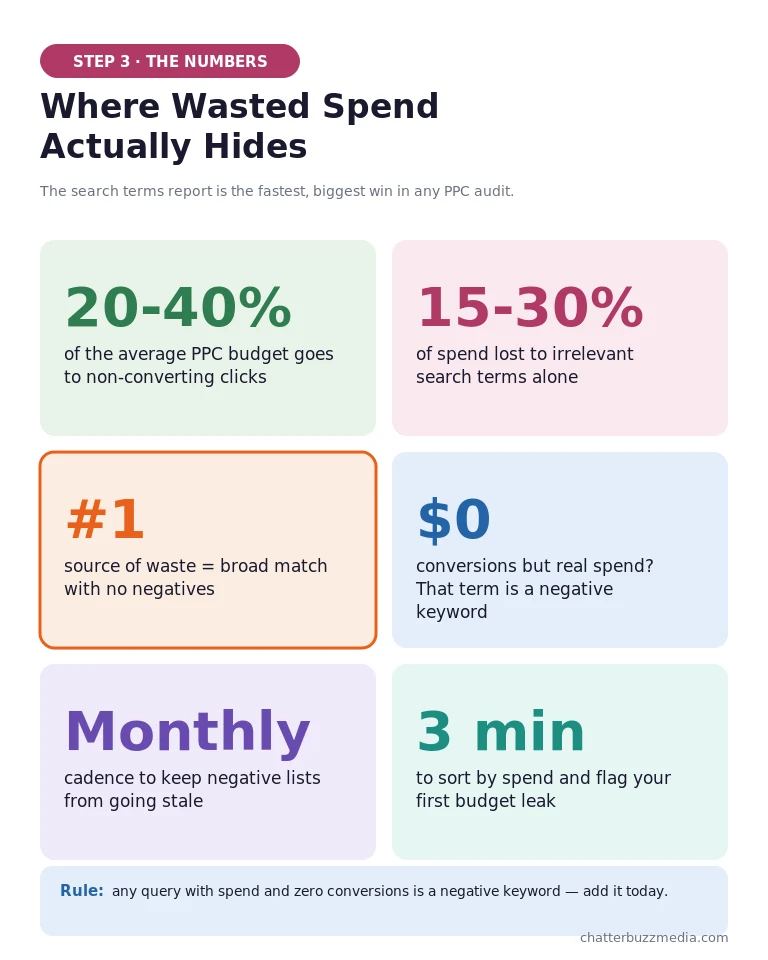
Open Insights & Reports, then Search terms, and work top-down by spend.
- Flag irrelevant queries. Any term with spend and zero conversions is a candidate for a negative keyword.
- Build tight negative keyword lists. Add words like “free,” “jobs,” “cheap,” or “DIY” where they don’t fit your offer, following Google’s negative keyword guidance.
- Fix loose match types. Broad match without strong Smart Bidding and negatives is the most common way accounts hemorrhage money.
- Catch brand leakage. Non-brand campaigns pulling your branded terms inflate your results and hide true performance.
Repeat this monthly, not once. Search behavior shifts constantly, and a negative list that was airtight in spring goes stale by fall, which is why the best PPC management treats negatives as a living document.
Once you’ve stopped paying for the wrong clicks, find out why you’re missing the right ones. That’s an impression share question.
Step 4: Use Impression Share to Diagnose Why You’re Losing Auctions
Impression share tells you how often your ads appear when they’re eligible, and its two “lost” metrics diagnose exactly why you’re missing traffic. This is one of the most underused diagnostics in a google ads account audit.
The reason this matters is that “not enough conversions” has two completely different root causes, and impression share separates them cleanly so you don’t waste time on the wrong fix.
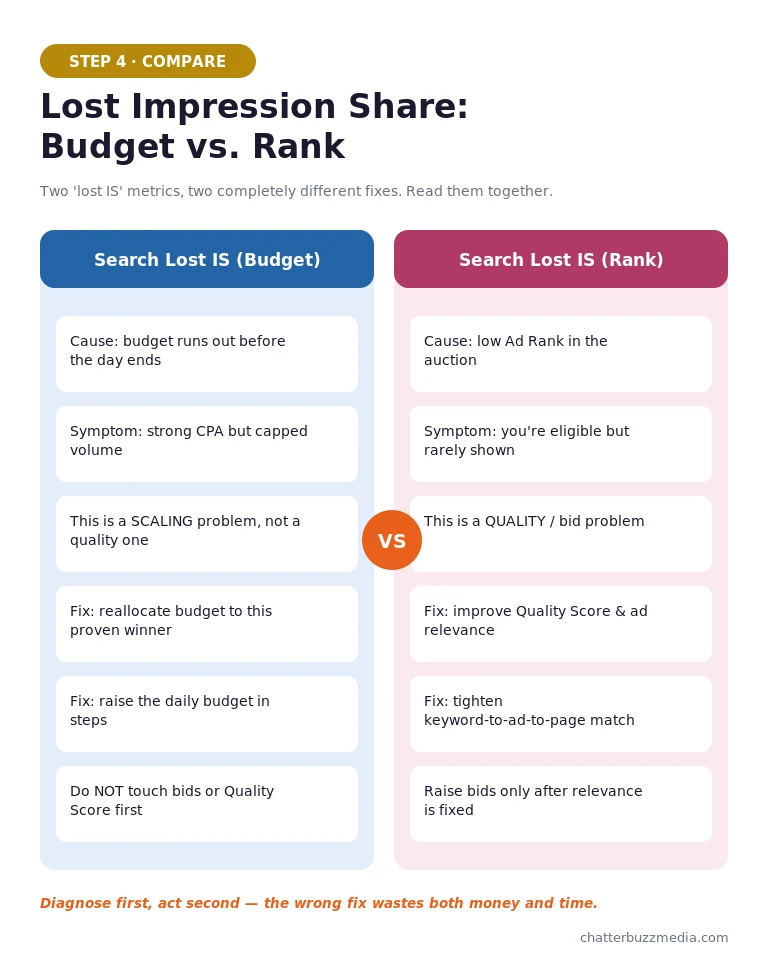
Add these columns to any campaign view and read them together.
- Search Lost IS (Budget). You’re losing auctions because your budget runs out, a scaling problem, not a quality problem.
- Search Lost IS (Rank). You’re losing because of low Ad Rank, driven by bids or Quality Score.
- High Lost IS (Rank) on a profitable campaign. Fix Quality Score and relevance before you simply raise bids.
- High Lost IS (Budget) with a strong CPA. This is your clearest signal to reallocate budget toward a proven winner.
Google explains the mechanics in its impression share support article. The practical payoff: you stop guessing and start moving money and effort to the exact lever that’s holding you back.
Budget and rank problems often trace back to how the account itself is built. Structure is the next place to look.
Step 5: Audit Campaign Structure and Settings for Silent Drains
Poor structure and leftover default settings drain budget silently, so a thorough google ads audit checklist always includes a pass through every campaign’s settings. These leaks rarely announce themselves in a headline metric.
The danger of default settings is that they optimize for Google’s reach, not your profit. A few toggles left in their out-of-the-box state can quietly send a meaningful share of your spend to low-quality placements.
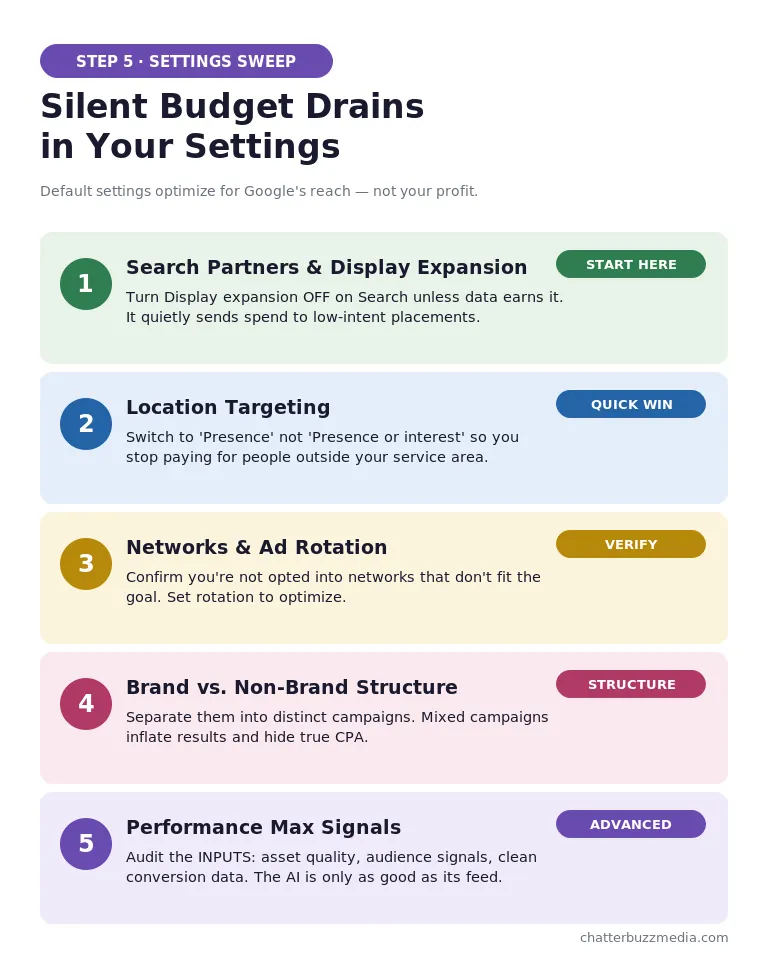
Open each campaign’s settings and check the usual suspects.
- Search Partners and Display Expansion. Turn off Display expansion on Search campaigns unless the data clearly earns it.
- Location targeting. Set it to “Presence” rather than “Presence or interest” so you don’t pay for people outside your service area.
- Ad rotation and networks. Confirm you aren’t unintentionally opted into networks that don’t fit your goals.
- Performance Max signals. For PMax and AI-driven campaigns, audit the inputs, asset quality, audience signals, and clean conversion data, since the algorithm is only as good as what you feed it.
Structure matters too: brand and non-brand belong in separate campaigns, and bloated ad groups dilute relevance. If your account grew organically over years, it may deserve the same fresh-eyes rebuild that a full marketing audit brings to the wider funnel.
With the plumbing checked, turn to the strategy that controls how aggressively you spend. That’s bidding.
Step 6: Pressure-Test Your Bidding and Budget Allocation
Your bidding strategy should match your goal, so confirm each campaign uses the right one and that budget flows to your proven winners. A mismatch here caps performance no matter how clean the rest of the account is.
This step matters because the wrong automated strategy fights against you. Target CPA and Target ROAS pursue very different outcomes, and pointing them at the wrong objective wastes both budget and learning time.
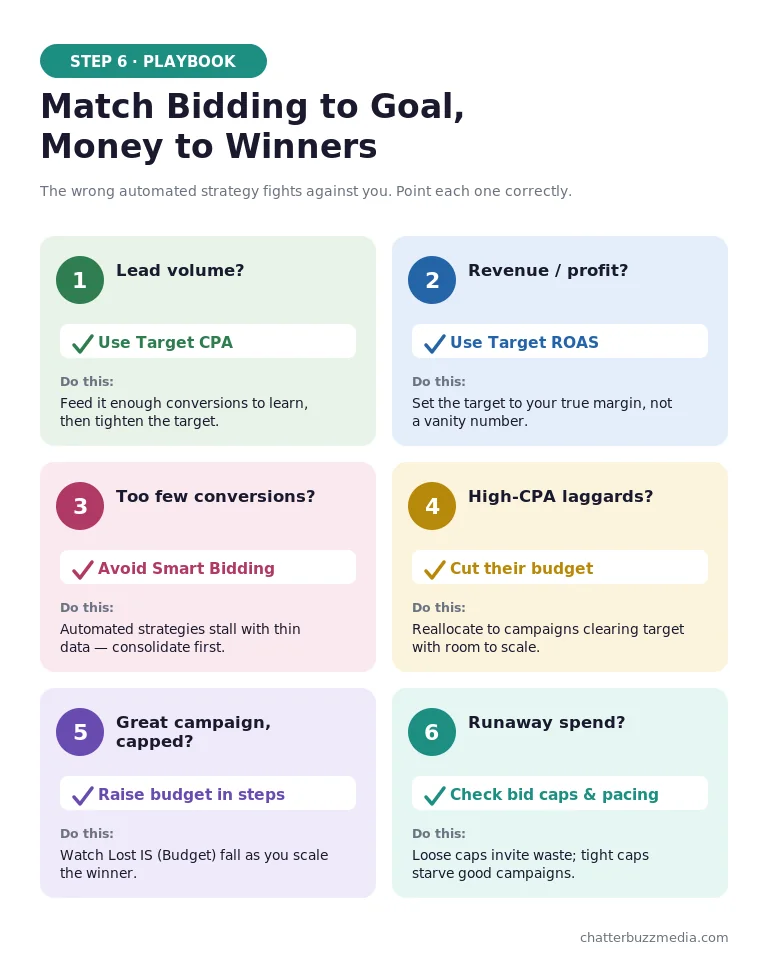
Review strategy and money together.
- Match strategy to objective. Use Target CPA for lead volume and Target ROAS for revenue and profitability.
- Feed Smart Bidding enough data. Automated strategies struggle in campaigns with too few conversions to learn from.
- Reallocate toward winners. Shift budget from high-CPA laggards to campaigns that clear your target with room to scale.
- Watch bid caps and pacing. Overly tight caps starve good campaigns; loose ones invite runaway spend.
Remember that clicks are only half the equation, since a perfectly bid campaign still fails if the landing page can’t close. That connection between spend and conversion is exactly where PPC and conversion rate optimization meet.
Speaking of the click experience, your ads and pages are the last place waste hides. Grade them next.
Step 7: Grade Your Ads, Assets, and Landing Pages
Even a flawless account setup wastes money if the ad and the page fail to convert, so end your audit by grading the creative and the destination. This is where relevance turns spend into revenue, or doesn’t.
The stakes are simple: you pay for every click, but you only profit from the ones that act. A mismatch between ad promise and page delivery quietly torches your budget and drags down Quality Score.
Score both sides of the click.
- Ad strength and formats. Replace legacy ad types, fill out Responsive Search Ads, and pin only where control truly matters.
- Message match. The headline a user clicked should be echoed on the page they land on.
- Page speed and mobile. Slow or clunky mobile pages kill conversion rate and inflate CPA, a core theme in high-converting PPC landing pages.
- Assets and extensions. Sitelinks, callouts, and structured snippets lift CTR and Ad Rank at no extra cost.
Great creative testing is a program, not a one-time fix, the same mindset behind disciplined ad creative testing and performance creative strategy. Weak pages are also worth a dedicated conversion rate optimization pass after the audit.
You now have a full picture of where money leaks. The final move is turning that picture into action.
Turn Your Audit Into a Prioritized 30-Day Fix List
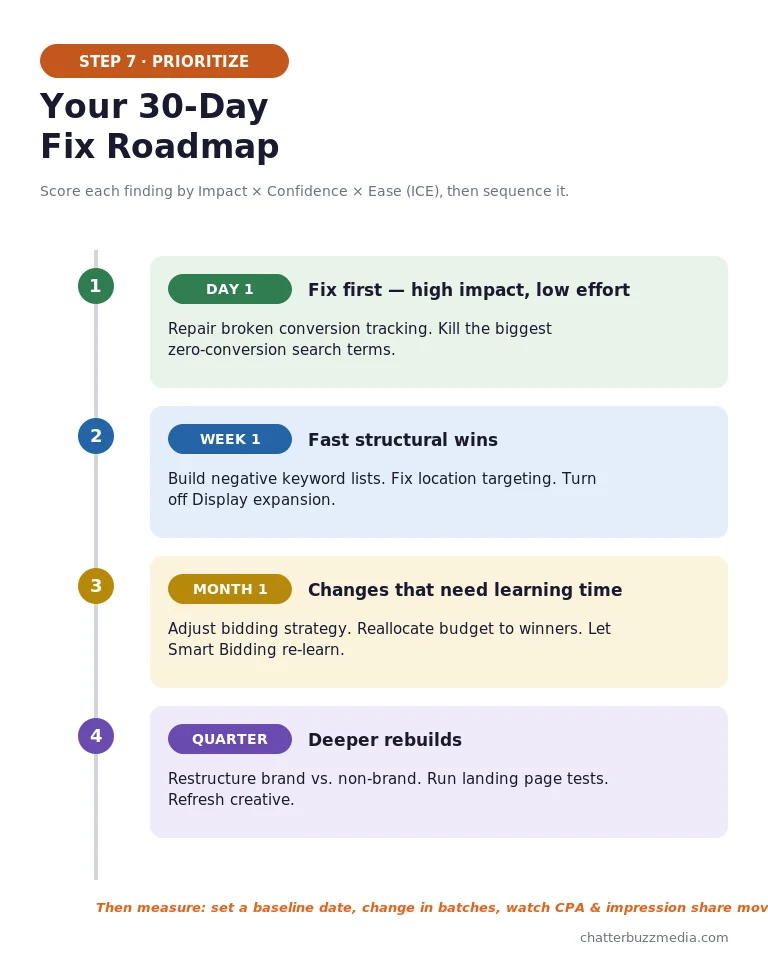
An audit only pays off when it ends in a ranked action plan, so score every finding by impact and effort before you touch the account again. A long list of problems without priorities just creates overwhelm.
The simplest method is the ICE framework: rate each fix on Impact, Confidence, and Ease, then multiply the scores. High-impact, high-ease items are your first moves.
- Fix first: broken conversion tracking and obvious search-term waste, high impact, low effort.
- Fix this week: negative keyword lists, location settings, and Display expansion toggles.
- Fix this month: bidding strategy changes and budget reallocation that need learning time.
- Plan next quarter: structural rebuilds, landing page tests, and creative refreshes.
Then measure. Set a baseline date, make your changes in batches, and watch CPA and impression share move so you can prove the audit worked.
Frequently Asked Questions
1. 🔍 How long does a Google Ads audit take?
A focused self-audit of a small-to-mid account takes about 30 minutes when you follow a fixed order. A deep, agency-grade audit of a large or complex account can take two to four hours, mostly spent on structure and historical trend analysis.
2. 📊 How often should I audit my Google Ads account?
Run a light health check monthly and a deeper audit each quarter. Also audit immediately whenever you inherit a new account, see a sudden performance drop, or restructure campaigns.
3. ⚡ What is the fastest way to find wasted ad spend?
Open the search terms report and sort by spend. Any query with real spend and zero conversions is wasted budget you can eliminate with a negative keyword in minutes.
4. 🏦 What tools do I need for a google ads audit?
The Google Ads interface and a linked GA4 property cover the essentials for free. A dedicated google ads audit template or checklist keeps you consistent, and third-party PPC tools speed up large accounts. If the account is complex, a specialized PPC agency can run a deeper diagnostic.
5. 🤝 What’s the difference between an audit and ongoing optimization?
An audit is a structured diagnosis that finds problems and opportunities at a point in time. Optimization is the ongoing execution of the fixes and tests that the audit surfaces.
6. 💰 How much wasted spend does a typical audit find?
Industry analyses commonly find 20% to 40% of a paid search budget going to non-converting clicks. Accounts with loose match types and thin negative lists often sit at the higher end of that range.
7. 🚀 Can I audit a Performance Max campaign the same way?
The principles hold, but the levers differ. For PMax you audit the inputs, asset group quality, audience signals, and conversion data cleanliness, rather than keyword-level bids.
8. 📈 What should I do first after finishing my audit?
Fix conversion tracking and eliminate the biggest search-term waste before anything else. These two moves are high impact, low effort, and they make every later optimization more reliable.
Conclusion: Your 30-Minute Audit, on Repeat
A Google Ads account rewards attention and punishes neglect. The waste you just learned to find doesn’t disappear on its own, it compounds, month after month, until someone runs the checklist.
The power of this google ads audit is that it’s repeatable. Run the same seven steps every month, and the leaks never get a chance to grow.
Here’s your action plan:
- Confirm your conversion tracking is accurate before trusting any metric.
- Mine the search terms report and stop paying for irrelevant clicks.
- Diagnose with impression share and reallocate budget to proven winners.
- Grade ads and pages, then prioritize your fixes with an impact-and-effort score.
Want a structured starting point? Grab a free digital marketing audit to benchmark your account, and explore the broader performance marketing guide for the strategy that turns a clean audit into sustained growth. For more tactical playbooks, the full resource library and the Google Ads best practices guide are the natural next reads.

Victoria Wallace
Victoria Wallace is a senior content strategist and marketing writer with 30+ years of experience helping more than 200 brands translate complex business goals into clear, conversion-focused content. Her background spans paid media, marketing strategy, go-to-market planning, brand positioning, and full-funnel campaign development, giving her a deep understanding of how SEO content connects to real business growth.