
 321-236-2899
Performance Max Campaigns: When to Use PMax (and When It’s Wasting Your Budget)
Most Google Ads accounts running Performance Max are not measuring whether it actually works. They see the dashboard ROAS climb, assume the automation is winning, and never check whether PMax is simply harvesting demand another campaign already created.
This guide walks through when Performance Max campaigns earn their budget and when they quietly waste it. It draws on patterns from managing hundreds of Google Ads accounts and more than $1B+ in tracked ad spend, where the same PMax mistakes show up again and again.
You will learn a five-step process to decide whether PMax fits your account, how to structure it so it complements Search instead of cannibalizing it, and how to catch the attribution problem that hides the truth from your reports. Let’s start with what PMax actually is.
Key Takeaways
- PMax earns budget on ecommerce accounts with real conversion volume (20-30+ conversions per month) sitting on top of a working Search and Shopping foundation.
- PMax burns budget on small budgets, weak lead-gen signals, and B2B account-based motions where the algorithm lacks the volume to learn.
- Cannibalization is the most common hidden failure: PMax takes credit for branded and high-intent demand that Search already owned.
- Native platform ROAS overstates PMax performance, often by 50% or more, because view-through credit inflates the numbers.
- The fix is structure and signals: brand exclusions, first-party audience signals, value-based bidding, and offline conversion imports.
- Run Search and Shopping first, PMax second, and judge the whole account against blended revenue, not campaign-level dashboards.
What Performance Max Actually Is (and What Google Doesn’t Advertise)
Performance Max is a single Google Ads campaign type that runs across all of Google’s inventory using AI to control targeting, creative, and placement. You supply assets, audience signals, and a conversion goal, and Google decides the rest.
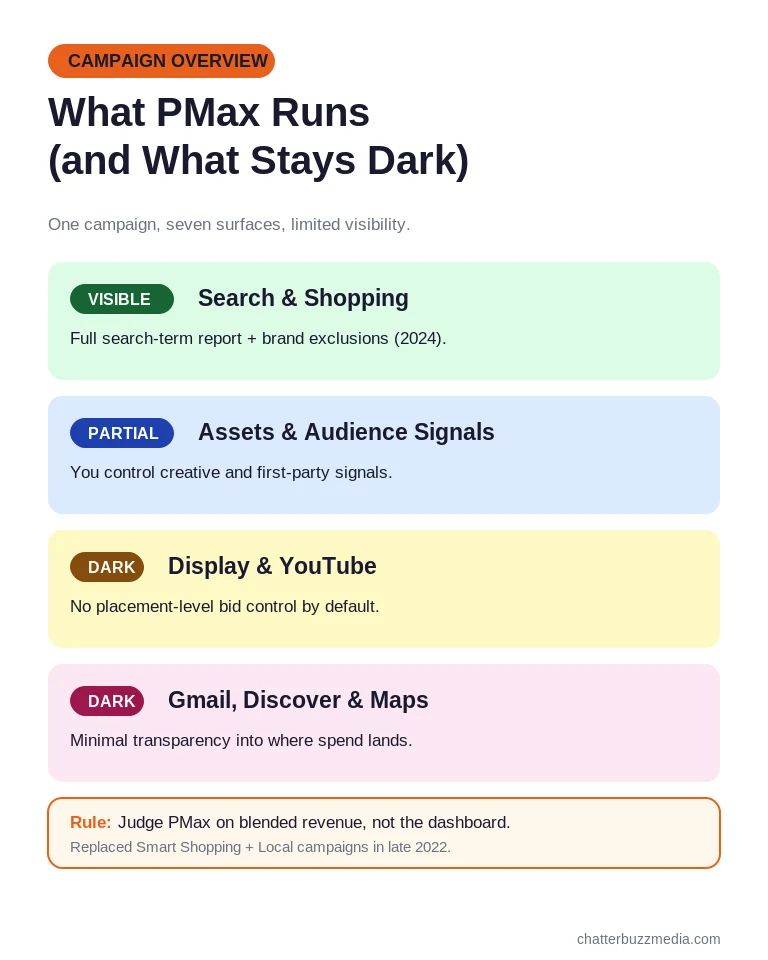
One PMax campaign can serve ads on Search, Shopping, Display, YouTube, Gmail, Discover, and Maps at the same time. It replaced Smart Shopping and Local campaigns in late 2022, and Google has pushed it hard ever since as part of its broader Google Ads best practices push.
Understanding what Google leads with (and what it leaves out) is the first step to using PMax well. The pitch is compelling, but the tradeoffs are real.
What Google advertises is simplicity: one campaign, all of its inventory, and algorithmic optimization that finds conversions for you. That story is genuinely attractive for lean teams.
What Google does not lead with is the loss of control. By default there is no full search-term visibility, no placement-level bid control, and no clean way to exclude Display or YouTube from the mix.
Google added a search-term report and brand exclusions to PMax in 2024, but they only cover Search and Shopping inventory. The Display, YouTube, Gmail, and Discover placements stay largely dark.
It also helps to name why Google promotes PMax so aggressively. PMax expands the surfaces Google can monetize inside a single campaign goal and reduces the need for hands-on management, which is good for Google’s business model.
That incentive is not a conspiracy, but it should shape how you read advice from Google reps and automation-first agencies. The question is never whether PMax works in the abstract; it is whether PMax fits your specific account.
None of this makes PMax bad. It makes PMax a tool with a specific job, which is exactly why the next question matters: is your account ready for it? That is where the real decision starts.
Step 1: Check Whether Your Account Is Ready for PMax
Performance Max only performs when your account gives the algorithm enough signal to learn. Turning it on before you have that signal is the fastest way to waste budget.
PMax is a machine-learning system, and like any Google Ads campaign it needs time and volume to exit its learning phase. Three conditions separate accounts that should run PMax from accounts that should wait.
Run through this readiness check before you build a single asset group:
- Conversion volume: aim for at least 20-30 conversions per month per campaign so the model has data to optimize against.
- Inventory or intent Google can match: retail and ecommerce feeds give PMax the most to work with; thin lead-gen offers give it the least.
- A Search foundation already in place: your Search campaigns should already capture your qualified keywords before PMax layers on top.
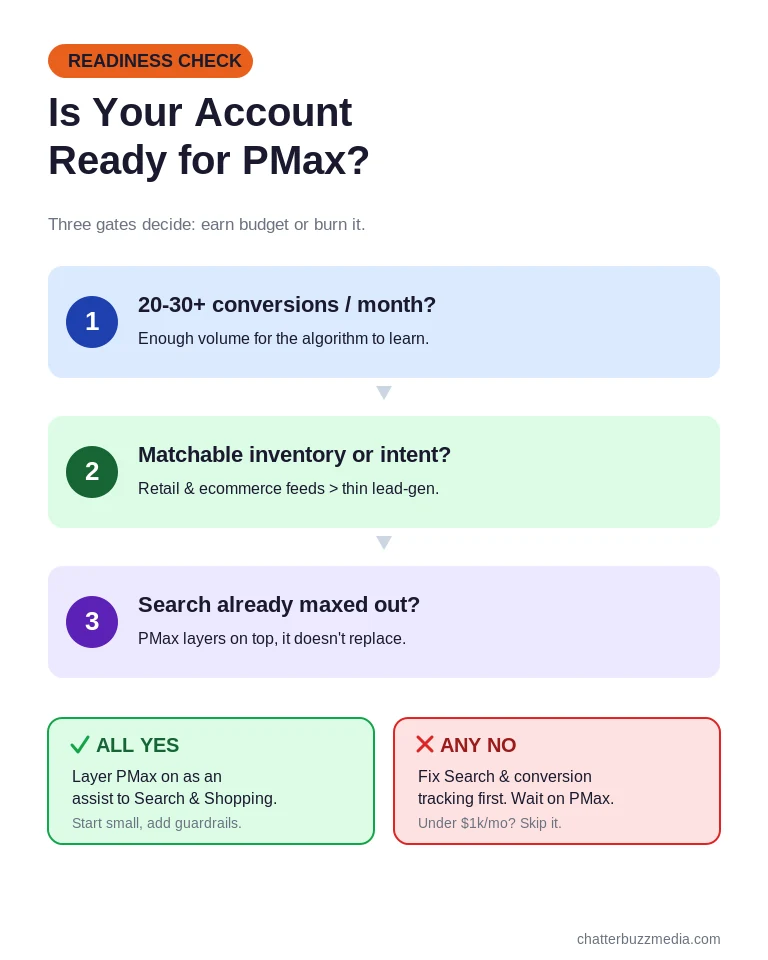
If your budget sits under $1,000 per month, PMax usually fails on volume alone. Display and YouTube consume the budget before the algorithm collects enough conversions to learn.
If you run B2B lead generation with a single form-fill conversion and no quality signal, PMax tends to find the cheapest form fills, which are often the worst leads. According to WordStream’s 2026 Google Ads benchmarks, the average cost per lead already runs around $70, and weak signals push effective cost per good lead much higher.
A real pattern makes this concrete. In audits of B2B SaaS accounts spending under $20,000 a month, PMax repeatedly pulled in branded traffic and existing-customer clicks, inflated its own reported ROAS, and buried what was happening in genuine new-customer acquisition.
The lesson from those accounts is that a weak conversion signal does not just underperform, it actively misleads. The dashboard looks healthy while the pipeline stays flat.
The takeaway is simple: readiness is a gate, not a formality. If you pass all three checks, move to where PMax fits in your budget. If you fail them, fix Search and conversion tracking first.
Step 2: Decide Where PMax Fits in Your Budget Split
The right split for most accounts is Search and Shopping first, Performance Max second. PMax should be an assist layer, not the whole account.
How much budget PMax deserves depends almost entirely on account size and your overall digital marketing budget. Giving it too much too early is how cannibalization and wasted spend begin.
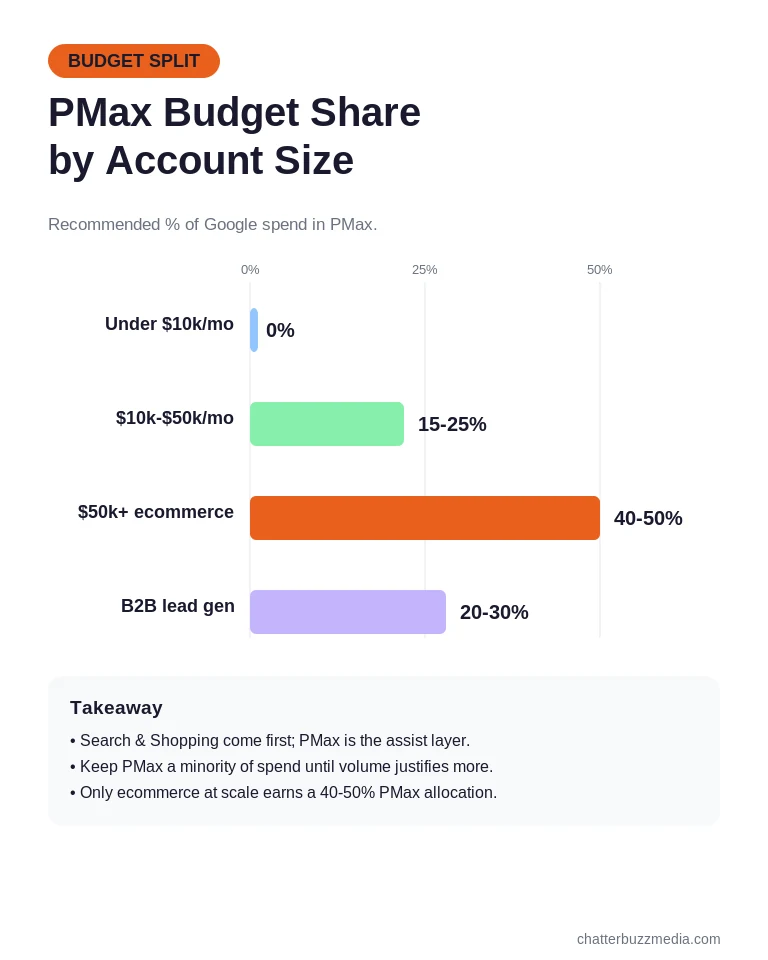
Use account monthly spend as your starting guide for allocation:
- Under $10,000/month: run Search and Shopping only, and skip PMax until volume grows.
- $10,000-$50,000/month: test PMax at roughly 15-25% of budget with tight guardrails.
- Above $50,000/month (ecommerce): scale PMax toward a 40-50% share, paired with Shopping and Search.
- B2B lead generation: keep PMax under 20-30%, and only with value-based bidding live.
Whatever share you land on, wrap PMax in guardrails from day one. Cap the daily spend, apply brand exclusions, feed first-party audience signals, and turn on value-based bidding wherever the data supports it.
These guardrails are what keep a test contained. Without them, a 20% PMax allocation can quietly balloon its influence by absorbing conversions that other campaigns earned.
Each campaign type should own a clear role instead of competing for the same query. Search owns high-intent and brand, Shopping owns product intent, and PMax owns broader discovery and warm retargeting.
Think of it like a relay team rather than four runners in the same lane. When Search, Shopping, and PMax each cover a distinct stretch of the funnel, the handoffs are clean and you can measure each leg.
This role clarity is what makes multi-campaign accounts beat single-campaign PMax setups. When every campaign has a defined job, you can see which lever actually drives incremental revenue.
If you are weighing paid channels more broadly, our breakdown of SEO versus PPC and the PPC versus CRO tradeoff both help frame where paid spend belongs. With the split decided, the next step is building PMax so it earns that budget.
Step 3: Set Up PMax So It Complements Search
A well-structured PMax campaign starts with exclusions, first-party signals, and asset groups that mirror your real product or service taxonomy. The defaults are built for Google’s convenience, not your performance.
Most PMax accounts underperform because they were launched on autopilot. A few deliberate setup choices separate a campaign that assists Search from one that quietly competes with it.
Work through these setup moves in order when you build the campaign:
- Exclude brand terms using Google’s brand-list feature so PMax stops claiming demand your Search brand campaign already owns.
- Upload first-party audience signals from customer lists, not lookalikes alone, to point the algorithm at your best-fit buyers.
- Structure asset groups by product line, persona, or funnel stage so creative stays relevant and quality scores climb.
- Provide strong creative assets, because PMax is only as good as the images, video, and copy you feed it.
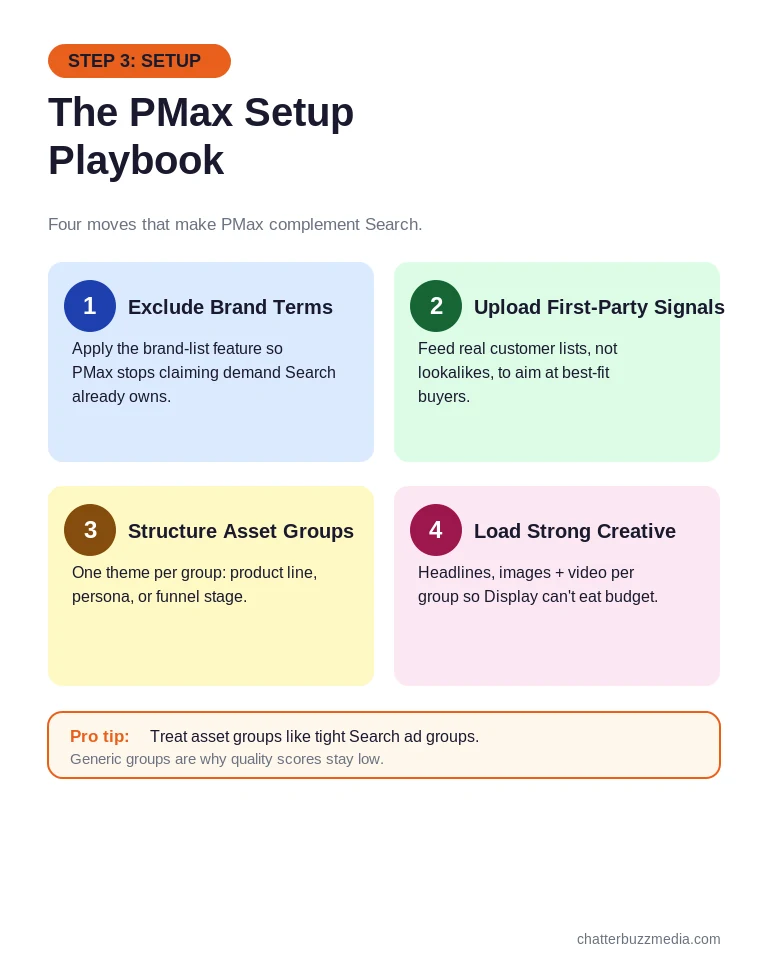
Generic asset groups are the reason Display placements eat budget and creative quality scores stay low. When one asset group tries to cover everything, Google cannot match the right message to the right user.
Pro tip: treat your asset groups the way you would treat ad groups in a well-run Search campaign. One tight theme per group, matched to one audience signal, gives Google the context it needs to serve the right creative.
The same discipline applies to creative volume. Give each asset group enough headlines, descriptions, images, and at least one video so PMax has real variety to test rather than defaulting to the cheapest Display placement it can find.
Pointing PMax at a strong landing page matters just as much as the campaign itself. Our guide to PPC landing pages that convert paid traffic covers the on-page work that makes any Google Ads campaign, including PMax, convert better.
Setup gets the structure right, but structure alone does not tell the algorithm what a good outcome looks like. That requires the right signals, which is the next step.
Step 4: Feed PMax the Right Signals With Value-Based Bidding
Performance Max bids toward whatever conversion signal you give it, so the single highest-impact fix is feeding it revenue data, not raw form fills. Train it on the wrong signal and it optimizes toward the wrong customers.
A raw form-fill signal teaches the algorithm to find cheap form fills. A revenue-stage signal teaches it to find buyers, which is a completely different outcome.
The mechanism that makes this work is the offline conversion import. Here is the sequence that connects your CRM back to Google:
- Capture the click ID when a lead enters your funnel through a PMax ad.
- Track the lead through real stages in your CRM: MQL, SQL, Opportunity, and Closed-Won.
- Push those stages back into Google via Enhanced Conversions for Leads or the Google Ads API, tied to the original click.
- Assign real values so bidding trains on what became revenue instead of what filled out a form.
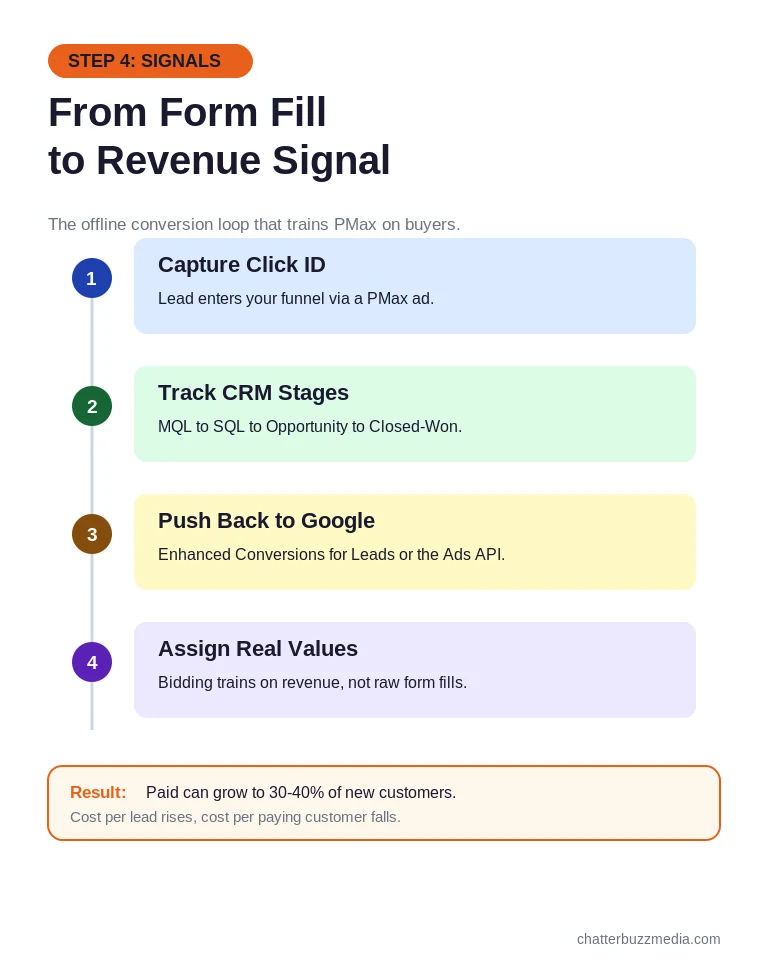
This is exactly the workflow Google recommends in its own best practices for lead generation. Value-based bidding turns PMax from a form-fill machine into a pipeline machine.
The impact of this shift is not theoretical. Accounts that rebuild attribution and align PMax to down-funnel signals routinely move paid media from a rounding error in new customers to 30-40% of them, even as cost per raw lead rises and cost per paying customer falls.
That tradeoff is the whole point. You are willing to pay more for a lead that closes and less interested in a cheap lead that never buys.
Server-side conversion tracking makes these signals far more reliable, especially as browser tracking degrades. Our guide to conversion API tracking explains the same principle that applies across platforms: send the platform your best-quality data.
Feeding PMax revenue signals is what separates accounts that scale profitably from accounts that scale waste. Once the signals are right, the last step is making sure PMax is not just stealing credit from Search.
Step 5: Watch for Cannibalization and Fix Your Attribution
Performance Max can cannibalize your Search campaigns whenever both are eligible for the same query, and native platform ROAS will hide it from you. This is the failure mode that fools the most advertisers.
Picture an account with an exact-match Search campaign and a PMax campaign both eligible for a high-intent query. Google’s auction usually lets PMax win, so the click and the conversion get logged to PMax.
The advertiser opens the dashboard, sees PMax revenue rising and Search revenue falling, and concludes PMax is working. In reality, PMax is harvesting demand Search already had, often at a higher cost.
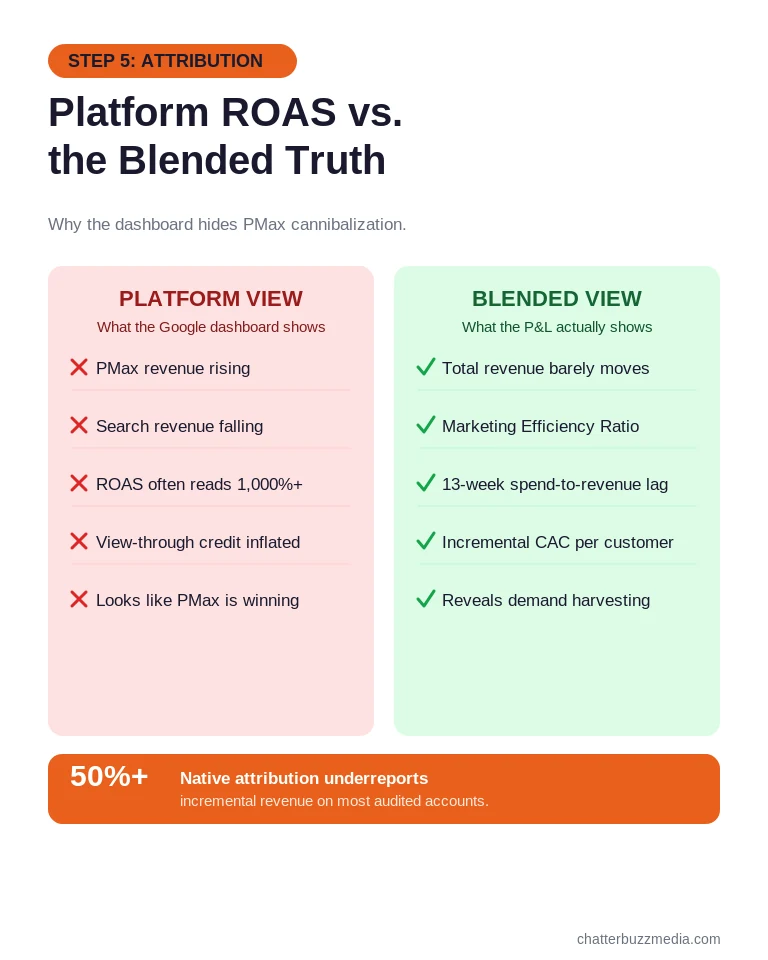
The attribution problem runs deeper than cannibalization. Native click-based attribution routinely underreports incremental revenue by 50% or more because PMax’s view-through credit on Display and YouTube never ties cleanly to sales.
That means the platform number can read far above reality on some accounts and far below it on others. You cannot tell which from the dashboard alone.
Set a standing cadence to check this, not a one-time audit. Review PMax against Search on a blended view at least monthly, because cannibalization creeps in slowly as the algorithm expands into queries it was never meant to touch.
The fix is to judge PMax against a blended view instead of a campaign dashboard. Track a 13-week spend-to-revenue lag, Marketing Efficiency Ratio, and incremental customer acquisition cost so you measure real business impact.
Each of those metrics answers a question the dashboard cannot. Marketing Efficiency Ratio compares total revenue to total spend, the 13-week lag respects the real time between click and purchase, and incremental CAC isolates what new customers actually cost.
Read together, they tell you whether PMax added revenue or just relabeled it. A campaign that looks brilliant on last-click and mediocre on blended metrics is almost always harvesting existing demand.
Getting this measurement right is a reporting discipline as much as a media one, and our overview of how to calculate customer acquisition cost and the value of clean marketing reporting and data visualization both feed directly into it. With attribution honest, you can finally see whether PMax deserves its budget.
Frequently Asked Questions About Performance Max Campaigns
1. 🔍 What are Performance Max campaigns in Google Ads?
Performance Max is a Google Ads campaign type that runs across Search, Shopping, Display, YouTube, Gmail, Discover, and Maps in one campaign. You supply assets, audience signals, and a conversion goal, and Google’s AI controls targeting, creative mix, and placement. It replaced Smart Shopping and Local campaigns in late 2022.
2. 📊 Should I use Performance Max or Search campaigns first?
Start with Search and Shopping for your high-intent queries, then add PMax once Search already captures your qualified keywords. Most accounts should wait until they hit 20-30 conversions per month before layering PMax on top. For B2B lead gen or budgets under $10,000 a month, Search alone usually wins.
3. ⚡ When should I avoid Performance Max?
Avoid PMax on budgets under $1,000 a month, on B2B account-based motions with a small named list, and on lead-gen campaigns with no lead-quality signal. In each case the algorithm either lacks the volume to learn or learns the wrong thing. Regulated industries should also be cautious, since auto-generated assets can trigger policy reviews.
4. 🏦 Does Performance Max cannibalize Search campaigns?
Yes, PMax can cannibalize Search when both campaigns are eligible for the same commercial intent. The tell is PMax revenue rising while Search revenue falls, without total revenue moving enough to justify the shift. Fixing it means separating campaign roles, applying brand exclusions, and judging results against blended revenue.
5. 🤝 Is Performance Max good for B2B lead generation?
PMax works for B2B only when sales cycles run 60 days or longer and value-based bidding feeds CRM lead quality back into Google. It needs a large enough addressable market for the algorithm to learn. For tightly targeted account-based motions with a few hundred accounts, PMax is usually the wrong tool.
6. 💰 What is the minimum budget for Performance Max?
The practical floor is around $1,000 a month for ecommerce with a Shopping feed. Below that, Display and YouTube consume budget without generating qualified traffic. Most accounts need 20-30 conversions per month per campaign for PMax to perform.
7. 🚀 How do I stop Performance Max from spending on brand terms?
Google added a brand-list exclusion feature to PMax in 2024. Build a brand list in account settings, apply it to the PMax campaign, and confirm branded terms no longer appear in the search-term report. Excluding brand terms stops PMax from taking credit for demand you already own.
8. 📈 How do I know if Performance Max is actually working?
Platform ROAS is not enough, because native attribution often underreports incremental revenue by 50% or more. Compare PMax against a blended view using Marketing Efficiency Ratio, a 13-week spend-to-revenue lag, and incremental CAC. If PMax shows strong ROAS on platform but your P&L does not reflect it, trust the P&L.
Putting Your Performance Max Strategy Into Action
Performance Max is neither a miracle nor a trap. It is a tool that earns budget on the right account and wastes it on the wrong one.
The accounts that win with PMax treat it as an assist layer on a healthy Search and Shopping foundation, feed it revenue signals, and measure it against blended business results instead of a platform dashboard.
Here is the action plan to apply everything above:
- Run the readiness check. Confirm you have 20-30 monthly conversions, matchable inventory, and a Search foundation before turning PMax on.
- Set the budget split by account size. Keep PMax as a minority of spend until volume and data justify scaling it.
- Structure and signal correctly. Add brand exclusions, first-party audiences, clean asset groups, and value-based bidding with offline conversions.
- Audit for cannibalization. Compare PMax against Search on a blended view and cut or cap it if incremental revenue does not move.
If you want to go deeper on the paid media strategy behind these decisions, our performance marketing guide and PPC management resources lay out how to build a Google Ads account that scales profitably. You can also explore more marketing resources and guides to round out your strategy.

Victoria Wallace
Victoria Wallace is a senior content strategist and marketing writer with 30+ years of experience helping more than 200 brands translate complex business goals into clear, conversion-focused content. Her background spans paid media, marketing strategy, go-to-market planning, brand positioning, and full-funnel campaign development, giving her a deep understanding of how SEO content connects to real business growth.